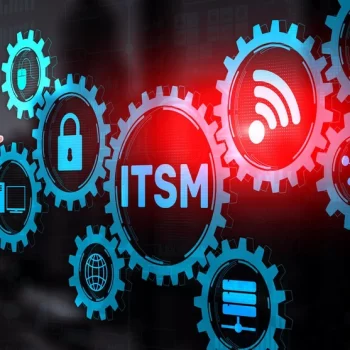



Today, IT operations handle higher request volume, tighter expectations, and broader service scope. ITSM practices give teams a repeatable way to manage work, reduce friction, and keep service delivery predictable as demand grows. IT Service Management defines how teams plan, deliver, operate, and improve IT services that help meet business goals.
Instead of focusing on tools alone, ITSM best practices focus on workflows, ownership, and service outcomes that leadership and end users depend on daily.
What Is ITSM and Why Do Best Practices Matter Today?
How ITSM supports business outcomes
ITSM connects IT work directly to business priorities such as uptime, productivity, and service experience. Incident handling, change planning, and request fulfillment follow shared rules that reduce confusion and delays.
When ITSM principles guide service delivery, teams respond faster, decisions rely on shared records, and leadership gains visibility into service health. This alignment improves trust between IT and business stakeholders while keeping service performance measurable.
Core challenges modern IT teams face
Many IT teams manage rising ticket volumes, fragmented tools, and manual handoffs that slow response times. Knowledge gaps, approval bottlenecks, and limited visibility into service dependencies increase operational risk.
ITSM best practices address these challenges by standardizing workflows, defining ownership, and promoting continual review. Teams gain consistency in daily operations while creating space for improvement initiatives that scale with business growth.
Key ITSM Principles Every Organization Should Follow
ITSM principles define how service teams think, prioritize work, and make decisions under pressure. These principles guide daily actions across incidents, changes, requests, and service planning.
Deliver services aligned with business goals
IT teams deliver value when service priorities mirror business outcomes. Requests, incidents, and improvements gain priority based on impact to revenue, operations, or customer experience rather than internal urgency alone. Clear ownership and shared objectives help teams evaluate tradeoffs and sequence work with purpose.
Build standardized, consistent processes
Repeatable processes reduce confusion during high-volume periods. When teams follow shared workflows, handoffs are predictable and reporting remains reliable. Benefits include:
- Faster onboarding for new agents
- Reduced dependency on individual expertise
- Consistent audit trails for service actions
Keep users at the center of service design
Service workflows should reflect how users request help and consume services. Clear request paths, predictable response timelines, and simple language improve adoption. User-focused service design also reduces rework and follow-ups while improving satisfaction across business units.
Focus on continual improvement and feedback
ITSM principles promote ongoing evaluation. Metrics, reviews, and feedback loops highlight gaps and improvement areas. Key inputs for improvement efforts are:
- Incident trend analysis
- Request volume patterns
- Service feedback scores

Strengthen governance, risk, and compliance
Governance ensures services operate within policy, regulatory, and security requirements. Defined approval paths and documented controls reduce exposure during audits and high-risk changes. Strong governance also drives confidence in service delivery while maintaining accountability across teams.
Essential ITSM Best Practices for Daily Operations
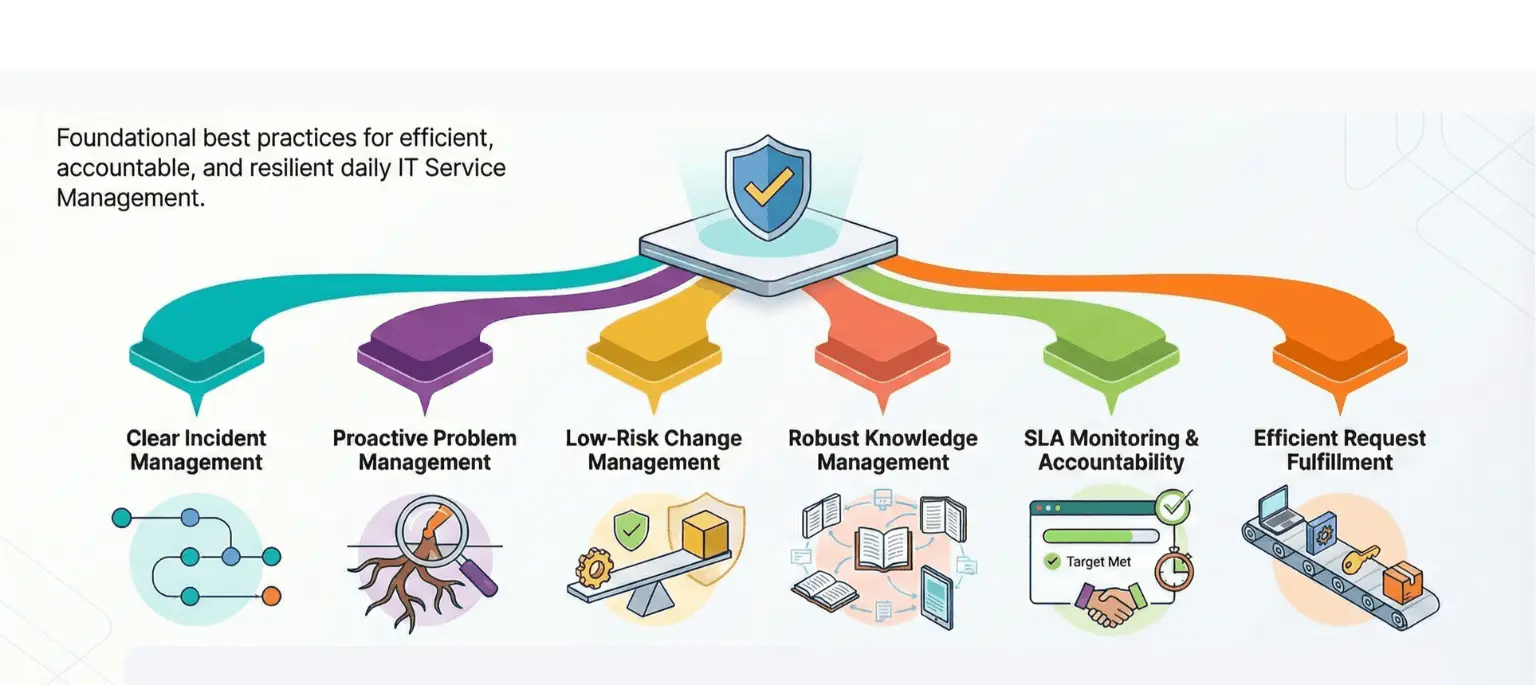
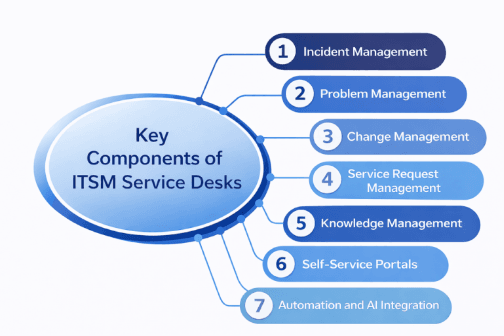
Daily operations rely on repeatable execution, visible ownership, and shared service routines. ITSM best practices convert principles into actions teams apply across incidents, problems, changes, knowledge, SLAs, and requests.
Create a clear incident management workflow
A defined incident workflow sets expectations from first report through recovery. Intake, prioritization, escalation, and closure follow agreed steps, keeping response orderly during high ticket volume. Remember to use:
- Single intake channel for incident reporting
- Priority logic linked to business impact
- Escalation paths with named owners
- Resolution records captured for review
Reduce recurring issues with problem management
Problem management targets root causes behind repeated incidents. Linked records, analysis notes, and corrective actions reduce repeat disruptions. You can:
- Group related incidents under one problem record
- Track contributing factors and failure patterns
- Document corrective actions and ownership
- Review outcomes during service reviews
- Monitor recurrence rates after fixes
Manage changes with minimum risk
Change workflows protect live services while enabling progress. Requests move through assessment, approval, scheduling, and validation with shared visibility. Steps include:
- Risk assessment captured before approval
- Rollback steps documented in advance
- Dependency checks across services
- Approved change windows defined
- Post-change validation recorded
Build a strong knowledge management system
Knowledge systems capture resolutions, procedures, and service guidance for reuse. Clear ownership and review cycles keep articles relevant for agents and users. Therefore, ensure:
- Standard article templates for consistency
- Review cadence assigned per article
- Search-friendly titles and summaries
- Usage tracking to identify gaps
Define and monitor SLAs for better accountability
Service level agreements set shared expectations for response and resolution. Tracking performance enables prioritization and workload balance through SLAs such as:
- Response targets by service category
- Resolution targets by priority level
- Breach alerts for early action
- Trend reporting
- Service review inputs for leadership
Enable efficient request fulfillment processes
Request fulfillment handles access, provisioning, and service delivery through structured workflows. Clear forms and approvals reduce follow-ups and delays. So, you must be equipped with:
- Standard request forms by service type
- Approval routing based on service rules
- Task assignment with due dates
- Status visibility for requesters
- Completion confirmation and closure
Improve ITSM Efficiency with Automation and Integrations
Automate repetitive IT tasks
Automation takes over routine service actions that consume agent time during high request volume. As rules trigger routing, prioritization, and notifications, work progresses with fewer pauses. Then, queues remain manageable even during spikes. As a result, ITSM teams spend more effort on diagnosis and improvement work.
Integrate tools to remove silos
Service operations rely on data distributed across service desks, asset systems, and monitoring tools. When integrations connect these systems, records are aligned during incidents and changes. With shared visibility, decisions happen faster and handoffs reduce friction. So, reporting gains consistency across service activities.
Use orchestration to streamline complex processes
Orchestration coordinates multiple automated actions across platforms in a defined sequence. With tasks progressing, dependencies remain visible and execution is controlled. In parallel, teams track progress from a single view. Long-running service actions remain manageable from start through completion.
How Infraon ITSM Simplifies Automation
Infraon ITSM is an ITSM software module that brings Gen AI–powered automation into day-to-day service operations. It focuses on incident handling, service requests, changes, and approvals, while keeping workflows connected inside a single software framework. As service volume grows, it can help with faster routing, smarter categorization, and improved handling of repetitive service actions.
Infraon ITSM’s Gen AI capabilities also extend into self-service and knowledge usage. Search, recommendations, and article discovery rely on AI to guide users and agents toward relevant information faster. For regulated environments, the module offers automated workflows that enable compliance requirements while keeping audit visibility intact across service activities.
Highlights:
- Gen AI–powered automation for incidents, requests, and change workflows
- AI-assisted routing, categorization, and prioritization of service tickets
- Gen AI–driven knowledge discovery within self-service experiences
- Built-in audit visibility for regulated service operations
- SaaS and on-premises deployment options for enterprise IT teams
Measure ITSM Performance with the Right Metrics
Service performance improves only after teams track the right signals. Metrics turn daily activity into measurable insight and guide decisions around staffing, prioritization, and improvement work. Strong measurement practices keep reporting tied to service outcomes.
Operational KPIs (MTTR, FCR, SLA Compliance)
Operational KPIs show how reliably service teams handle demand. Resolution time, first contact resolution, and SLA adherence reflect execution quality across incidents and requests. These indicators expose delays, bottlenecks, and workload imbalance. They include:
- Mean time to resolution tracked by priority
- First contact resolution rates by service type
- SLA compliance by category and urgency
- Backlog volume and aging trends
- Escalation frequency by queue
Experience metrics (CSAT, CES)
User experience metrics capture perception alongside performance. Satisfaction and effort scores reveal how service delivery feels from the user side. These signals highlight friction that operational metrics miss. Some of them are:
- CSAT captured after request or incident closure
- Effort scores tied to request complexity
- Feedback trends by service category
- Response quality ratings over time
Reporting dashboards and trend analysis
Dashboards translate raw data into patterns teams can act on. Trend analysis reveals recurring delays, rising demand areas, and improvement opportunities. Leadership relies on views such as:
- Role-based dashboards for agents and managers
- Trend views across weeks and months
- Drill-down reports for root analysis
- Export-ready views for reviews
How Infraon ITSM Helps You Track KPIs
Infraon ITSM includes built-in dashboards and reporting aligned to core ITSM metrics. KPI tracking covers incidents, requests, changes, and service levels through configurable views. Data remains current as workflows progress, giving teams a reliable picture of service performance. Use features such as:
- Preconfigured KPI dashboards for service operations
- Real-time metric updates linked to workflow activity
- Custom views based on role and responsibility
- Historical trend reporting for reviews
- Exportable reports for audits and leadership updates
Use an ITSM Maturity Model to Drive Continuous Improvement
An ITSM maturity model helps teams evaluate current service practices and identify gaps that limit scale. It provides a structured way to compare execution against defined capability levels and guides prioritization for improvement initiatives.
Stages of ITSM maturity
Maturity stages describe how service operations progress from reactive handling to disciplined, data-led execution. Early stages rely on individual effort and manual coordination, while advanced stages rely on standardized workflows, automation, and measurable outcomes. Each stage highlights capabilities that must exist before moving forward.
How to assess your current maturity level
Assessment starts with reviewing service workflows, ownership clarity, data usage, and reporting depth. Evidence comes from incident records, change outcomes, request handling quality, and metric consistency. Gaps become visible by comparing current practices against maturity stage definitions.
Steps to move toward optimization
Improvement follows a deliberate sequence focused on workflow consistency, data accuracy, and measurement discipline. Teams prioritize foundational gaps before pursuing automation or advanced analytics. Progress remains measurable through periodic reassessment against the same maturity criteria.
Modern ITSM Trends Shaping the Future
IT service management continues to change as service demand grows and operational complexity increases. Modern practices focus on anticipation, automation depth, and service resilience.
- AI and predictive service management: AI introduces foresight into service operations by analyzing historical patterns and live signals. Predictive insights highlight potential service issues before user impact grows. Teams gain time to act earlier and reduce incident volume tied to recurring conditions.
- Hyper-automation across it operations: Hyper-automation expands automation beyond single tasks into end-to-end service workflows. Service requests, approvals, changes, and remediation actions execute through connected automation chains. Manual coordination reduces as execution becomes repeatable at scale.
- Self-healing systems and proactive issue resolution: Self-healing approaches focus on automated detection and corrective action during service degradation. Known conditions trigger predefined remediation steps that restore service continuity. Operations teams intervene mainly for exceptions and complex scenarios.
- Cloud-native ITSM approaches: Cloud-native ITSM drive faster deployment, elastic scale, and frequent capability updates. Service teams manage distributed environments through centralized workflows. Operational visibility remains consistent despite changing infrastructure footprints.
How Infraon ITSM Helps You Implement Best Practices
Infraon ITSM focuses on translating ITSM best practices into daily execution through structured workflows, automation, and visibility. The module brings service operations, data, and reporting together so teams manage incidents, requests, and changes with consistency.
Unified service desk
The service desk brings incidents, requests, and changes into one operational view. Agents work from shared queues and records, which reduces handoff confusion. Visibility across service activity improves coordination and response quality.
No-code automation and workflows
Workflow automation covers routing, approvals, escalations, and task sequencing. Teams configure logic through visual controls. Automation depth expands as service volume increases.
Integrated CMDB
Integrated CMDB ensures that configuration data are linked to incidents, changes, and service requests. Impact analysis improves because dependencies remain visible during decision-making. Records stay current through workflow updates.
Self-service portal and knowledge base
Users access services and information through a single entry point. AI-assisted search guides users toward relevant articles and request paths. Request quality improves as guidance appears during submission.
Smart dashboards and reporting
Dashboards present operational metrics through role-based views. Managers track service performance and trends through configurable reports. Data refreshes as workflows progress, supporting informed reviews.
Final Thoughts
ITSM best practices bring order to service work that expands quickly as demand rises. Defined workflows replace guesswork, and ownership introduces accountability teams can depend on. Measurement then converts routine activity into something leaders can evaluate and act on.
Discipline begins with fundamentals. Incident handling, request fulfillment, and change control establish consistency that holds during pressure periods. Metrics then expose friction and recurring breakdowns that previously were buried inside queues and inboxes.
Infraon ITSM operates as a software module embedded directly in service operations. Gen AI–powered automation reduces routing and classification effort tied to routine work. Reporting and audit records remain aligned with live activity, keeping scale manageable as expectations rise.
FAQs
1. Why do ITSM best practices matter for growing IT teams?
As ticket volumes and service scope expand, informal handling breaks down. ITSM best practices introduce repeatable workflows and ownership. This keeps service delivery predictable as demand increases.
2. How does ITSM connect IT work with business outcomes?
ITSM aligns incidents, requests, and changes with business priorities such as uptime and productivity. Shared records and metrics support informed decisions. Leadership gains visibility into service health and risk.
3. What challenges do ITSM best practices address directly?
They address fragmented tools, manual handoffs, unclear ownership, and limited visibility. Standardized workflows reduce confusion during high-volume periods. Continual review supports improvement over time.
4. How do metrics support ITSM maturity?
Metrics translate operational activity into measurable insight. Indicators such as MTTR, SLA compliance, and request trends expose friction points. These signals guide staffing, prioritization, and improvement planning.
5. What role does automation play in ITSM best practices?
Automation handles repetitive routing, approvals, and notifications. This reduces coordination effort during peak demand. Teams spend more time on diagnosis and service improvement work.