


What Is IT Service Management (ITSM)?
IT Service Management (ITSM) is the approach an organization uses to plan, deliver, operate, and improve technology services for employees and customers. It brings incident resolution and service requests together with change control, asset oversight, knowledge sharing, and service commitments under a common operating model.
A new employee requesting a laptop and a sales team reporting an application outage need different responses. ITSM establishes how each need reaches the right team and how responsibility continues through completion. It also connects that work to the business service involved, giving managers a basis for deciding which issues deserve attention first.
The scope includes the people responsible for delivery and the processes they follow. Software records and automates their work, while service owners remain accountable for the experience users receive.
How ITSM Works Through the Service Lifecycle
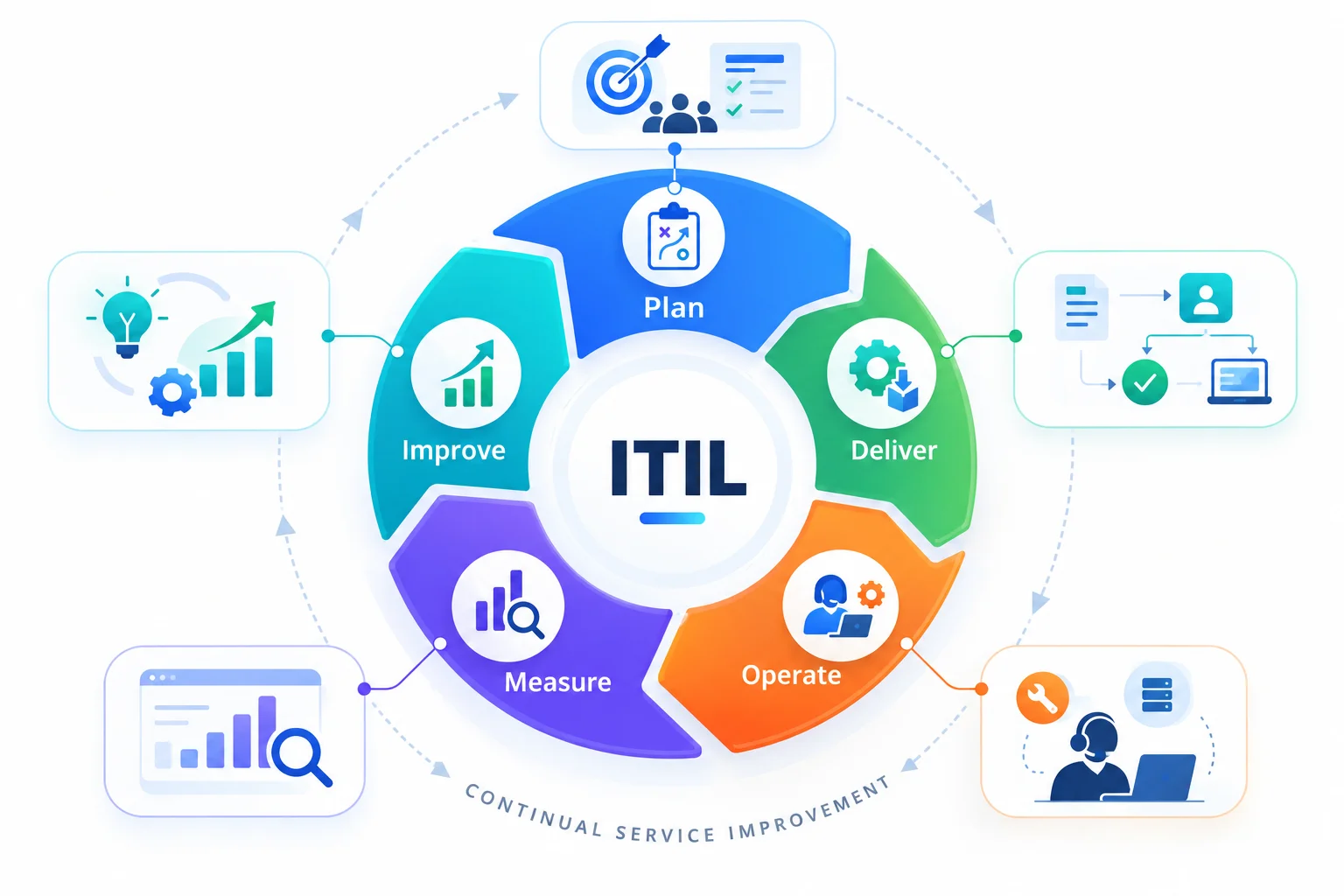
The service lifecycle connects an initial business requirement to daily operation and subsequent improvement. A practical way to understand this cycle is plan → deliver → operate → measure → improve, with each review feeding the next round of planning.
Plan
Define the outcome the service must provide and identify who depends on it. Agree on ownership and support expectations before choosing the workflow. A new employee setup service, for example, needs an agreed start date and a clear division of responsibility between HR and IT.
Deliver
Put the service into use through an agreed request and fulfillment path. The onboarding request triggers the required approvals, followed by account creation and device preparation. Each handoff should have an owner so completion can be confirmed before the employee starts.
Operate
Support the service during everyday use. Agents handle access requests and investigate interruptions while keeping service records current. Linking device assignments to the asset lifecycle helps the team follow equipment through reassignment and eventual retirement.
Measure
Compare delivery with the commitments made during planning. Review completion times alongside user feedback to understand where delays occur. An onboarding request might appear complete in the queue even though the employee still lacks access to a required application.
Improve
Use the findings to change the service. If approvals repeatedly hold up onboarding, review the approval sequence and the information collected at submission. Track the revised workflow against the same measures to establish how much the change helped.
Core ITSM Processes Explained
Each ITSM process addresses a different service responsibility. Their records should connect, so the team restoring an interrupted service can pass evidence to the people investigating its cause or planning a permanent fix.
Incident management
Incident management restores normal service after an unplanned interruption or reduction in service quality. The team records the issue and assigns a priority based on business impact and urgency, then coordinates recovery. During a payroll outage, the immediate objective is to get payroll working again and keep affected users informed.
Problem management
Problem management identifies and manages the causes, or potential causes, of incidents. Investigation can continue after service has recovered. If an application repeatedly fails, the problem record brings related incidents together so the team can document a workaround and pursue a lasting correction.
Change management
Change management assesses and controls changes that could affect IT services. It establishes the authorization required and the conditions for implementation. A database upgrade, for example, needs an impact assessment and a recovery plan, followed by checks that the dependent service works after deployment.
Service request management
Service request management handles agreed user requests for access, information, or standard services. It turns a request for approved software into a trackable fulfillment workflow. The required checks can include manager approval and software license management before installation, with status updates available to the requester.
Knowledge management
Knowledge management captures and maintains information that people can reuse during service work. An article explaining a verified fix helps agents resolve similar cases and gives users a self-service option. Its usefulness depends on an accountable owner who checks the instructions as systems change.
Service level management
Service level management agrees service targets with stakeholders and reviews delivery against them. A service level agreement (SLA) defines the applicable commitments, including response or resolution targets. The practice also examines repeated breaches and determines what must change to meet business expectations.
IT asset management
IT asset management manages the ownership, cost, and use of technology assets throughout their lifecycle. It gives support teams context for decisions about repair and replacement. An agent investigating a faulty laptop can check its assigned user and warranty position before choosing the next action.
Configuration management
Configuration management maintains information about configuration items and their relationships. A configuration management database (CMDB) can show which applications depend on a server and which business services depend on those applications. That relationship view supports incident diagnosis and helps assess the impact of a proposed change.
ITSM vs. ITIL vs. DevOps vs. ITOM vs. ESM
These terms describe different parts of service delivery. ITSM provides the management approach; ITIL offers a framework for applying it. DevOps and IT operations management contribute to delivery and operation, while enterprise service management extends service practices to other business functions.
| Term | Primary focus | Example in practice |
|---|---|---|
| ITSM | Managing IT services around user needs and business outcomes | Coordinate restoration of an application and review the effect on its users |
| ITIL | A framework of service management practices and continual improvement | Apply shared practices to service ownership and change decisions |
| DevOps | Collaboration between development and operations to build and deliver software | Connect release work with operational feedback and service support |
| ITOM | IT operations management of infrastructure health and availability | Detect a server fault and provide diagnostic information to the service team |
| ESM | Enterprise service management for functions outside IT | Use request workflows for HR onboarding or facilities support |
The approaches can work together. An ITOM alert can initiate an ITSM incident, and the resulting investigation can feed a DevOps team’s release work. ITIL practices can support the change decision. When HR uses the same request principles for an employee joining the business, that extension falls within ESM.
Why ITSM Matters for Business Outcomes
ITSM helps a business judge service performance against the work people need to complete. A support team can close a large number of tickets while a business-critical application remains unavailable. Connecting priorities to service impact directs attention toward the disruption with the greatest operational consequence.
- Service continuity improves when recovery has a named owner and recurring failures receive follow-up investigation
- Employee time is protected when requests have visible status and staff can find answers without repeatedly contacting an agent
- Spending decisions improve when support history and asset tracking show where repair or replacement is justified
- Governance gains evidence through recorded approvals and traceable changes to live services
The value should be assessed through outcomes the business recognizes. Reduced downtime is useful evidence; so is a shorter wait for the access an employee needs to start work. Service reviews should connect operational measures to those consequences.
ITSM Best Practices
Daily service work needs repeatable rules for ownership, escalation, and closure. Focus first on the points where requests lose context or responsibility.
Give every incident a clear route to recovery
Bring incident reports into a shared queue, capture service impact at intake, and assign an owner with an escalation path. Record recovery details so another agent can continue the work.
Follow recurring incidents through to corrective action
Link recurring incidents to a problem record and document the investigation. Keep the workaround available during root-cause work, then review recurrence after corrective action.
Match change controls to service risk
Assess dependencies before approval and record rollback steps before implementation. Match the review level to service impact, then validate the service after deployment.
Keep reusable answers current
Capture useful resolutions while details are fresh. Give each article an owner and review date, then use failed searches and agent feedback to identify gaps.
Make SLA ownership visible before a breach
Set targets by service and priority, with clear escalation ownership. Review breach patterns with service owners to separate capacity constraints from workflow delays.
Make requests easy to complete
Use service-specific forms, route approvals to the responsible person, and assign due dates. Update asset allocation during device requests and confirm delivery before closure.
ITSM Tools and What to Look For
Evaluate an ITSM tool against real work from your service desk. A useful demonstration follows a request from submission through approval and completion, then shows the same record in a manager’s report. This reveals how well the software connects daily actions with service oversight.
- Ticketing and intake should retain the conversation and assign clear ownership, even when users contact support through different channels
- A service catalog should show available services and collect the information required to fulfill each request
- Workflow automation should handle routing and escalation, with a visible path for exceptions
- Self-service and knowledge search should help users reach relevant answers and follow the progress of their requests
- SLA reporting should expose approaching deadlines and support investigation of repeated breaches
- Asset and CMDB connections should give agents current equipment context and service dependency information
- Integration options should connect service records with monitoring and identity systems without repeated manual entry
Test the administrative work as well. Ask how permissions are assigned and how workflow changes are recorded. Check the cost of required integrations alongside implementation and training, then assess the platform against expected growth in request volume. A feature included in a demonstration may depend on a separate module or configuration effort.
ITSM Metrics and KPIs
Use a small set of measures to understand response performance and user experience together. Define the calculation and reporting period for each KPI before comparing teams, since different ticket types can produce very different results.
| Metric | What it measures | How to use it |
|---|---|---|
| Mean time to resolution (MTTR) | Total resolution time divided by resolved incidents in the measured group | Compare by priority and service; state the start and stop points used |
| First contact resolution (FCR) | Share of eligible cases resolved during the first contact | Identify where frontline knowledge or access needs improvement |
| SLA compliance | Share of measured cases that meet the applicable SLA target | Review breaches by service and investigate recurring delays |
| Backlog and ticket age | Open work and the time it has remained unresolved | Separate older stalled cases from recent arrivals |
| Escalation rate | Share of cases requiring escalation under the chosen definition | Check routing quality and gaps in resolver capability |
| Customer satisfaction (CSAT) | User ratings after a service interaction | Read comments alongside scores and track the response rate |
| Customer effort score (CES) | Users’ assessment of the effort required to get help | Find friction in request submission and follow-up |
Role-based dashboards should make the next decision clear. Agents need visibility into approaching deadlines; managers need trends that reveal persistent delays. Review MTTR alongside reopened cases and user feedback, because faster recorded closure can coexist with unresolved user concerns.
ITSM Maturity Model
An ITSM maturity model helps organizations assess how consistently they manage services and where improvement is needed. The ITIL Maturity Model uses five named levels. The descriptions below summarize their progression.
- Initial. Work happens, but achievement of the intended service outcomes is inconsistent
- Managed. Basic activities and dedicated resources support repeatable achievement of the practice’s purpose
- Defined. Organization-wide standards establish a consistent approach supported by integrated resources
- Quantitative. Performance is measured and evaluated using data in its operating context
- Optimizing. Continual improvement develops the capabilities needed to sustain and improve outcomes
Assess maturity through evidence from actual service work. Review incident records and change outcomes, then examine the consistency of ownership and reporting. Where unreliable equipment data slows diagnosis, improving asset discovery may deserve attention before adding another layer of automation. Reassess the same scope after improvements so progress has a comparable baseline.
AI and Automation in ITSM
Automation executes repeatable service steps according to defined rules. AI can interpret ticket language and recognize patterns that help the team decide what should happen next. Used together, they can reduce the work involved in triage while preserving a recorded path through the service process.
Current research shows where AI is already gaining traction in service management. The 2025 State of AI in IT report, based on surveys of 346 IT professionals and 700 end users, found that data analysis was the leading area of AI impact in ITSM at 55%, followed by end-user assistants at 48%, knowledge management at 43%, and incident management at 39%. The same research found that 40% of IT respondents reported increased employee productivity as a realized benefit.
Source: PeopleCert, State of AI in IT 2025
Support agents during triage and resolution
AI can suggest a category and resolver group from a ticket’s description. It can also summarize case history and retrieve relevant knowledge during diagnosis. These uses are valuable when an agent would otherwise spend time reading long conversations or searching several records before acting.
Connect service signals to controlled action
Historical incidents and monitoring signals can help identify developing service risks. An identified pattern can trigger a review or initiate a predefined workflow. Automated recovery should be limited to conditions with an approved response, with exceptions routed to an accountable person.
Begin with a bounded use case and measure the result. Check suggested classifications against agent corrections, or compare knowledge recommendations with confirmed resolutions. Keep approval requirements attached to actions that change access or live services, and retain the record of what the automation executed.
How Infraon ITSM Helps
Infraon ITSM brings incident handling and service requests into a shared service desk, with connected change workflows and approval records. Teams can configure routing and escalation through visual workflow controls, while self-service gives employees a place to request help and find relevant knowledge.
The platform combines AI-assisted ticket handling with service context from its CMDB. Agents can use that context during diagnosis, and managers can review performance through configurable dashboards. SLA tracking and audit visibility support oversight as work moves between resolver groups.
Organizations can use SaaS or on-premises deployment according to their operational requirements. An initial rollout can focus on a service with a clear owner and measurable baseline, then expand after the team has reviewed adoption and delivery performance.
ITSM Case Studies
Eternis Fine Chemicals
Eternis Fine Chemicals replaced email-based service management with Infraon ITSM. Some of the benefits were 50–75% higher agent productivity, 25–50% higher customer satisfaction, 25–50% higher compliance, and a 25–50% reduction in annual IT spend. The deployment introduced omnichannel ticket creation, automated multi-department approvals, SLA management, workload visibility, and asset lifecycle tracking for requests, approvals, service commitments, and equipment records.
Source: Infraon case study — Eternis Fine Chemicals
Tatanet Services Limited
Tatanet Services Limited moved from manual processes to Infraon ITSM while handling 15,000–20,000 complaints system-wide and supporting 80,000+ nodes. Its case study reports improved ticket resolution times, higher SLA compliance, and increased customer satisfaction through configurable ticketing, automated SLA management, performance dashboards, and scalable service operations, showing both the service environment’s scale and the operational gains reported after deployment.
Source: Infraon case study — Tatanet Services Limited
Frequently Asked Questions
What is ITSM?
ITSM stands for IT service management. It is the approach used to manage technology services around business and user needs, from initial planning through operation and improvement. It establishes responsibility for service delivery and a way to evaluate the results.
What is the difference between ITSM and ITIL?
ITSM is the discipline of managing IT services. ITIL is a framework that organizations can use to implement and improve that discipline. A business can apply ITSM through its own processes or adopt ITIL practices that suit its service requirements.
What are the 5 core ITSM processes?
A common introductory grouping includes incident management and problem management, along with change management, service request management, and knowledge management. The scope of ITSM also includes service levels and the management of assets and configuration information. The five-process grouping is a starting point rather than a complete framework.
Is ITSM the same as a help desk?
A help desk provides a contact point for users seeking technical support. ITSM covers the wider management of services, including planning and change decisions as well as ongoing measurement. Help desk activity forms one part of that service management approach.
What does an ITSM tool do?
An ITSM tool records service work and coordinates the workflows needed to complete it. Typical capabilities include ticket handling and request approvals, supported by knowledge search and SLA tracking. Connected asset records and reporting give the team context during delivery and service reviews.
What are the main ITSM processes?
The main processes covered here are incident and problem management; change and service request management; knowledge and service level management; and asset and configuration management. They connect through shared service information, with continual improvement using their results to identify what needs attention.
What are the benefits of ITSM?
ITSM can reduce service disruption and make requests easier to follow. Clear ownership helps teams resolve issues, while consistent records support risk review and spending decisions. Businesses can assess the benefits through resolution performance and user feedback, alongside the operational impact of service interruptions.
How does AI improve ITSM?
AI can help classify incoming tickets and suggest relevant knowledge for resolution. It can also summarize case history and identify patterns in service data. These capabilities support faster triage when records are accurate and the team reviews AI recommendations against actual service outcomes.