


Unlike ad-hoc support channels, a service desk operates with defined processes. Requests enter through formal intake paths, move through categorization and assignment, and close with documented outcomes. This structure helps with accountability, reporting, and service quality measurement across IT operations.
What Is an IT Service Desk?
An IT service desk serves as the central point where users interact with IT for assistance, access, and service needs. It manages incidents, service requests, and communication through a structured system that records ownership, priority, and resolution steps from start to closure.
The service desk also differs from basic technical support. Support focuses on fixing individual issues as they arise. A service desk manages services end to end, linking user demand with service commitments, response targets, and continuous improvement activities tied to business operations.
What does an IT service desk do?
An IT service desk manages the full flow of user support, from the moment a request enters IT through resolution and closure. It controls intake, prioritization, communication, and follow-through so that work moves in a predictable, auditable manner rather than through scattered exchanges.

Core IT service desk responsibilities
- Intake and logging of incidents and service requests through a single channel
- Classification and prioritization based on urgency, impact, and service rules
- Resolution at first contact where possible, with structured escalation when required
- Ongoing user communication covering status, progress, and closure
- SLA tracking for response and resolution performance
- Knowledge management through documented fixes, known issues, and reusable guidance
The service desk also builds continuity over time. Patterns across tickets reveal recurring gaps, recurring questions feed documentation, and resolution data informs operational planning, turning daily activity into an input for broader IT decisions.
IT Service Desk Roles Explained
Service desk agent
Service desk agents handle the first exchange with users and convert requests into actionable tickets. They assess urgency, resolve routine issues, document outcomes, and keep communication concise so expectations remain aligned through closure.
Service desk manager
The service desk manager oversees demand flow and service quality. This role reviews queue health, response performance, and coverage levels, then guides prioritization and process adjustments based on reporting signals.
IT operations team
IT operations teams take ownership of escalations that exceed frontline scope. Infrastructure faults and application issues reach these specialists with full ticket history, which shortens diagnosis cycles and enables coordinated remediation.
End users
End users initiate requests, respond to updates, and confirm completion. Their inputs highlight recurring issues and service gaps, feeding insights that influence request catalogs going forward.
Benefits of an IT Service Desk
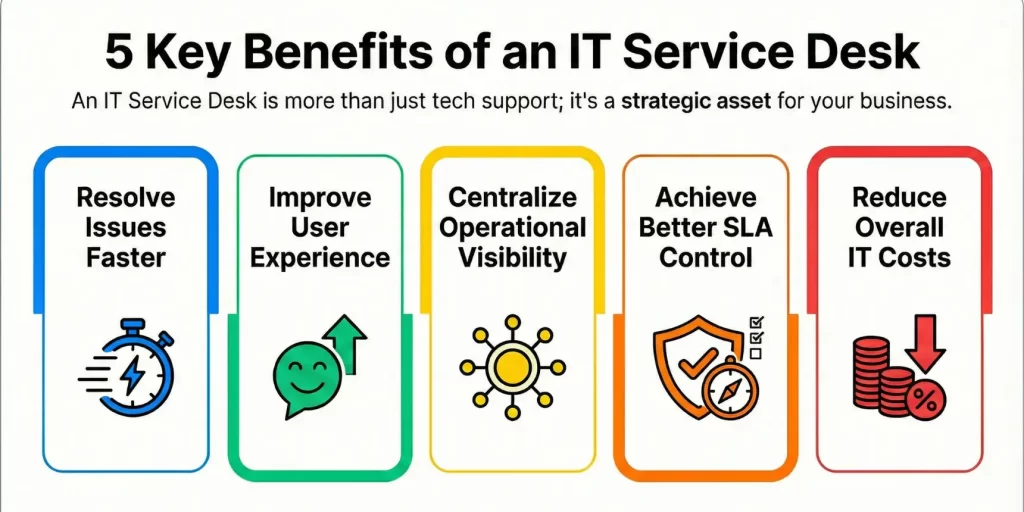
Faster issue resolution
Centralized intake routes requests to the right handlers early in the process. Clear ownership and prioritization reduce back-and-forth, which shortens resolution cycles and limits idle time between actions.
Improved user experience
Users gain a predictable path with consistent updates and clear closure. This reliability reduces frustration and builds confidence in how IT responds to everyday service needs.
Centralized operational visibility
All requests, workloads, and outcomes live in one system. This visibility highlights recurring problems, demand patterns, and service pressure points that guide operational decisions.
Better SLA control
Response and resolution targets are visible throughout ticket handling. Tracking and escalation rules keep commitments in focus and help teams address risks before targets slip.
IT Service Desk vs. IT Help Desk vs. ITSM
| Category | IT Help Desk | IT Service Desk | ITSM |
|---|---|---|---|
| Focus | Issue resolution and break-fix support | Service delivery and user support | End-to-end IT service management |
| Scope | Reactive support for user problems | Incidents, service requests, communication, and knowledge | Strategy, design, delivery, and improvement of IT services |
| Approach | Ticket-based troubleshooting | Process-driven service handling | Framework-led lifecycle management |
| Features | Ticket logging, email-based intake, basic categorization, limited reporting | SLAs, workflows, self-service portal, knowledge base, request catalog, automation rules, dashboards | Governance models, service portfolio, change management, problem management, continual improvement, enterprise reporting |
| Best For | Small teams handling basic technical issues | Growing IT teams for business users at scale | Organizations managing complex IT services across departments |
Why IT Service Desk Software Matters
An IT service desk reaches limits when work relies on email threads, spreadsheets, or shared inboxes. Request volume grows, tracking weakens, and ownership blurs. Software brings structure by enforcing intake rules, routing logic, and visibility across the entire request lifecycle.
Automation changes day-to-day handling. Routine requests move faster, escalations follow defined paths, and updates reach users automatically. Reporting then turns raw ticket data into signals around load, delays, and service quality, giving leaders a factual base for decisions.
Must-have features in IT service desk software
- Centralized ticket intake across portal, email, and integrations
- Automated categorization, priority assignment, and routing
- SLA tracking with alerts and escalation rules
- Self-service portal with searchable knowledge articles
- Request catalog for standard services
- Dashboards and reports for workload and performance review
Tools Needed to Run an IT Service Desk
An IT service desk relies on a connected toolset that keeps request handling organized and visible. These tools ensure intake, resolution, tracking, and review so that support work remains controlled as volume increases.
- Ticketing system to capture requests, manage queues, assign ownership, and record resolution history
- Asset and CMDB integration to link tickets with devices, applications, and service dependencies
- Monitoring and alert feeds that convert system events into actionable service requests
- Knowledge management system to store resolutions, workarounds, and standard guidance for reuse
- Reporting and analytics tools that show workload trends, SLA performance, and service health
Real-World IT Service Desk Use Cases
Mid-market IT teams
Mid-market teams use a service desk to bring order to rising demand. Centralized intake replaces scattered emails and messages, while routing rules move work toward resolution with visible ownership. This helps smaller teams handle higher volume while keeping oversight intact.
Fast-growing enterprises
Enterprises in growth phases rely on a service desk to keep service delivery consistent as departments expand. Standard request catalogs and shared workflows reduce variation in handling, even as systems and users increase. Reporting highlights load patterns that guide staffing and service planning.
Remote and distributed workforces
Distributed workforces depend on a service desk for continuity across locations. A single request system keeps support reachable across time zones, while documented resolutions help teams respond faster to recurring issues across the organization.

Frequently Asked Questions
What is the role of an IT service desk?
An IT service desk manages user requests, incidents, and access needs through a structured system. It coordinates intake, routing, communication, and closure while maintaining records for tracking and review.
How does an IT service desk differ from ITSM?
An IT service desk focuses on user-facing support and service delivery. ITSM covers the broader lifecycle of IT services, including planning, design, governance, and improvement.
What skills does an IT service desk agent need?
Agents need technical troubleshooting ability, clear communication skills, and familiarity with service workflows. Documentation discipline and user interaction skills matter as much as technical depth.
Can small businesses use IT service desk software?
Smaller teams use service desk software to replace inbox-driven support with structured request handling. This improves visibility and workload control as request volume grows.
Does an IT service desk improve response times?
Centralized intake, prioritization rules, and routing reduce delays caused by missed or misdirected requests. This leads to faster handling and more predictable outcomes.