


IT teams are managing more complexity than ever before: larger infrastructure footprints, higher ticket volumes, more demanding SLAs, and a growing expectation that IT operates proactively rather than reactively. Manual processes that once kept pace with business demands are now a bottleneck.
IT workflow automation removes that bottleneck by replacing repetitive, rules-based tasks with automated processes that execute faster, more consistently, and at scale.
What Is IT Workflow Automation?
IT workflow automation is the use of software to execute IT processes automatically, based on predefined triggers, rules, and logic, without requiring manual intervention at each step. Rather than having agents manually triage tickets, route requests, send approvals, or escalate incidents, automation handles these tasks the moment the triggering conditions are met.
The scope of IT workflow automation spans every major IT operations function: ticket management, incident response, service request fulfillment, change management, patch management, employee onboarding, asset provisioning, and more. Wherever a process is repetitive, rules-based, and time-sensitive, automation delivers measurable improvements in speed, accuracy, and consistency.
Why IT Workflow Automation Is Critical for Modern IT Teams
Increasing IT Complexity
Modern enterprise IT environments span on-premises infrastructure, multiple cloud platforms, SaaS applications, and remote endpoints. Managing this complexity manually creates gaps, errors, and delays. Automation provides the connective tissue that keeps these environments running cohesively, executing processes across systems and platforms without manual coordination at every step.
Growing Ticket Volumes
As organizations scale, ticket volumes grow faster than IT headcount. Service desks that rely on manual triage and routing quickly become overwhelmed, leading to longer resolution times, poor SLA performance, and frustrated users. Automation handles the high-volume, repeatable work so that human agents can focus on complex, high-value issues that genuinely require their expertise.
Need for Faster Incident Response
The cost of unresolved incidents increases with every minute of downtime. Manual incident response processes introduce delays at every handoff: detection to logging, logging to assignment, assignment to escalation. Automated workflows eliminate those delays by executing each step immediately upon the triggering condition, cutting mean time to resolution significantly.
Cost Reduction
IT automation is one of the highest-return investments an IT organization can make. Reducing manual handling of routine tasks lowers operational costs, enables IT teams to manage growing workloads without proportional headcount increases, and frees skilled staff for strategic initiatives that drive business value.
Key Components of IT Workflow Automation

Workflow Triggers
A trigger is the event or condition that initiates an automated workflow. Triggers can be alert-based, time-based, event-based, or user-initiated. Defining clear, reliable triggers is the foundation of effective workflow automation.
Rules and Logic
Rules and logic determine what happens after a trigger fires. They define the sequence of actions, the conditions under which different paths are taken, and the criteria for escalation or exception handling. A well-designed rules engine allows IT teams to automate complex, multi-step processes with branching logic, without writing custom code.
Integrations
Workflow automation only delivers its full value when it connects the systems involved in a process. Integrations with monitoring tools, ITSM platforms, CMDB, identity management systems, cloud providers, communication platforms, and HR systems enable end-to-end automation across the IT environment.
Monitoring and Reporting
Automated workflows need to be monitored to ensure they are executing correctly and delivering expected outcomes. Workflow performance dashboards show execution rates, failure rates, and processing times. Reporting surfaces trends that inform optimization, and alerting flags exceptions that require human review.
Types of IT Workflow Automation
Incident Management Automation
Incident management automation covers the detection, logging, classification, routing, escalation, and resolution of IT incidents. Automated workflows ensure that every incident is captured immediately upon detection, classified accurately, routed to the right resolver, and escalated if SLA thresholds approach breach, without requiring manual intervention at each stage.
Service Request Automation
Service request automation streamlines the fulfillment of standard user requests through predefined workflows. When a user submits a request through the self-service portal, automation classifies it, routes it for approval if required, and triggers fulfillment actions, delivering faster, more consistent outcomes than manual handling.
Change Management Automation
Change management automation enforces the organization’s change control process consistently. Risk assessment, approval routing, scheduling, and post-implementation review steps are all automated according to the change type and risk level, reducing the administrative burden on change managers while maintaining governance rigor.
Asset Lifecycle Automation
Asset lifecycle automation tracks hardware and software assets from procurement through retirement, triggering workflows at key lifecycle milestones: new asset onboarding, warranty renewal reminders, software license expiry alerts, end-of-life notifications, and decommissioning workflows.
Security Response Automation
Security response automation connects threat detection tools with response workflows, enabling the IT security team to respond to incidents faster and more consistently. When a security alert fires, automated workflows can isolate affected endpoints, block suspicious users, create incident tickets, notify the security team, and initiate investigation procedures, all within seconds of detection.
10 Real IT Workflow Automation Examples
1. Automated Ticket Routing
When a new ticket is submitted, automation classifies it by type, priority, and affected service, then routes it directly to the appropriate team or agent. Manual triage is eliminated, reducing the time between ticket submission and first response.
2. Password Reset Automation
Password reset requests are among the highest-volume service desk interactions in most organizations. Automated password reset workflows allow users to verify their identity through a self-service portal and reset their credentials instantly, without agent involvement.
3. Automated Incident Escalation
When an incident approaches its SLA resolution deadline, an automated escalation workflow fires: the incident is reassigned to a senior resolver, the relevant manager is notified, and the ticket priority is updated. Escalation happens in real time rather than when a supervisor happens to review the queue.
4. Patch Management Automation
Automated patch management workflows scan endpoints for missing patches, schedule patch deployment during approved maintenance windows, apply patches, verify successful installation, and generate compliance reports, replacing a time-intensive manual process with a reliable, repeatable automated cycle.
5. Employee Onboarding Automation
When a new employee record is created in the HR system, an onboarding automation workflow triggers: account creation across required systems, hardware provisioning requests, software license assignments, access provisioning, and welcome communications are all handled automatically based on the employee’s role and department.
6. Device Provisioning Workflow
Device provisioning automation handles the end-to-end process of preparing and issuing a new device: asset record creation, operating system imaging, software installation, security policy application, and assignment to the user, all executed through a coordinated automated workflow triggered by the provisioning request.
7. Security Incident Response Automation
When a security monitoring tool detects a threat, an automated response workflow isolates the affected endpoint, creates a high-priority security incident ticket, notifies the security operations team, and initiates a predefined investigation checklist, compressing the time from detection to initial response from hours to seconds.
8. Backup Monitoring Workflow
Automated backup monitoring workflows check backup job completion status on a scheduled basis. When a backup job fails or produces an unexpected result, an automated alert creates a ticket, assigns it to the infrastructure team, and escalates based on the criticality of the affected system.
9. SLA Breach Alerts
Automated SLA workflows monitor every open ticket against its resolution target in real time. When a ticket reaches a configurable percentage of its SLA window, an automated alert notifies the assigned agent and their manager, enabling proactive intervention before a breach occurs.
10. Software License Tracking Automation
When a software license approaches its renewal date, an automated workflow creates a renewal task, notifies the SAM team and procurement, pulls current usage data for negotiation preparation, and schedules a review meeting, ensuring that renewals are managed proactively and data-driven.
Best Practices for Implementing IT Workflow Automation
Start with Repetitive Processes
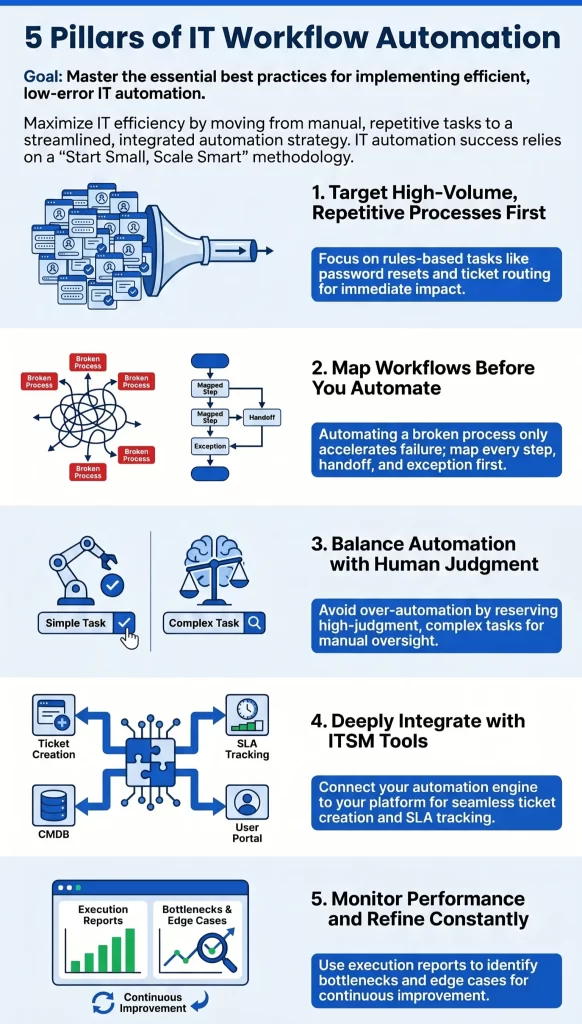
The best candidates for automation are processes that are high-volume, rules-based, and time-sensitive. Password resets, ticket routing, SLA escalations, and onboarding workflows deliver immediate, measurable impact and build organizational confidence in automation before moving to more complex use cases.
Map Workflows Before Automating
Automating a poorly designed manual process produces a poorly designed automated process. Before building any workflow, map the current process end to end: identify every step, every decision point, every handoff, and every exception case. Automation should reflect a well-understood, optimized process rather than simply digitizing an existing one.
Avoid Over-Automation

Automation works best on processes that are well-defined and low-variation. High-judgment tasks, complex escalations, and sensitive communications benefit from human involvement. The goal is to automate where automation adds clear value and preserve human judgment where it genuinely matters.
Integrate with ITSM Tools
IT workflow automation delivers its full value when it is integrated with the ITSM platform at the center of IT operations. Ticket creation, SLA tracking, approval workflows, and knowledge base updates should all connect seamlessly with the automation engine, creating a unified operational environment.
Monitor Workflow Performance
Automation requires ongoing oversight. Review workflow execution reports regularly to identify failures, bottlenecks, and edge cases that fall outside the automation rules. Use performance data to continuously refine workflows and expand automation coverage to new use cases.
IT Workflow Automation Adoption in Enterprises
- Telecom: Telecom providers use automation extensively for network incident response, service provisioning, and customer-facing service request fulfillment. With infrastructure spanning thousands of nodes, manual IT operations are simply unscalable.
- BFSI: Banking and financial services organizations automate compliance workflows, access provisioning, incident escalation, and audit trail generation, supporting both operational efficiency and stringent regulatory documentation requirements.
- Managed Service Providers: MSPs depend on automation for multi-client ticket management, SLA monitoring, patch deployment, and reporting, enabling service delivery at scale across multiple client environments.
- SaaS Companies: Fast-growing SaaS businesses use automation for employee onboarding, infrastructure provisioning, security response, and developer tool chain management, enabling IT teams to support rapid growth without proportional staffing increases.
- Government IT: Government IT departments automate service request fulfillment, compliance reporting, change management approvals, and asset lifecycle management, improving service delivery while maintaining governance standards.
IT Workflow Automation Maturity Model
Organizations typically progress through five levels of automation maturity:
- Manual IT Operations: Processes are entirely manual. Tickets are triaged by hand, approvals are managed via email, and incidents are escalated through phone calls and direct messages. Outcomes are inconsistent and highly dependent on individual effort.
- Script Automation: Individual scripts automate specific repetitive tasks, such as scheduled reports or basic monitoring checks. Automation is ad hoc and fragmented, with no unified automation framework.
- Workflow Automation: Structured workflow automation is in place for core IT processes: ticket routing, SLA escalation, service request fulfillment, and change approvals. Automation is integrated with the ITSM platform and delivers consistent, measurable outcomes.
- Intelligent Automation: Automation incorporates rules-based intelligence and begins to leverage data from across the IT environment to make routing, prioritization, and escalation decisions. Integration across tools enables end-to-end process automation.
- AI-Driven Autonomous IT: AI and machine learning power predictive incident detection, autonomous remediation, dynamic resource optimization, and continuous self-improvement of automation rules. Human oversight focuses on strategy, governance, and exception management.
Top IT Workflow Automation Tools
Infraon ITSM
Infraon ITSM is a unified GenAI-based service management software with a powerful native workflow automation engine designed for enterprise-scale IT environments. Its no-code workflow builder enables IT teams to design, deploy, and manage automation workflows without developer involvement.
- Key automation capabilities: Automated incident detection and routing, service request fulfillment workflows, change management automation, SLA monitoring and breach prevention, asset lifecycle automation, and AI-driven incident correlation.
- Best for: Enterprises seeking a unified platform that combines ITSM, automation, and AI-powered IT operations management in a single solution.
Explore Infraon ITSM’s workflow automation capabilities.
ServiceNow ITSM
ServiceNow ITSM has workflow automation capabilities through its Flow Designer and IntegrationHub. It supports complex, cross-functional automation across IT, HR, and operations.
- Best for: Large enterprises with dedicated platform teams and broad, cross-departmental automation requirements.
Jira Service Management
Jira Service Management from Atlassian offers workflow automation tightly integrated with software development pipelines, making it a strong choice for technology-forward organizations.
- Best for: Development and engineering teams seeking ITSM automation aligned with Agile and DevOps practices.
InvGate Service Management
InvGate Service Management lets IT teams configure workflows, forms, and approval chains through the interface — no code, no developer, no partner required.
- Best for: Mid-size and enterprise IT teams replacing a legacy or overgrown service management suite.
Freshservice
Freshservice provides accessible workflow automation through a visual workflow builder with a broad library of pre-built templates for common IT processes.
- Best for: Mid-market IT teams looking for fast time to value with minimal configuration complexity.
Zapier
Zapier is a general-purpose integration and automation platform that connects thousands of applications through no-code workflows. It is best suited for lightweight IT automation use cases and cross-tool integrations.
- Best for: Small IT teams or individual IT professionals automating specific cross-tool workflows without enterprise ITSM requirements.
Workato
Workato is an enterprise integration and automation platform focused on complex, multi-system workflows across IT and business operations.
- Best for: Enterprises with sophisticated cross-system integration requirements and dedicated automation teams.
Tool Comparison
| Tool | Best For | Integrations | Pricing |
|---|---|---|---|
| Infraon ITSM | Enterprise ITSM + automation | Broad: monitoring, CMDB, cloud, comms | Contact for enterprise pricing |
| ServiceNow | Large enterprise, cross-functional | Extensive ecosystem | Enterprise licensing |
| Jira Service Management | DevOps-aligned IT teams | Atlassian ecosystem + third-party | Per-agent, tiered |
| InvGate Service Management | Configurable no-code ITSM automation | 20+ (Jira, Teams, Outlook, Gmail, Asana, Azure DevOps) | Per-agent, tiered; 30-day free trial |
| Freshservice | Mid-market IT teams | 100+ integrations | Per-agent, tiered |
| Zapier | Lightweight cross-tool automation | 5,000+ apps | Per-task, tiered |
| Workato | Complex enterprise integration | Enterprise-grade | Contact for pricing |
How ITSM Platforms Enable Workflow Automation
ITSM platforms are the natural home for IT workflow automation because they sit at the center of IT operations. Every ticket, request, change, and asset record passes through the ITSM platform, making it the ideal orchestration layer for automation workflows.
- Ticket routing: When a ticket arrives, the ITSM platform’s automation engine classifies it, applies priority rules, and routes it to the correct team instantly, replacing manual triage with a consistent, rules-based process.
- Approvals: Change requests, access requests, and high-priority purchases require structured approval workflows. ITSM platforms automate approval routing, send notifications to approvers, track responses, and escalate overdue approvals automatically.
- Change workflows: Change management processes involve multiple stages: risk assessment, CAB review scheduling, implementation notification, and post-change verification. ITSM automation ensures each stage executes in the correct sequence with full audit trail capture.
- SLA tracking: ITSM platforms monitor every open ticket against its SLA target in real time, triggering automated escalation workflows before breaches occur and generating SLA performance reports for IT leadership.
Automate IT Workflows with Infraon ITSM
Infraon ITSM’s workflow automation engine is built for enterprises that need reliable, scalable automation without the overhead of custom development or complex configuration.
- No-code workflow builder: Infraon ITSM’s visual workflow designer allows IT teams to build, test, and deploy automation workflows without writing code. Drag-and-drop logic, pre-built templates, and a comprehensive trigger and action library accelerate time to automation.
- Automated ticket routing: Incoming tickets are automatically classified by type, priority, and affected service, then routed directly to the correct resolver group based on configurable rules and AI-driven recommendations.
- Incident response automation: Infraon ITSM connects with monitoring and observability tools to detect incidents, create tickets automatically, route them to the right team, and escalate based on SLA thresholds, compressing the time from detection to resolution.
- Asset lifecycle automation: Hardware and software asset events trigger automated workflows throughout the asset lifecycle, from procurement and onboarding through renewal alerts and decommissioning, keeping asset records accurate and processes consistent.
IT Workflow Automation FAQs
What is IT workflow automation?
IT workflow automation uses software to automate repetitive IT processes such as ticket management, approvals, incident response, and system monitoring. Automated workflows execute predefined sequences of actions in response to triggers, without requiring manual intervention at each step.
What are examples of IT workflow automation?
Examples include automated ticket routing, password reset workflows, patch management automation, incident escalation, employee onboarding automation, device provisioning, SLA breach alerts, backup monitoring, security incident response, and software license tracking.
What tools are used for workflow automation?
Common tools include Infraon ITSM, ServiceNow, Jira Service Management, Freshservice, Zapier, and Workato. The right choice depends on the scale of the IT environment, the complexity of workflows required, and the need for integration with existing ITSM and monitoring tools.
What are the benefits of IT workflow automation?
- Reduced manual tasks and operational overhead
- Faster incident and request resolution
- Improved and consistent service delivery
- Better SLA compliance
- Stronger audit trails for governance and compliance
- The ability to scale IT operations without proportional headcount growth