


How Modern Network Devices Compare Across Performance and Use Cases
Network hardware has evolved from simple connectivity boxes to intelligent, application-aware systems. The difference lies in control, visibility, and adaptability to modern demands.
Unmanaged vs. managed devices
Basic, unmanaged switches and hubs work immediately after you plug them in. They are fixed in their operation, which makes them simple and low-cost for very small, static setups where no configuration is needed.
Managed devices provide control. You can configure ports, set up virtual networks (VLANs), prioritize critical traffic, and monitor performance. This flexibility is essential for any business network that needs to grow, adapt, and remain secure.
Traditional hardware vs. software-defined networking
In a traditional network, each device is configured individually. Changing a security policy or rerouting traffic often requires touching multiple boxes, which is slow and prone to error.
Software-Defined Networking (SDN) centralizes control. A software controller manages the entire network’s behavior, empowering you to make network-wide changes instantly through a single interface.
This approach is key for dynamic environments like cloud data centers or campuses with shifting connectivity needs.
Related Blog: Network Topologies in Computer Networks
Why Centralized Monitoring Makes Network Devices Easier to Manage
As networks grow, device counts multiply. You might have routers from one vendor, switches from another, and firewalls from a third. Each has its own management console, log format, and alert system. Manually checking each one is not just time-consuming; it’s ineffective.
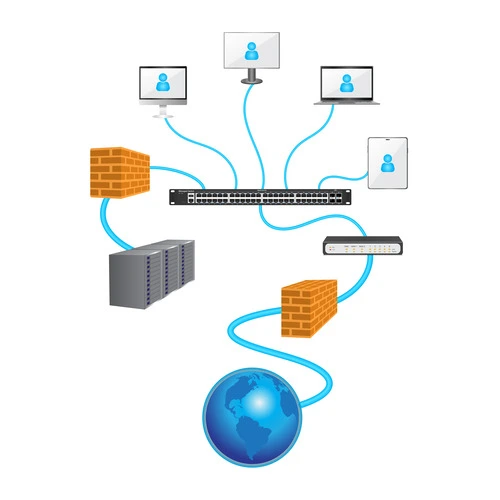
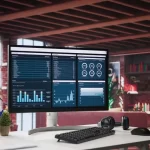
- Unified visibility: A centralized platform provides a single dashboard showing the status of every device, regardless of type or vendor.
- Faster troubleshooting: When an issue arises, you can trace a connection path across routers and switches in seconds instead of hours.
- Proactive maintenance: Performance trends and early warning signs like rising error rates or temperature alerts become visible before users are affected.
- Consistent policy enforcement: You can ensure security and configuration policies are applied uniformly across all managed devices from one control point.
Without this unified view, IT teams are left reacting to problems instead of preventing them, and network reliability becomes a constant challenge.
How Infraon ITIM Helps You Track and Manage All Your Network Devices
Managing a diverse network requires more than periodic check-ups. It requires continuous, automated oversight. Infraon ITIM (IT Infrastructure Monitoring) provides this oversight by unifying discovery, monitoring, and management in one platform.
Automatic discovery and mapping
Infraon ITIM automatically discovers every device on your network, from core routers to edge switches. It builds an interactive, real-time map that shows how devices are connected, giving you an immediate understanding of your network’s topology.
Health and performance monitoring
Infraon ITIM continuously monitors key health metrics for each device:
- CPU and memory utilization
- Interface status and traffic loads
- Temperature and hardware health
- Key performance indicators (KPIs)
It triggers threshold-based alerts that notify your team of potential issues before they impact service, enabling proactive intervention.
Compliance and configuration backup
Infraon ITIM helps maintain network integrity by tracking configuration changes and automating backups. You can define compliance policies to ensure device configurations adhere to security standards, reducing risk and audit preparation time.
Trends That Will Shape the Future of Network Devices
The next generation of networking is being defined by intelligence, automation, and cloud-native management.
AI-driven optimization and predictive operations
Artificial intelligence is moving into network operations. AI can analyze traffic patterns to predict congestion and automatically reroute data. It can also identify the root cause of performance issues by correlating data across devices, drastically reducing mean time to repair (MTTR).
Zero-trust security models embedded in hardware
The zero-trust principle of “never trust, always verify” is becoming a hardware requirement. Newer firewalls and switches have built-in capabilities to authenticate every device and user attempting to access the network, segment traffic micro-segments, and enforce strict access policies at the port level.
The rise of cloud-managed networks
Management itself is shifting to the cloud. Cloud-managed network solutions equip administrators to configure, monitor, and secure globally distributed devices from a single web portal. This simplifies operations for branch offices and remote sites, enabling consistent policy deployment everywhere.
Ready to Improve Visibility Across All Your Network Devices?
Managing a modern network doesn’t have to mean managing complexity. With the right approach and tools, you can transform your network infrastructure from a source of problems into a platform for growth.
Start by gaining a complete, real-time view of every device in your ecosystem. See how automated monitoring and intelligent alerts can free your team from reactive firefighting.
Explore how Infraon ITIM provides unified visibility and control across your entire network infrastructure.
FAQ
What’s the easiest way to manage a large network with multiple device types?
The easiest way is to implement a centralized network monitoring and management platform. This type of tool automatically discovers all devices, provides a unified health dashboard, and allows for consistent configuration and policy management from a single interface, eliminating the need to juggle multiple vendor-specific consoles.
How do I know if my network devices need an upgrade?
Key signs include consistent performance degradation (slow speeds, high latency), an inability to support new security protocols, lack of compatibility with modern software-defined features, and frequent hardware failures. Additionally, if devices are no longer receiving security updates from the vendor, they pose a significant risk and should be replaced.