


What Are IT Operations Best Practices?
IT operations best practices are the proven frameworks, processes, and strategies that help IT teams deliver stable, secure, and efficient technology services. These practices cover incident management, asset tracking, monitoring, compliance, and more. The goal is to keep systems running while supporting business growth.
IT operations vs. IT operations management
IT operations refers to the day-to-day activities of running and maintaining an organization’s technology infrastructure. This includes servers, networks, devices, and applications. IT operations management (ITOM) refers to the strategic layer above it: the processes, tools, and governance that ensure daily activities align with business goals.
While IT operations focus on execution, IT operations management focuses on optimization and alignment.
Why IT operations still break at scale
Many organizations manage fine with 50 employees. At 500, processes start creaking. At 5,000, things often break spectacularly. The culprit is rarely technology. Informal processes and tribal knowledge stop working when teams grow. What worked for a lean team becomes a liability at scale.
Common IT Operations Challenges in Growing Organizations
Tool sprawl and poor visibility
Most mid-sized IT teams juggle 10 or more tools. One tool for monitoring, another for ticketing, spreadsheets for asset tracking, and separate systems for different teams. No single source of truth exists. When an incident hits, teams waste time jumping between tools instead of fixing the problem.
Manual incident response
When every alert requires human triage, response times suffer. Teams get buried in noise and miss critical signals. Maintaining consistency becomes difficult. In regulated industries like banking or healthcare in the UAE and Saudi Arabia, this creates compliance risks as well.
Limited IT budgets and lean teams
IT teams across India and Southeast Asia often run lean. With limited headcount, every manual task reduces productivity. Hiring more people cannot fix operational inefficiency. Smarter processes are the only sustainable solution.
Compliance and audit readiness
ISO 27001, SOC 2, GDPR, and regional regulations like Saudi Arabia’s NCA require evidence. Who approved that change? When was that asset patched? Spreadsheets and email trails make audits painful. Growing organizations feel this pain acutely.
12 IT Operations Best Practices You Should Adopt
1. Centralize IT asset and service visibility
You cannot manage what you cannot see. A centralized configuration management database or IT operations platform gives you a single source of truth for all assets. Hardware, software, cloud resources, and relationships between them should all be visible. When an incident occurs, you instantly know what is affected.
2. Standardize incident and request workflows
Every team member should follow the same process for common tasks. Password resets, new hardware requests, and incident triage all benefit from standardization. Standardization reduces errors, speeds up resolution, and makes training new hires easier. Document these workflows and bake them into your tools.
3. Automate repetitive IT operations tasks
Start with high-volume, low-complexity tasks. User provisioning, password resets, server patching, and alert triage are good candidates. Automation frees your team for higher-value work. For IT teams in India and SEA where headcount is limited, automation provides leverage.
4. Implement proactive monitoring and alerts
Reactive IT means fixing things after they break. Proactive monitoring means catching issues before users notice. Set up alerts for disk space, memory usage, certificate expiry, and other leading indicators. Configure alert thresholds carefully to avoid noise.
5. Define and track IT operations KPIs
What gets measured gets improved. Choose metrics that reflect both operational health and business impact. Track them consistently and review them with your team. We will cover specific KPIs in detail later.
6. Build a Strong IT documentation culture
Tribal knowledge is risky. When only one person knows how a system works, vacations become stressful and departures become crises. Make documentation part of every task. Keep it simple, searchable, and accessible.
7. Align IT operations with business SLAs
Service level agreements define what the business expects from IT. Response times, resolution times, and availability targets should be clearly defined and measured. When SLAs are missed, conduct blameless post-mortems and improve processes.
8. Strengthen change and release coordination
Uncontrolled changes are a leading cause of incidents. Implement a change management process that balances speed and risk. For low-risk changes, use pre-approved workflows. For high-risk changes, require review and scheduling.
9. Improve collaboration between IT and business teams
IT exists to enable the business, not the other way around. Regular communication with business stakeholders helps IT understand priorities. When business teams understand IT constraints, they become partners rather than complainants.
10. Prepare for audits and compliance early
Do not wait for audit notices to organize your compliance evidence. Build compliance into daily operations. Automated audit trails, access reviews, and change approvals should be standard practice. This approach reduces audit stress and improves security.
11. Adopt a phased IT operations maturity model
You cannot fix everything at once. Assess your current maturity level and plan gradual improvements. The maturity model in the next section provides a roadmap.
12. Continuously review and optimize operations
Best practices evolve. Technology evolves. Your business evolves. Schedule regular reviews of your IT operations processes. What worked six months ago may now be outdated. Continuous improvement should be embedded in your team culture.
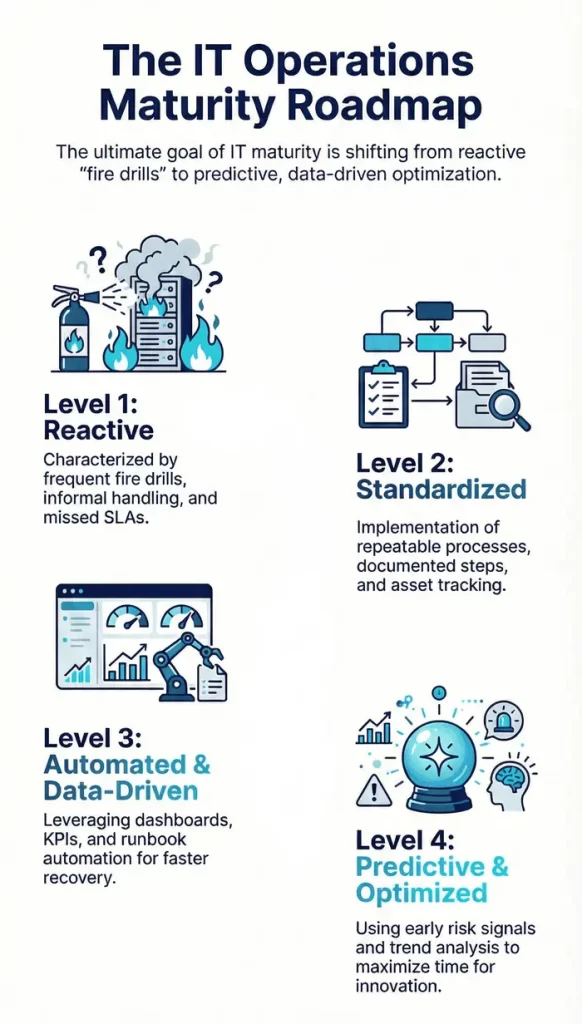
IT Operations Maturity Model
Level 1: Reactive IT operations
The team spends most of its time fighting fires. There is no formal process for incident management. Documentation is sparse or nonexistent. The same issues recur because root causes are never addressed. This level is stressful and unsustainable.
Level 2: Standardized processes
Basic processes are documented and followed. Incidents are logged. Assets are tracked. The team has moved from chaos to consistency. However, processes may still be manual and siloed.
Level 3: Automated and data-driven
Repetitive tasks are automated. Metrics are collected and reviewed regularly. The team has visibility across the environment. Decisions are based on data rather than intuition. Incidents are resolved faster with less manual effort.
Level 4: Predictive and optimized IT operations
The team anticipates issues before they occur. Trend analysis identifies potential failures. Automation handles routine responses. IT operations are aligned with business strategy. The team focuses on innovation rather than maintenance.
Key IT Operations Metrics That Actually Matter
MTTR, MTBF, SLA Compliance
Mean Time to Repair measures how quickly you restore service after failure. Mean Time Between Failures measures system reliability. SLA compliance tracks whether you meet agreed service levels. These three metrics together give a balanced view of operational performance.
Asset utilization rate
Underutilized assets waste money. Overutilized assets risk failure. Tracking utilization helps optimize spending and prevent capacity issues. For cloud environments, this directly impacts cost management.
Ticket backlog trends
A growing backlog indicates capacity or process problems. Aging tickets suggest issues are not being resolved. Review backlog by category to identify problem areas.
Cost per incident
Understanding incident costs helps build business cases for prevention. Include labor hours, tool costs, and business impact. High-cost incidents deserve root cause analysis and process improvements.
How Tools Enable IT Operations Best Practices
Why spreadsheets and siloed tools fail
Spreadsheets are flexible but they do not scale. They lack automation, real-time updates, and access controls. Siloed tools create data gaps and manual handoffs. When an incident spans multiple systems, teams waste time reconciling information.
Capabilities to look for in an IT operations platform
Look for unified visibility across assets and services. Automation capabilities for common workflows matter. Built-in reporting for KPIs and compliance saves time. Integration with existing tools reduces friction. The platform should adapt to your processes, not force you to adapt to it.
How Infraon Supports Modern IT Operations
Infraon helps IT teams implement these best practices without complexity.
- Real-time asset and service visibility gives you a complete picture of your environment. No more jumping between spreadsheets and disconnected tools. When questions arise about what you have and how it is configured, the answers are immediately available.
- Automated incident and request workflows reduce manual effort. Common tasks move through consistent processes. Teams spend less time on routine work and more time on strategic initiatives. New team members ramp up faster because processes are standardized.
- SLA and KPI tracking happen automatically from a single platform. Compliance evidence is generated as part of daily operations. When auditors ask questions, you have answers ready. When leadership asks for reports, you can provide them instantly.
Real-World IT Operations Use Cases
Reducing downtime in mid-sized IT teams
A mid-sized logistics company in Dubai struggled with recurring network outages. Each incident took hours to diagnose because asset relationships were not documented. After centralizing visibility and implementing standardized incident workflows, the MTTR dropped by 60%. The team now identifies potential failures before they affect operations.
Scaling IT ops without adding headcount
A fast-growing e-commerce company in Bangalore supported 400 employees with just five IT staff. Manual user onboarding consumed hours each week. Password reset requests flooded the team daily. By automating these tasks and implementing self-service options, the team absorbed 200% growth without adding headcount.
FAQs: IT Operations Best Practices
What is the difference between IT operations and ITSM?
IT operations focuses on the technology itself: keeping servers running, networks connected, and devices working. IT service management focuses on the services delivered to users: incident response, request fulfillment, and service desk operations. Both are essential, and they overlap significantly.
What are the most important IT operations KPIs?
Start with MTTR (Mean Time to Repair), SLA compliance rates, and ticket backlog trends. These three give you visibility into responsiveness, reliability, and capacity. Add asset utilization and cost per incident as your metrics program matures.
How do small IT teams manage operations efficiently?
Small teams should prioritize standardization and automation. Document your most common tasks and create templates. Automate repetitive work like user provisioning and password resets. Use a unified platform rather than multiple point tools. Focus on preventing issues rather than fighting fires.
Which tools help with IT infrastructure and operations?
Look for platforms that combine asset management, incident tracking, automation, and reporting. Avoid tools that solve only one problem. The best tools adapt to your team size and grow with you. Cloud-based options reduce maintenance overhead for lean teams.