



IT teams manage hardware across offices, data centers, remote users, warehouses, and branch locations. Laptops, desktops, network devices, servers, mobile devices, peripherals, and shared equipment all carry purchase costs, ownership data, warranty details, security risk, and service history. When this data is scattered, teams lose visibility into usage, location, refresh needs, and compliance exposure.
The hardware asset management lifecycle gives IT teams a structured way to manage each asset from planning and procurement through deployment, use, maintenance, refresh, and disposal.
With automation, discovery, lifecycle dashboards, and ITSM integration, hardware asset management becomes an operational discipline that helps reduce waste, tighten governance, and improve service planning.
What Is Hardware Asset Management?
Definition of hardware asset management
Hardware asset management is the process of tracking physical IT assets through their full lifecycle. It covers purchase data, ownership, location, user assignment, configuration, warranty, maintenance, usage, refresh, and retirement. The goal is to give IT, finance, security, and operations teams reliable asset data for daily service work and long-term planning.
Why IT hardware asset management matters today
Modern IT hardware moves through remote work setups, hybrid offices, cloud-connected operations, and branch environments. IT teams need asset records that reflect where devices are, who owns them, how they are used, and when they should be repaired or replaced. Hardware asset management reduces blind spots that affect cost, security, service, and audit readiness.
Hardware vs. software asset management
| Hardware asset management | Software asset management |
| Tracks physical devices, ownership, location, condition, warranty, and disposal. | Tracks licenses, subscriptions, usage rights, renewals, deployments, and compliance. |
| Focuses on devices such as laptops, servers, network gear, printers, and mobile devices. | Focuses on applications, SaaS tools, installed software, and license contracts. |
| Helps plan procurement, repairs, refresh cycles, and secure disposal. | Helps manage license costs, renewal risk, audits, and usage gaps. |
What Is the Hardware Asset Management Lifecycle
Overview of the hardware asset management process
The hardware asset management process follows each asset from purchase planning to final disposal. It records who requested the asset, who approved it, where it was deployed, how it was configured, who used it, what service it received, and when it left the organization. Each stage creates data that improves the next decision.
Why lifecycle visibility is critical for IT teams
Lifecycle visibility helps IT teams control costs, plan refresh cycles, respond to incidents, reduce shadow IT, and prepare for audits. It also helps leaders understand which assets are underused, which assets are nearing warranty end, and which devices create service risk.
The 7 Stages of the Hardware Asset Management Lifecycle
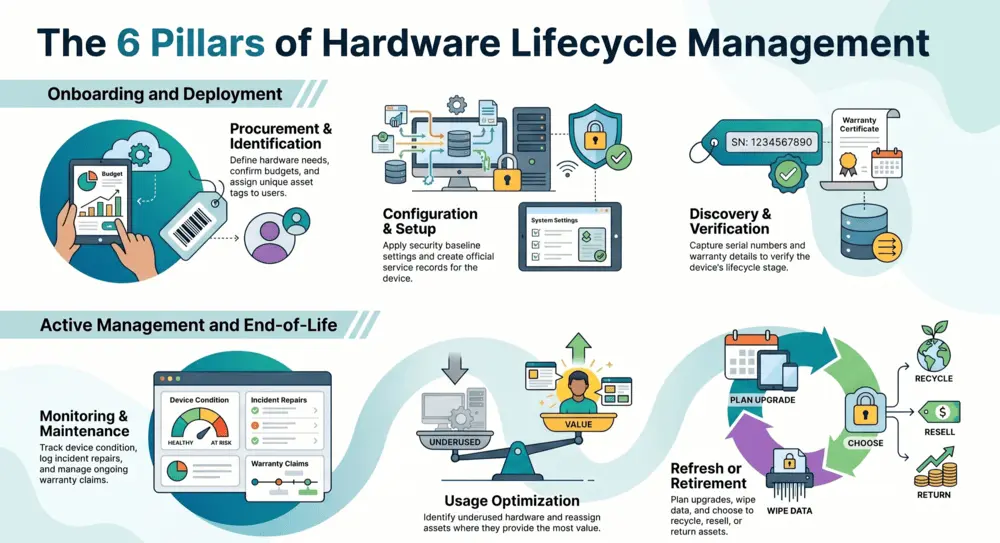
Asset planning and procurement
This stage defines what hardware is needed, why it is needed, how it will be funded, and which approval path applies. Good planning links business demand with budget, security rules, supplier terms, and standard device categories.
Asset deployment and configuration
Deployment covers asset tagging, user assignment, baseline configuration, security settings, and service record creation. A well-managed deployment helps IT know which device went to which user, location, or department.
Asset discovery and inventory management
Discovery confirms which devices are present across networks, offices, and remote environments. Inventory records should capture asset type, serial number, location, owner, warranty, and lifecycle stage.
Asset monitoring and maintenance
Monitoring and maintenance track device condition, incidents, repairs, warranty claims, and service history. This helps IT act before avoidable downtime affects users.
Asset optimization and utilization tracking
Utilization tracking shows whether hardware is active, underused, overused, or ready for reassignment. This helps reduce unnecessary purchases and improves budget planning.
Asset refresh and upgrade management
Refresh planning identifies aging devices, upcoming warranty end dates, and hardware that needs upgrade or replacement. Planned refresh cycles reduce last-minute purchases and user disruption.
Asset retirement and secure disposal
Retirement covers data wipe, chain of custody, disposal approval, recycling, resale, or return to vendor. Secure disposal protects data and creates records needed for governance reviews.
Common Challenges in Hardware Asset Management
- Poor asset visibility creates uncertainty around device location, user ownership, and lifecycle stage
- Spreadsheet-based tracking creates outdated records and manual reporting efforts
- Remote workforce asset issues make it harder to confirm assignment, usage, return, and repair status
- Compliance and audit risks rise when ownership, disposal, and warranty data are incomplete
- Shadow IT and unauthorized devices create security exposure and asset data gaps
Hardware Asset Management Best Practices
Automate asset discovery
Automated discovery helps IT teams capture active assets and reduce reliance on manual updates. It also helps detect devices that appear on the network but are missing from formal records.
Standardize asset lifecycle policies
Policies should define purchase approval, deployment steps, ownership updates, maintenance rules, refresh criteria, and disposal controls. Consistency makes hardware data easier to trust across teams and locations.
Maintain a centralized asset repository
A central repository gives IT, service desk, security, procurement, and finance teams a shared view of hardware data. It also reduces duplicate records and improves reporting quality.
Track asset ownership and Usage
Each asset should link to a user, department, location, cost center, and service history. Usage records help teams decide whether to repair, replace, redeploy, or retire hardware.
Integrate ITAM with ITSM and CMDB
ITAM, ITSM, and CMDB integration connects hardware records with incidents, service requests, changes, and configuration data. This gives service teams better operational context during support activity.
Use lifecycle analytics for forecasting
Lifecycle analytics help teams forecast refresh demand, warranty exposure, repair costs, and replacement budgets. Forecasting also helps procurement plan vendor activity and avoid rushed purchasing.
Manual vs. Automated Hardware Asset Management

| Manual tracking | Automated hardware asset management |
| Spreadsheets and email updates require constant manual effort. | Discovery, workflow triggers, and dashboards reduce repeated administrative work. |
| Asset records often lag behind actual movement and ownership changes. | Records update through scans, integrations, monitoring, and workflow activity. |
| Audit prep requires manual collection from many sources. | Reports draw from a central asset repository with service and lifecycle history. |
| Lifecycle planning depends on guesswork and individual knowledge. | Lifecycle dashboards show warranty, refresh, utilization, and disposal status. |
| Shadow IT can remain hidden until service or security issues appear. | Discovery and governance controls help detect unauthorized or unmanaged devices. |
Challenges of manual asset tracking
- Teams work from many locations
- Records depend on individual updates
- Missing serial data and outdated ownership
- Incomplete disposal records that create cost and governance problems
Benefits of automated IT hardware asset management
Automation improves asset discovery, lifecycle updates, service workflows, warranty tracking, and reporting. IT teams can spend less time chasing records and gain time for operational problem solving.
ROI of lifecycle automation
Lifecycle automation improves return by reducing duplicate purchases, asset loss, manual reporting, missed warranty claims, avoidable downtime, and rushed replacements. It also gives finance and IT better data for planning refresh cycles.
Key Features to Look for in a Hardware Asset Management Tool
| Feature | Operational value |
| Real-time asset discovery | Finds active devices and updates hardware inventory records. |
| Lifecycle tracking dashboard | Shows planning, deployment, use, maintenance, refresh, and retirement status. |
| Warranty and contract management | Tracks warranty dates, supplier terms, renewals, and service coverage. |
| Remote device monitoring | Tracks hardware used by distributed users and branch teams. |
| Compliance reporting | Creates audit-ready records for ownership, lifecycle, service, and disposal. |
| ITSM platform integration | Links assets with incidents, service requests, changes, and operational workflows. |
How Infraon Simplifies the Hardware Asset Management Lifecycle
Infraon Assets helps IT teams manage hardware assets through centralized visibility, automated discovery, lifecycle tracking, compliance controls, and integration with IT operations workflows. Teams can track assets from procurement to retirement while linking asset data with tickets, incidents, changes, and service requests.
Infraon Hardware Asset Management Solutions help organizations reduce manual tracking, monitor device status, and view hardware data across locations. This gives IT leaders a practical way to govern assets, plan refresh cycles, and respond faster when hardware issues affect users.
Hardware Asset Management KPIs Every IT Team Should Track
- Asset utilization rate shows whether hardware is active, idle, overused, or ready for reassignment
- Mean time between failures shows reliability patterns across devices and asset groups
- Lifecycle cost per asset connects purchase, repair, service, downtime, and disposal costs
- Asset recovery rate shows how well IT retrieves devices from exiting users or changing teams
- Compliance audit readiness measures the quality of ownership, disposal, warranty, and lifecycle records
Future Trends in Hardware Asset Management
AI-driven asset monitoring
AI-driven monitoring can help IT teams detect usage patterns, failure signals, unusual device activity, and asset records that need attention. The value depends on reliable data from discovery, service workflows, and lifecycle history.
Predictive maintenance
Predictive maintenance uses device condition, service history, and performance trends to help teams act before hardware issues affect users. This approach helps reduce avoidable downtime and repair delays.
Unified ITAM and ITSM platforms
IT teams increasingly need asset and service data in one workflow. Unified platforms connect assets with tickets, requests, changes, incidents, and compliance reporting, which improves service desk decisions.
Sustainability and green IT disposal
Hardware retirement now carries data, governance, and environmental responsibilities. IT teams need disposal records, data wipe-proofed, recycling paths, and reuse decisions that align with company policy.
Which industries benefit from hardware asset management tools?
Industries with distributed assets, regulated operations, or large device fleets benefit greatly. This includes healthcare, finance, education, telecom, manufacturing, public sector, retail, and large enterprises with hybrid workforces.
Final Thoughts

Hardware asset management helps IT teams control device data, ownership, service history, lifecycle cost, and disposal records. A mature lifecycle program gives leaders better planning data and gives service teams faster access to the hardware context behind incidents and requests.See how IT teams can automate asset tracking, lifecycle management, compliance reporting, and hardware governance from Infraon Infinity – a unified AI-led platform.Book your demo
Frequently Asked Questions
What is the hardware asset management lifecycle?
The hardware asset management lifecycle tracks IT hardware from planning and purchase to deployment, discovery, use, maintenance, refresh, and secure disposal. It gives IT teams visibility into location, ownership, status, cost, and governance records.
Why is hardware asset management important?
Hardware asset management helps IT teams control cost, reduce asset loss, plan refresh cycles, track ownership, prepare audits, and improve service response. It also helps manage devices used by remote, branch, and hybrid teams.
What are the stages of hardware asset management?
The main stages are planning and procurement, deployment and configuration, discovery and inventory, monitoring and maintenance, utilization tracking, refresh and upgrade planning, and secure retirement or disposal.
How does automation improve IT hardware asset management?
Automation improves hardware asset management by discovering devices, updating records, triggering workflows, tracking warranty dates, and producing reports. This reduces manual work and improves data quality across the asset lifecycle.
What is the difference between ITAM and HAM?
ITAM covers the management of IT assets across hardware, software, contracts, and lifecycle data. HAM focuses on physical IT hardware such as laptops, servers, network devices, printers, mobile devices, and peripherals.