


Cloud asset management software gives IT teams a structured way to discover, track, govern, and optimize assets across cloud, SaaS, hybrid, and enterprise environments. As companies use AWS, Azure, Google Cloud, SaaS apps, remote devices, and virtual workloads together, asset ownership becomes harder to trace through emails, invoices, spreadsheets, and disconnected tools.
A cloud-based asset management program brings asset data into a single operating view. Teams can see what exists, who owns it, how it is used, what it costs, and where risk may appear. This guide explains how cloud asset management works, where it fits within IT asset management cloud programs, which features matter, and how modern IT teams can choose the right platform with cleaner governance from the start.
What Is Cloud Asset Management Software?
Understanding cloud asset management
Cloud asset management software ensures organizations can manage digital and cloud-connected assets through their full lifecycle. These assets may include virtual machines, cloud storage, SaaS licenses, containers, cloud accounts, endpoints, configuration records, and linked business services.
IT teams need a live view of assets across cloud and hybrid environments so they can reduce waste, strengthen governance, and respond faster when something changes. Cloud asset management turns scattered asset data into a usable system of record for IT, security, finance, and operations teams.
Why businesses need cloud-based asset management
Cloud use grows quickly because teams can deploy resources fast. That same speed can create asset sprawl when new accounts, services, licenses, and workloads appear without clear ownership. A cloud-based asset management process gives each asset a record, context, and lifecycle status.
This is critical because cloud assets affect budgets, audits, security reviews, service uptime, and employee productivity. When asset data stays fragmented, teams spend too much time chasing answers. When asset data is organized, leaders can see usage, spend, risk, and accountability with greater clarity.
How cloud asset management works
Cloud asset management software works by connecting to asset sources, collecting asset data, classifying records, and keeping information updated as environments change. It usually connects with cloud platforms, SaaS tools, ITSM systems, discovery engines, identity tools, CMDBs, and reporting platforms.
- Discovery finds assets across cloud accounts, SaaS apps, and hybrid systems
- Classification groups assets by type, owner, business unit, cost center, status, and risk level
- Monitoring tracks changes in usage, configuration, compliance posture, and lifecycle stage
- Reporting turns asset data into views for IT, finance, security, and leadership teams
Cloud Asset Management vs. Traditional Asset Management
| Cloud Asset Management | Traditional Asset Management |
| Tracks virtual, SaaS, cloud, and hybrid assets across distributed environments | Tracks physical hardware, local software, and fixed infrastructure through internal records |
| Uses automated discovery and API-based updates | Often depends on manual entry, scheduled audits, or static spreadsheets |
| Connects asset data with cost, usage, ownership, and configuration signals | Focuses on purchase records, ownership, warranty, and inventory status |
| Fits fast-changing cloud workloads and SaaS portfolios | Fits slower asset change cycles in controlled physical environments |
Key differences
Traditional asset management was built around physical assets, installed software, procurement records, and planned audits. Cloud asset management handles a faster environment where assets can be created, changed, scaled, or retired in minutes.
The main difference is pace. Traditional asset tracking can work for stable inventories. Cloud asset management needs automation because manual updates fail to keep pace with cloud resource changes, SaaS license changes, and multi-cloud account activity.
Benefits of a cloud-based approach
A cloud-based approach gives teams near real-time visibility into asset status, ownership, cost, and compliance posture. It also empowers departments to work from the same data instead of keeping separate spreadsheets for IT, security, finance, and operations.
For IT leaders, the value lies in control. Cloud asset management software can show unused resources, duplicate licenses, missing tags, orphaned assets, and risky configurations before they turn into larger business problems.
When to move to cloud asset management
A business should move to cloud asset management when cloud usage spreads across several teams, regions, or platforms. Other clear signals include rising SaaS spend, weak tagging discipline, audit gaps, unclear asset ownership, and recurring confusion around cloud resource usage.
The shift also makes sense when IT teams manage remote employees, hybrid infrastructure, or DevOps environments. At that point, asset tracking needs to match the speed of cloud operations.
Types of Cloud Asset Management Software
IT asset management cloud solutions
IT asset management cloud solutions focus on the full IT asset record across cloud, SaaS, endpoint, and infrastructure environments. IT teams can manage ownership, lifecycle stage, cost, compliance, and service impact from one repository. These platforms are useful when organizations want ITAM practices to cover cloud resources and digital services along with physical hardware and software records.
SaaS asset management platforms
SaaS asset management platforms track subscriptions, users, licenses, usage patterns, renewals, and app ownership. Teams can find inactive licenses, duplicate tools, unused seats, and risky shadow app usage. It is necessary for companies with fast SaaS adoption across departments such as sales, marketing, finance, HR, and product teams.
Multi-cloud asset management tools
Multi-cloud asset management tools track resources across AWS, Azure, Google Cloud, and other cloud providers. So IT and cloud operations teams can see resource ownership, service relationships, account activity, and cost patterns across several platforms. These tools are useful for enterprises that use different cloud providers for resilience, regional coverage, application hosting, or vendor strategy.
Hybrid cloud asset management solutions
Hybrid cloud asset management solutions connect cloud assets with on-premises infrastructure. They give teams a clearer view of how physical systems, virtual assets, cloud workloads, and business services depend on one another. This is important for organizations that are still running data centers while expanding cloud adoption.
Enterprise asset management platforms
Enterprise asset management platforms manage IT and business assets across departments, locations, and service teams. They can support asset lifecycle workflows, reporting, governance, and cross-functional operations.
Key Features of Cloud Asset Management Software
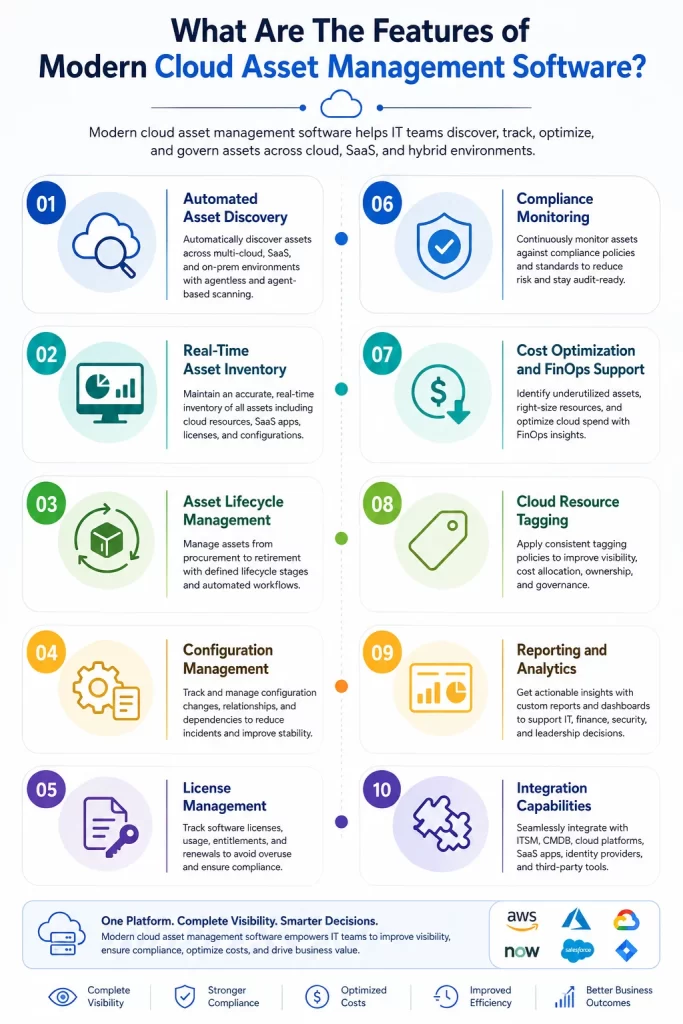
What Are The Features of Modern Cloud Asset Management Software?
- Automated Asset Discovery
- Real-Time Asset Inventory
- Asset Lifecycle Management
- Configuration Management
- License Management
- Compliance Monitoring
- Cost Optimization and FinOps Support
- Cloud Resource Tagging
- Reporting and Analytics
- Integration Capabilities
Automated asset discovery
Automated discovery is the starting point for reliable cloud asset data. It scans connected environments and identifies assets without depending on manual inventory updates. Discovery should cover cloud resources, SaaS applications, endpoints, virtual assets, accounts, and services. Strong discovery reduces blind spots and gives teams a current view of what they own and use.
Real-time asset inventory
A real-time asset inventory keeps records current as cloud environments change. This is key for workloads, licenses, accounts, and resources that may appear or disappear quickly. A strong inventory should show asset type, status, owner, business unit, location, cost center, linked services, lifecycle stage, and compliance posture.
Asset lifecycle management
Asset lifecycle management tracks each asset from request and approval through deployment, usage, optimization, refresh, and retirement. In cloud settings, lifecycle visibility reduces unused resources and stale accounts. Finance and procurement teams can also understand cost exposure across active, inactive, and retired assets.
Configuration management
Configuration management connects cloud assets with configuration records and service relationships. IT teams can understand how one asset affects another during incidents, changes, or audits. When configuration data is linked with asset records, service impact analysis becomes faster and cleaner.
License management
License management features track SaaS usage, license assignments, renewals, and unused seats. It also reduces waste from duplicate apps or underused subscriptions. For cloud-heavy organizations, license management should connect usage data with employee roles, departments, and renewal dates.
Compliance monitoring
Compliance monitoring tracks asset records, ownership, policy status, and audit readiness. Teams can find missing tags, unmanaged assets, expired contracts, unauthorized usage, and weak controls.
It is useful for industries that need traceable records for security reviews, internal audits, and regulatory checks.
Cost optimization and FinOps support
Cost optimization equips teams to find unused resources, overprovisioned services, idle licenses, and cost spikes. FinOps support adds a shared operating model between IT, finance, and business owners.
With the right reporting, leaders can connect asset decisions with budget impact and reduce cloud waste without slowing service delivery.
Cloud resource tagging
Cloud resource tagging classifies assets by owner, project, department, cost center, environment, and lifecycle status. Tags make cloud assets easier to search, govern, and report. Consistent tagging also improves chargeback, cost tracking, compliance reviews, and asset ownership clarity.
Reporting and analytics
Reporting and analytics help teams turn asset records into decisions. Useful dashboards show asset growth, unused resources, compliance status, cost patterns, ownership gaps, and lifecycle health.
Reports should serve different audiences. IT needs operational views, finance needs cost views, security needs risk views, and leadership needs trend views.
Integration capabilities
Integration capabilities empower cloud asset management software to connect with ITSM, CMDB, cloud providers, SaaS apps, identity systems, monitoring tools, and finance platforms. The right integrations reduce duplicate data entry and keep asset records aligned with the systems teams already use.
Benefits of Cloud-Based Asset Management
Improved asset visibility
Cloud-based asset management gives teams a single view of assets that may otherwise sit across several platforms and departments. That visibility answers basic questions quickly. What exists, who owns it, where it runs, and how it is being used.
Better cost control
Cloud asset management software finds wasted spend from idle workloads, duplicate tools, inactive licenses, and poorly tagged resources. It also links asset usage with business owners and cost centers. Cost control becomes easier when teams can see usage and ownership together. Finance can review spend with context, while IT can act on waste with clear accountability.
Higher operational speed
Clean asset data helps IT teams respond faster to requests, incidents, audits, and cloud changes. When teams know where assets are and how they relate to services, they spend less time searching for ownership details. It improves daily operations because the asset record becomes a working tool instead of a static inventory.
Stronger security and compliance
Cloud environments can expose risk when assets are created without ownership, tagging, or review. Cloud asset management helps security and compliance teams find unmanaged resources, risky configurations, expired assets, and missing controls.
Simpler resource governance
Governance improves when asset policies are visible and repeatable. Teams can define tagging rules, ownership fields, lifecycle stages, approval flows, and compliance checks for cloud assets. IT teams get a practical way to manage cloud growth without slowing teams that need to build and deploy services.
Better decision making
Decision-making improves when IT, finance, security, and business teams work from the same asset data. Leaders can evaluate renewals, migrations, cloud spend, and lifecycle plans using current information. Asset data also helps teams plan capacity, remove unused resources, and set clearer priorities for cloud governance.
Faster asset tracking
Cloud asset tracking becomes faster when discovery, tagging, reporting, and lifecycle updates run through one platform. Teams can locate resources, identify owners, and review usage without searching several systems.
The Cloud Asset Management Lifecycle
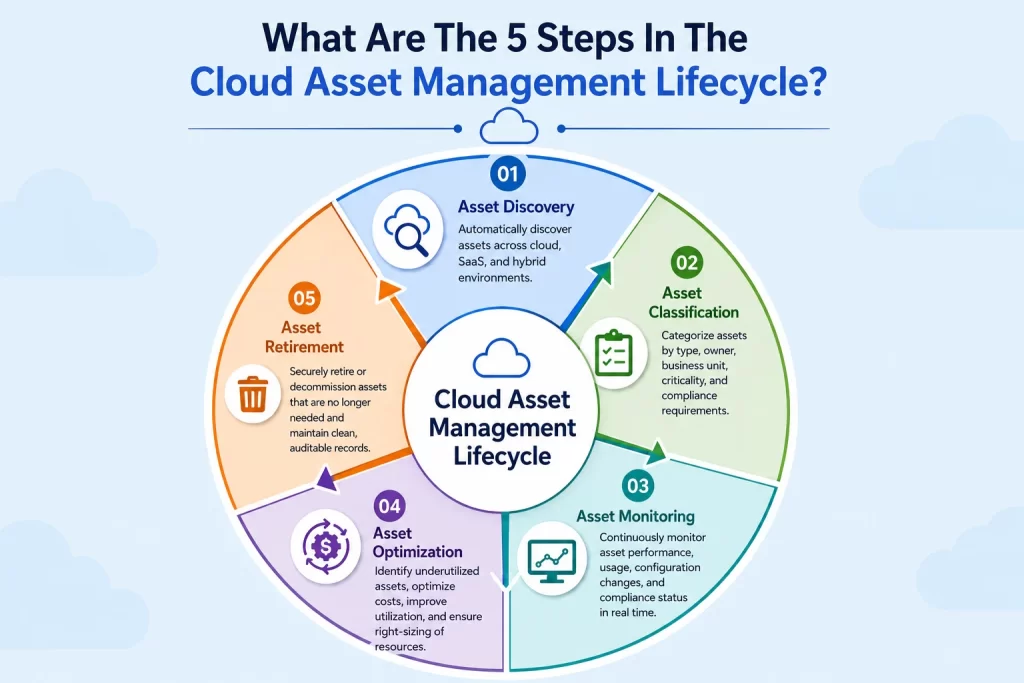
What Are The 5 Steps In The Cloud Asset Management Lifecycle
- Asset Discovery
- Asset Classification
- Asset Monitoring
- Asset Optimization
- Asset Retirement
Asset discovery
The lifecycle starts with discovery. IT teams connect asset sources and identify cloud resources, SaaS apps, devices, virtual assets, accounts, and related configuration data. Discovery should run on a recurring basis because cloud environments change fast. A stale asset record can quickly become a source of waste or risk.
Asset classification
After discovery, each asset should be classified with useful details such as owner, department, environment, cost center, business service, lifecycle stage, and compliance status. Classification helps teams find assets quickly and create reports that match real business needs.
Asset monitoring
Monitoring tracks asset status, usage, configuration changes, cost movement, and policy alignment. It helps teams catch unusual activity or resource waste early. Operations teams can also connect asset data with incidents, service health, and change activity.
Asset optimization
Optimization focuses on rightsizing resources, removing unused assets, cleaning up inactive licenses, and improving cost allocation. It also supports FinOps practices by linking cloud usage with business value.
Asset retirement
Retirement closes the lifecycle. Assets that are no longer needed should be removed, deactivated, archived, or marked inactive through a controlled process. Retirement reduces cost, lowers risk, and keeps asset records clean for future audits and planning.
Common Use Cases for IT Asset Management Cloud Solutions
Managing multi-cloud environments
Multi-cloud environments are difficult to govern when every platform uses its own naming, tagging, billing, and reporting model. IT Asset Management Cloud solutions create a common view across providers so teams can track resources and ownership in one place.
AWS asset tracking
AWS asset tracking helps teams follow instances, storage, databases, accounts, services, and linked cost centers. It also identifies inactive resources and assets without clear ownership.
Azure asset management
Azure asset management helps teams track subscriptions, resource groups, virtual machines, identities, storage, and services. It aligns asset data with business teams and governance policies.
Google Cloud asset visibility
Google Cloud asset visibility helps teams track projects, compute resources, storage, services, permissions, and usage patterns. It supports clearer governance for engineering and cloud operations teams.
SaaS application management
SaaS application management makes it easy to track apps, user access, license usage, renewals, and spend. This is useful when departments buy tools directly, and IT needs a better view of the full software portfolio.
Compliance and audit readiness
Cloud asset records support audits by showing ownership, status, usage, configuration, and policy alignment. A cleaner asset repository helps teams respond to audit questions with fewer delays.
Cost optimization and FinOps
Cost optimization and FinOps use asset data to connect cloud spend with usage and business ownership. Teams can find idle resources, review cost anomalies, and make cloud budgets easier to govern.
DevOps asset management
DevOps teams create and change resources quickly. Cloud asset management tracks these resources without slowing development cycles. Operations teams can understand which services depend on which assets.
Enterprise IT operations
Enterprise IT operations teams use cloud asset management to connect inventory, service health, cost, compliance, and lifecycle planning. This gives leaders a cleaner view across hybrid and cloud operations.
How to Choose the Right Cloud Asset Management Software
Define business requirements
Start by listing the problems the platform must solve. Common goals include stronger asset visibility, cost control, SaaS license tracking, compliance readiness, multi-cloud governance, and lifecycle reporting. The right platform should match current asset pain points and near-term cloud strategy.
Evaluate discovery capabilities
Discovery capabilities should cover the asset sources that are crucial to the organization. This may include cloud platforms, SaaS apps, endpoints, virtual assets, network devices, and CMDB records. The platform should also refresh data enough to reflect real cloud activity.
Assess automation features
Automation should reduce manual effort across discovery, classification, tagging, compliance checks, lifecycle updates, alerts, and reports. Useful automation works quietly in the background while still giving teams control over rules, exceptions, and approvals.
Review integration options
Cloud asset management software should connect with the tools already used by IT, cloud operations, finance, security, and service teams. Common integrations include ITSM, CMDB, cloud providers, identity tools, monitoring platforms, and finance systems. Integration depth is necessary because disconnected tools create duplicate records and reporting gaps.
Analyze security features
Security features should cover access controls, audit trails, policy checks, role-based permissions, and reporting for risky assets. Cloud asset data can be sensitive because it shows systems, ownership, costs, and infrastructure relationships.
Consider scalability
The platform should handle growth across asset volume, users, departments, cloud accounts, and regions. Scalability is critical s because cloud adoption can expand faster than planned. A tool that works for one team should also work when finance, security, procurement, DevOps, and operations need asset views.
Compare pricing models
Pricing should be reviewed against asset volume, modules, users, integrations, support levels, and long-term growth. Teams should also check how pricing changes as cloud usage expands. The lowest entry price may create higher costs later if discovery, reporting, or integration features require upgrades.
Evaluate vendor support
Vendor support affects implementation, adoption, and ongoing value. Teams should review onboarding assistance, documentation, training, support channels, release cadence, and customer success resources.
Best Practices for Cloud Asset Management
Maintain accurate asset inventories
Asset inventory accuracy should be treated as a continuous operating practice. Teams should define required fields, ownership rules, lifecycle stages, and review cadences. Inventory quality improves when teams make asset records useful for real work, such as audits, incident response, budget planning, and service reviews.
Automate asset discovery
Automated discovery reduces manual tracking and improves data freshness. It should run across cloud providers, SaaS platforms, endpoints, and hybrid systems where needed. Discovery automation should also identify new assets that lack tags, owners, or policy alignment.
Implement consistent tagging policies
Tagging policies should define required tags such as owner, department, cost center, environment, project, and lifecycle stage. Clear policies make reporting and governance easier. Use standard tag names across cloud accounts
Assign ownership for every asset class
Tagging works best when it is simple enough for teams to follow and structured enough for leaders to trust. So, it’s crucial to review missing tags during regular asset checks while connecting tags with cost, compliance, and service reporting
Establish governance frameworks
Governance frameworks define how assets are requested, approved, tracked, reviewed, optimized, and retired. They also define who owns decisions for asset data, cloud spend, and compliance. A good governance model gives teams guardrails without creating unnecessary delay in cloud operations.
Conduct regular asset audits
Regular audits help verify inventory accuracy, ownership, lifecycle status, license usage, and policy alignment. Audits also uncover inactive assets, duplicate services, and untracked resources. Cloud asset audits should use automated reports where possible, and then focus human review on exceptions and risk areas.
Monitor compliance continuously
Continuous compliance monitoring helps teams detect gaps as cloud environments change. It can flag missing owners, inactive resources, risky configurations, and records that need review. So audit pressure is reduced because teams can fix issues during normal operations instead of waiting for a formal review.
Optimize cloud spending
Cloud spending should be reviewed through the asset lens. Teams can connect cost with usage, owner, project, environment, and business value. Teams can reduce waste from idle resources, oversized workloads, unused licenses, and services that no longer match business needs.
Common Cloud Asset Management Challenges
Shadow IT and untracked assets
Shadow IT appears when teams adopt cloud services or SaaS tools without central visibility. This can create cost, security, and governance gaps. Cloud asset management helps by discovering assets, identifying owners, and bringing hidden resources into a managed process.
Multi-cloud complexity
Multi-cloud complexity grows when each platform has its own structure, roles, tags, billing model, and reporting layer. Teams can struggle to compare asset data across providers. A cloud asset management platform should normalize this data so leaders can see cloud usage across the full environment.
Data accuracy issues
Asset data loses value when records are outdated, incomplete, duplicated, or missing ownership details. Data accuracy issues start small and grow as cloud usage expands. Automation, tagging rules, validation checks, and regular audits help keep asset records useful.
Compliance risks
Compliance risks increase when cloud assets lack owners, approved configurations, audit trails, or lifecycle controls. These gaps can affect internal audits and external reviews. Cloud asset management software helps teams trace assets, policies, owners, and usage history from a central system.
Resource sprawl
Resource sprawl happens when workloads, licenses, accounts, and services keep growing without review. Over time, this increases spend and makes governance harder. Lifecycle controls, cost reports, and asset cleanup processes help keep cloud growth under control.
AI and Automation in Cloud Asset Management
AI-powered asset discovery
AI-powered asset discovery can help classify assets, group similar records, identify unusual patterns, and flag records that need review. This supports cleaner inventory data with less manual effort. AI can also make sure teams can understand assets that lack proper tags by reading usage patterns, ownership signals, and related service data.
Predictive asset monitoring
Predictive asset monitoring uses patterns in usage, performance, and lifecycle data to identify assets that may need review. Teams can act earlier on resource waste, performance risks, or ownership gaps. For IT teams, predictive monitoring turns asset data into a planning tool instead of a passive record.
Automated compliance checks
Automated compliance checks compare cloud assets against approved rules and policies. They can flag missing tags, risky configurations, unauthorized resources, expired assets, and access concerns. Compliance teams can keep pace with fast cloud changes without relying on manual review alone.
Intelligent cost optimization
Intelligent cost optimization finds patterns that show waste, underused resources, inactive licenses, and budget anomalies. It can help teams decide which resources to resize, retire, or review. The main benefit is timing. Teams can act while cost issues are still small.
Self-healing infrastructure
Self-healing infrastructure connects asset intelligence with automated remediation. For example, a policy violation may trigger an alert, a workflow, or a controlled corrective action. Such an approach can reduce routine manual work while keeping human oversight for high-risk changes.
Measuring Cloud Asset Management Success
Asset utilization rate
Asset utilization rate shows how much of the asset portfolio is being used productively. Low utilization can reveal idle cloud resources, inactive licenses, or overprovisioned services. Tracking this metric helps teams connect asset ownership with actual usage.
Compliance score
A compliance score can measure how many assets meet required policies for ownership, tagging, configuration, lifecycle status, and audit readiness.
Cost savings achieved
Cost savings achieved measure the financial impact of cleanup, rightsizing, license recovery, and resource retirement. Savings should be tied to documented actions so leaders can trust the result.
Asset discovery coverage
Asset discovery coverage shows how much of the environment is visible through automated discovery. Higher coverage means fewer blind spots in cloud, SaaS, and hybrid environments. It is especially necessary during the early stages of cloud asset management because it shows data maturity.
Mean Time to Resolution
Mean Time to Resolution (MTR) shows how quickly teams resolve incidents or asset-related issues. Better asset visibility can reduce investigation time during outages, access issues, and service disruptions. When asset data is connected with ITSM and monitoring systems, teams can find owners and dependencies faster.
Resource optimization rate
Resource optimization rate measures how teams act on asset improvement opportunities. This may include retiring idle assets, fixing tags, resizing services, or recovering licenses. Leaders can see if asset insights are turning into operational action.
Future Trends in Cloud Asset Management
FinOps integration
FinOps integration will make cloud asset management stronger by connecting asset ownership, usage, cost, and accountability. Finance, IT, and engineering teams will need shared views to manage cloud spend with discipline.
Cloud asset intelligence
Cloud asset intelligence will help teams understand assets through relationships, usage patterns, business impact, and risk signals. Asset data will become useful for planning, governance, and service decisions.
AI-driven operations
AI-driven operations will use asset data to recommend actions, detect anomalies, support incident response, and improve lifecycle decisions. This will reduce manual analysis for large cloud environments. Human teams will still guide policy, risk decisions, and business priorities.
Unified asset visibility
Unified asset visibility will become a core goal as organizations manage cloud, SaaS, endpoints, IoT, and hybrid infrastructure together. Teams will need one trusted place to understand the full asset picture. It will strengthen collaboration between ITAM, ITSM, security, procurement, and finance.
Autonomous asset management
Autonomous asset management will use automation and AI to handle routine discovery, classification, cleanup, compliance checks, and lifecycle updates. This will help manage scale without adding large manual workloads. The strongest programs will combine automation with clear governance and human review for business-sensitive decisions.
Frequently Asked Questions
What is cloud asset management software?
Cloud asset management software discovers, tracks, governs, and optimizes assets across cloud, SaaS, hybrid, and enterprise environments. It creates a central record of assets, ownership, usage, cost, lifecycle status, and compliance posture.
How does cloud-based asset management work?
Cloud-based asset management works by connecting to cloud platforms, SaaS applications, ITSM systems, CMDBs, identity tools, and reporting sources. It collects asset data, classifies records, monitors changes, and turns that data into dashboards, reports, and workflows.
What are the key features of cloud asset management software?
Key features include automated discovery, real-time inventory, lifecycle tracking, configuration management, license management, compliance monitoring, cost optimization, tagging, analytics, and integrations with IT and cloud systems.
What is the difference between cloud asset management and IT asset management?
IT asset management covers the broader IT asset portfolio, including hardware, software, contracts, licenses, and lifecycle records. Cloud asset management focuses on cloud resources, SaaS assets, virtual workloads, usage patterns, and cloud governance. Many teams use both together.
Why is cloud asset visibility important?
Teams will know what exists, who owns it, how it is used, and what risk or cost it creates. Without clear visibility, cloud assets can become difficult to govern, audit, secure, and optimize.
How do businesses benefit from cloud asset management?
Businesses benefit through better asset visibility, stronger cost control, faster tracking, improved compliance readiness, cleaner governance, and better decisions across IT, finance, security, and operations teams.
What should I look for in cloud asset management software?
Look for strong discovery, real-time inventory, lifecycle tracking, tagging, compliance checks, reporting, automation, integrations, security controls, scalability, and vendor support that match your cloud environment.
Can cloud asset management support multi-cloud environments?
Yes. Cloud asset management can support multi-cloud environments when it connects with AWS, Azure, Google Cloud, SaaS tools, and hybrid systems. A strong platform should normalize data across providers so teams can see assets through one operating view.