



Inventory becomes difficult to control when purchasing, receiving, storage, sales, transfers, returns, and replenishment are recorded in separate places. A business may know how much it ordered and still struggle to answer basic operational questions about what is available, where items are located, which stock is moving, and what needs attention next.
An inventory management system brings those activities into a shared operating record. It tracks quantities and movement as inventory enters, moves through, and leaves the business, giving teams a current basis for purchasing, fulfillment, audits, and planning.
What Is an Inventory Management System?
Understanding Inventory Management
Inventory management covers the decisions and records used to control stock through its working cycle. That includes ordering, receiving, storage, movement, counting, replenishment, and dispatch. The discipline applies to finished goods, raw materials, spare parts, supplies, and other items that a business needs to buy, hold, move, or issue.
The operating challenge comes from change. A quantity can be correct at the start of a day and become unreliable after a delivery, transfer, damaged item, return, or unrecorded issue. Inventory management keeps those events connected to the current stock record so teams can act on what is actually available.
Why Businesses Need Inventory Management Software
Manual records become harder to maintain as transaction volume, locations, product lines, and fulfillment channels grow. Inventory software records movement as work happens and gives purchasing, warehouse, finance, sales, and operations teams a shared reference.
That shared record can reduce duplicate data entry, shorten reconciliation work, and make shortages or excess stock easier to identify. It also gives managers a clearer basis for deciding what to buy, where to place inventory, and when existing stock should be moved before another order is raised.
How an Inventory Management System Works
The system begins with item records and quantities, then updates those records through each inventory event. A receipt increases available stock. A transfer changes location. A sale or issue reduces quantity. A return, adjustment, or damaged-item record changes the balance again.
Scanning, mobile entry, connected warehouse systems, ERP integrations, and automated rules can capture these events closer to the point of work. Reporting then turns the transaction history into information about stock levels, movement, reorder needs, inventory value, and operating performance.
Types of Inventory Management Systems
The right system model depends on where inventory data is hosted, how many locations are involved, how tightly warehouse activity must be controlled, and which business processes need to connect with inventory records.
Cloud-Based Inventory Management
Cloud-based systems are hosted by the software provider and accessed through a browser or application. They can suit organizations that want users in different locations to work from the same inventory data without maintaining the application on local servers.
Deployment, updates, user access, integrations, backup arrangements, and subscription costs should be reviewed together. The operating model works best when connectivity is reliable and the organization is comfortable with the provider’s hosting and data-management approach.
On-Premise Inventory Systems
On-premise systems run within infrastructure controlled by the organization. This model can suit businesses with internal hosting requirements, established data-center operations, or integration needs that depend heavily on local systems.
The organization takes greater responsibility for infrastructure, upgrades, backups, security administration, and capacity planning. That can provide deeper internal control while increasing the technical work needed to run the platform.
Warehouse Inventory Management Systems
Warehouse-focused systems concentrate on receiving, bin or location control, picking, packing, transfers, cycle counts, and replenishment. Their value comes from connecting physical movement with digital stock records as warehouse work takes place.
Businesses with high transaction volumes may also need handheld scanning, location rules, batch or serial tracking, and links with order-management or shipping systems. These capabilities help keep warehouse activity synchronized with the quantities shown to purchasing and fulfillment teams.
Enterprise Inventory Management Software
Enterprise inventory software supports inventory activity across business units, warehouses, branches, and operational systems. It usually needs stronger governance around item masters, user access, integrations, reporting, and approval workflows because the same inventory record may serve many departments.
The main challenge is consistency. Common item definitions, location naming, transaction rules, and ownership standards help prevent each business unit from creating its own version of inventory data.
Industry-Specific Inventory Solutions
Some sectors need inventory controls that reflect the way their goods are stored, identified, issued, or regulated. Healthcare may depend on batch and serial traceability. Manufacturing may focus on raw materials and components. Retail may prioritize store replenishment and fast stock counts.
A sector-focused system should still be evaluated against core inventory requirements. Specialized workflows add value when they strengthen the operating process and integrate with the core data model.
Key Features of Inventory Management Software
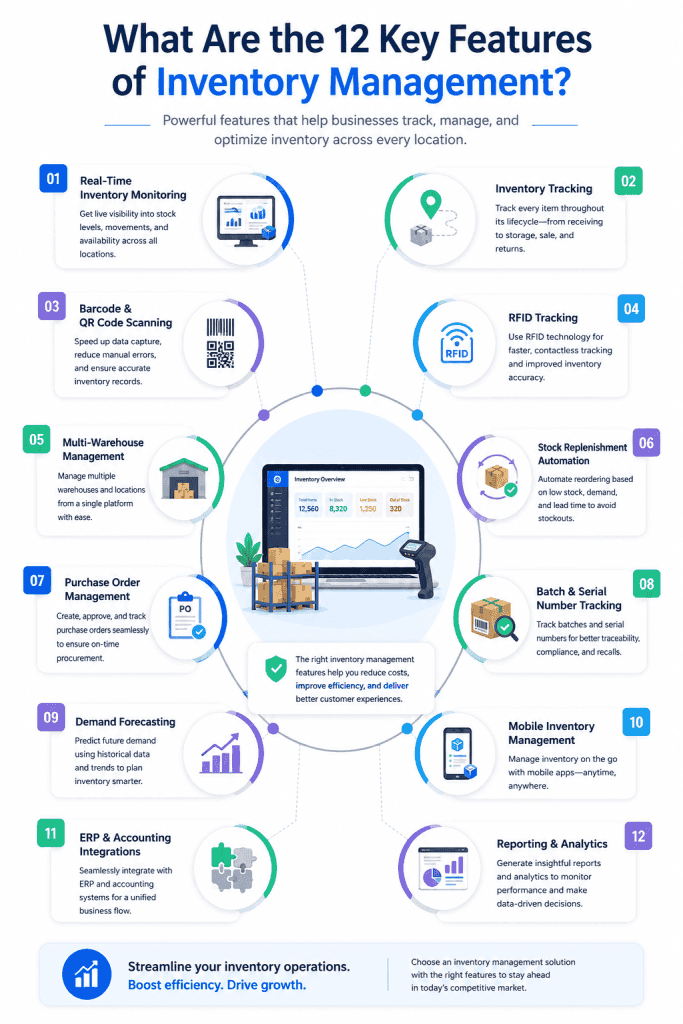
Feature lists can become long very quickly, so evaluation should begin with the points where inventory records change. The strongest capabilities are those that capture movement accurately, reduce manual reconciliation, and provide useful information for the next operating decision.
Real-Time Inventory Monitoring
Real-time monitoring updates stock information as receiving, sales, transfers, returns, issues, and adjustments are recorded. Managers can see current quantities by item and location throughout the day.
The value depends on transaction discipline. A live dashboard cannot correct movements that were never recorded, so the process around scanning, approvals, and exception handling remains central.
Inventory Tracking
Inventory tracking records where an item is, how much is available, and how its status changes through movement or use. Tracking may rely on item codes, location identifiers, serial numbers, batch data, tags, or connected devices depending on the inventory type.
A dependable history helps teams investigate discrepancies and understand how an item moved from receipt to its current location or final issue. That history also supports audits and root-cause analysis when physical counts differ from system quantities.
Barcode & QR Code Scanning
Barcodes and QR codes give teams a fast way to identify items during receiving, storage, transfer, counting, and dispatch. GS1 barcodes are widely used for machine-readable identification, while QR codes can carry or reference additional data when the process needs it.
In an IT asset context, barcode asset tracking can also connect a physical scan with an asset record. The wider inventory principle is the same. Scanning reduces reliance on manual item lookup and records activity closer to the physical event.
RFID Tracking
RFID tracking uses radio-frequency tags and readers to identify tagged items without the same line-of-sight requirement as conventional barcode scanning. It can support faster counts or movement detection where the inventory environment and economics justify the hardware.
Tag cost, reader placement, interference, item materials, read range, and process design all influence the result. RFID should therefore be chosen around a clear operational use and an economic case that justifies the higher degree of automation.
Multi-Warehouse Management
Multi-warehouse management gives organizations a shared view of inventory held in different facilities while preserving location-level quantities. Users can compare stock, transfer goods between sites, and plan replenishment with visibility into what other locations already hold.
This becomes valuable when one warehouse faces a shortage while another carries excess stock. A transfer may solve the problem faster and at lower cost than a new purchase, provided lead times and transport costs support the decision.
Stock Replenishment Automation
Replenishment automation uses rules such as reorder points, minimum stock levels, lead times, or forecast demand to identify when inventory needs attention. Depending on the process, the system can generate alerts, purchase suggestions, or internal transfer requests.
Automation should reflect how the business actually buys and consumes stock. Static reorder rules can create poor results when demand, supplier lead time, order quantity, or seasonality changes.
Purchase Order Management
Purchase order management connects planned replenishment with supplier orders and expected receipts. Inventory teams can compare what was requested, what has arrived, and what remains outstanding.
When purchasing and receiving records are linked, discrepancies become easier to investigate. Partial deliveries, quantity differences, damaged goods, and late receipts can be recorded against the original order, keeping resolution in the same transaction history.
Batch & Serial Number Tracking
Batch tracking groups inventory produced or received under a common lot, while serial tracking identifies individual units. These identifiers can support traceability, warranty work, returns, recalls, and item-level history.
The right level of detail depends on the inventory. Tracking every low-value consumable by serial number would add unnecessary work, while high-value equipment or regulated items may require individual records from receipt through disposal.
Demand Forecasting
Demand forecasting uses historical consumption, sales, seasonality, known events, and business expectations to estimate future inventory needs. It gives purchasing teams a forward view based on expected requirements and current stock.
Forecasts should be reviewed against changes that historical data may miss, such as a new customer, discontinued product, supplier disruption, campaign, or policy change. Human judgment remains part of the planning cycle.
Mobile Inventory Management
Mobile access brings inventory tasks to the warehouse floor, store, site, or field location. Staff can record receipts, scans, counts, transfers, and issues where the physical activity occurs.
This reduces the delay between movement and system entry. Device security, user permissions, offline operation, scanning support, and screen design should be reviewed when mobile work is a major part of the inventory process.
ERP & Accounting Integrations
Inventory rarely operates as an isolated process. ERP and accounting integrations can connect purchasing, receipts, inventory value, sales, supplier records, and financial transactions so teams avoid maintaining the same data in several systems.
Integration design should define which system owns each data field and how conflicts are resolved. A connection that synchronizes bad data faster simply spreads the problem.
Reporting & Analytics
Reporting turns inventory transactions into operational and financial insight. Teams can examine current stock, aging inventory, turnover, stockouts, order fulfillment, inventory value, and location-level differences.
Useful analytics should lead to a decision. A report that identifies slow-moving stock should lead to transfer, promotion, purchasing, or disposal action. Otherwise it becomes another dashboard that receives little attention.
How an Inventory Monitoring System Works
An inventory monitoring system follows stock through a sequence of business events. Each event updates the record and creates the basis for the next step.
Inventory Receiving
Receiving starts when goods arrive and are checked against a purchase order, transfer, return, or other expected transaction. Quantities, condition, item identifiers, batch details, and storage destination may be recorded at this point.
Accurate receiving matters because every later stock decision depends on the opening record. Errors introduced here can appear later as unexplained shortages, overages, or supplier disputes.
Stock Storage
Once received, inventory is assigned to a warehouse, room, rack, bin, shelf, store, or other location. The system records where quantities are held so staff can retrieve items and managers can see how stock is distributed.
Location discipline becomes increasingly important as item counts rise. Naming conventions and controlled movement rules reduce the chance that physical stock becomes separated from its digital location record.
Inventory Tracking
As items move, the system updates quantity, location, status, batch, or serial information. This creates a transaction trail from the original receipt through internal movement and eventual issue, sale, return, or disposal.
Exceptions need their own record as well. Damaged stock, quarantined goods, missing items, and adjustments should remain distinguishable from inventory that is available for normal use.
Inventory Movement
Movement covers transfers between bins, warehouses, stores, departments, production stages, or users. Each transfer should record the source, destination, quantity, time, and responsible user.
This becomes a control point when stock changes custody. A digital transfer record reduces ambiguity over which location or team became responsible after the item left its previous position.
Stock Replenishment
The system compares available inventory with replenishment rules, expected demand, open orders, and lead times. When stock reaches a defined threshold, it can trigger a review or purchasing action.
Replenishment should account for inventory already on order or in transit. Ignoring incoming supply can produce duplicate purchases and excess stock.
Reporting & Auditing
Reports bring together stock balances, transaction history, adjustments, aging, value, and location data. Audits compare those records with physical inventory and investigate differences.
For IT equipment, asset audits can extend this control by confirming the identity, location, ownership, and status of individual technology assets. The same principle applies to inventory generally. Records gain value when they are tested against what is physically present.
Benefits of an Inventory Management System
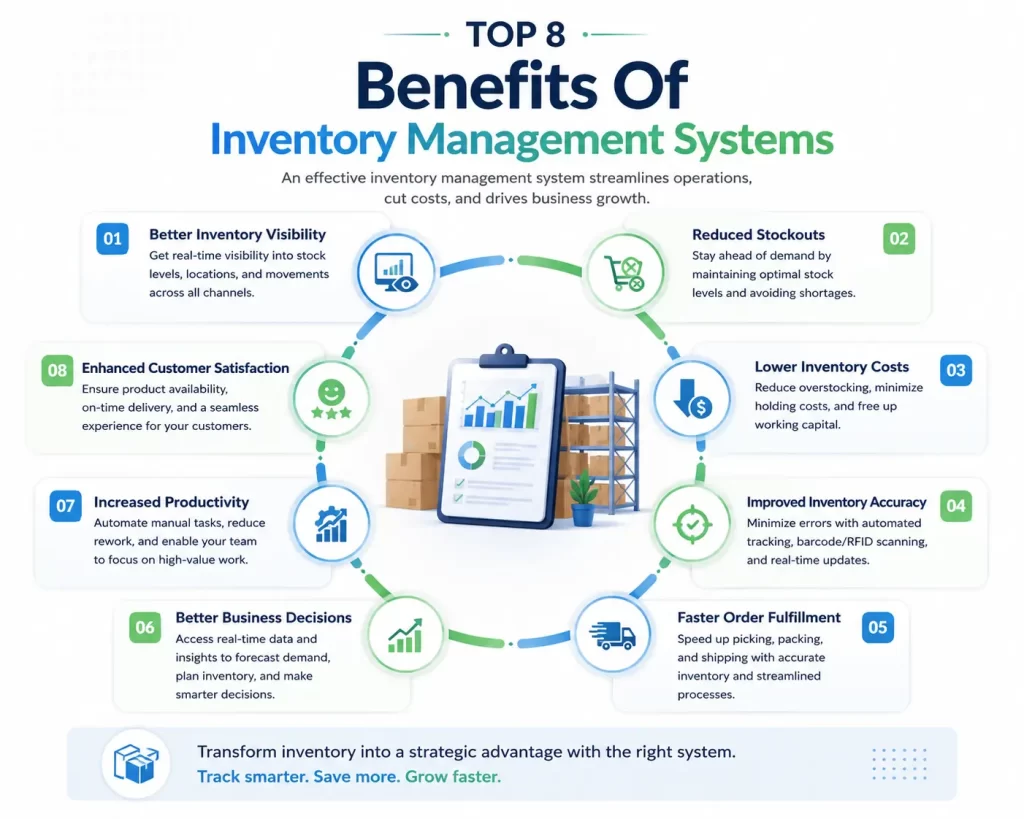
Inventory software creates value when better information changes daily decisions. The impact usually appears in availability, cost, accuracy, fulfillment, planning, productivity, and customer service.
Better Inventory Visibility
A shared system gives authorized teams a current view of what is available and where it is held. Purchasing can see stock before ordering, fulfillment can see availability before committing an item, and managers can compare inventory between locations.
That visibility also makes exceptions easier to identify. Slow-moving items, aging stock, unexplained adjustments, and location imbalances become easier to investigate when transaction history is connected to current balances.
Reduced Stockouts
Stockouts often begin earlier than the moment an item reaches zero. Demand may rise, a supplier may slip, an internal transfer may take longer than expected, or an open order may remain unresolved.
Inventory systems give teams earlier warning through current balances, replenishment rules, outstanding purchase orders, and demand information. That gives purchasing or operations time to respond before the shortage reaches a customer or production line.
Lower Inventory Costs
Inventory carries purchasing, storage, handling, insurance, obsolescence, and financing costs. Better stock information can help a business avoid buying items it already has and reduce quantities that remain unused for long periods.
Cost control also comes from reallocating stock between locations, reviewing slow-moving inventory, and setting replenishment levels that reflect actual consumption patterns.
Improved Inventory Accuracy
Accuracy improves when transactions are captured consistently and reconciled with physical counts. Scanning, controlled workflows, user accountability, and regular audits reduce the number of movements that depend on memory or later manual entry.
Higher accuracy improves downstream decisions as well. Purchasing, sales, finance, warehouse staff, and managers can work from the same quantities, eliminating local estimates.
Faster Order Fulfillment
Fulfillment slows when staff need to search for stock, confirm quantities manually, or resolve location errors before picking can begin. Current location and availability data reduces those interruptions.
Warehouse workflows can also sequence receiving, picking, packing, and dispatch tasks around confirmed inventory. The result is a shorter path from order release to shipment.
Better Business Decisions
Inventory data gives managers evidence for purchasing, supplier reviews, warehouse planning, assortment decisions, working-capital discussions, and stock rationalization. Trends in turnover, aging, shortages, and carrying cost reveal where operational choices are creating avoidable expense.
The value comes from combining current balances with history. A single stock figure says what exists now, while movement data explains how the business reached that position.
Increased Productivity
Employees lose time when they search warehouses, compare spreadsheets, re-enter data, or ask other departments to confirm quantities. A shared inventory record removes much of that administrative work.
Automation can also take over repetitive alerts, reorder checks, data synchronization, and routine reporting. Staff can then spend their time resolving exceptions and making decisions that require judgment.
Enhanced Customer Satisfaction
Customer commitments become easier to manage when sales and service teams can rely on current availability. Accurate stock information reduces the risk of promising items that cannot be fulfilled on time.
Better replenishment and fulfillment also help the business meet expected delivery dates consistently. Inventory management therefore affects the customer experience even when the customer never interacts with the inventory system itself.
Common Use Cases of Inventory Management Software
The same inventory principles appear in different forms depending on what is being stored, how quickly it moves, and what information must follow each item.
Retail Inventory Management
Retailers use inventory systems to track stock by store, warehouse, channel, and item. Sales reduce available quantities, replenishment restores them, and transfers can rebalance stock between locations when demand differs.
Manufacturing Inventory
Manufacturers manage raw materials, components, work-in-progress, spare parts, and finished goods. Inventory records need to connect material availability with purchasing and production so shortages are identified before they interrupt planned work.
Warehouse Management
Warehouses depend on location accuracy and transaction speed. Receiving, put-away, internal movement, picking, packing, cycle counting, and dispatch each create inventory events that need to update the same stock record.
Healthcare Inventory
Healthcare inventory can include medicines, consumables, devices, and supplies that require careful quantity and batch control. Expiry information, lot history, storage location, and issue records can be central to day-to-day management.
Logistics & Distribution
Distribution operations track goods as they enter facilities, move through storage, transfer between sites, and leave for customers. Inventory data supports allocation and order fulfillment while shipment systems manage transport activity.
E-commerce Inventory
E-commerce businesses need inventory quantities to remain synchronized with online orders and fulfillment locations. A delay between sale and stock update can create overselling, while weak returns processing can leave usable goods outside available inventory.
IT Asset Inventory
An IT asset inventory tracks technology such as laptops, desktops, servers, network equipment, peripherals, and related hardware. The record usually goes further than quantity by capturing assignment, location, status, warranty, lifecycle, and ownership data.
Automated asset discovery can supplement physical inventory methods by identifying technology connected to the IT environment. This use case has different lifecycle requirements from retail or warehouse stock, but it still depends on current inventory records and controlled updates.
Inventory Management System vs Manual Inventory Tracking
Key Differences
Manual inventory relies on people to update spreadsheets, paper records, or disconnected files after stock activity occurs. A software-based system records transactions in a central database and can connect scanning, purchasing, warehouse activity, sales, and reporting.
| Area | Manual tracking | Inventory management system |
|---|---|---|
| Updates | Entered by users in separate records | Recorded in a shared system as transactions occur |
| Location data | Often maintained by local teams | Tracked by defined warehouse or site locations |
| Reconciliation | Requires file comparison and physical checks | Uses transaction history plus physical counts |
| Alerts | Depends on manual review | Can flag thresholds, shortages, or exceptions |
| Reporting | Built through spreadsheet consolidation | Generated from current inventory records |
Benefits of Automation
Automation is most useful where the business repeats the same inventory decision frequently. Examples include low-stock alerts, reorder reviews, purchase suggestions, data synchronization, recurring reports, and scan-based transaction entry.
The gain comes from reducing delay and inconsistency in routine work. Exception handling should remain visible so users can review unusual transactions before rules process data that needs human attention.
When to Upgrade Your Inventory Process
A business usually reaches the point for an upgrade when the effort required to maintain inventory records begins interfering with the work those records are meant to support.
- Teams spend recurring time reconciling several spreadsheets
- Physical counts regularly differ from recorded quantities
- Stockouts occur while usable inventory exists elsewhere
- Purchase decisions are made without current location-level inventory
- Returns, transfers, or damaged stock frequently remain unresolved in records
- Reporting depends on manual consolidation before managers can use the data
How to Choose the Right Inventory Management Software
Selection should begin with the inventory process. Map where inventory enters, moves, changes status, and leaves the business, then identify which steps create the greatest risk of error, delay, or duplicate work. Use the software demonstration to test those requirements.
Identify Business Requirements
Define the inventory types, user groups, locations, transaction volumes, approval needs, and reporting requirements the system must support. Include expected growth so the evaluation reflects where the operation is heading as well as today’s workload.
Requirements should also separate mandatory operating needs from preferences. This prevents attractive secondary features from distracting the evaluation from receiving, tracking, replenishment, fulfillment, and audit controls.
Evaluate Inventory Tracking Features
Check how the system identifies items, records location, captures movement, handles batch or serial data, and maintains transaction history. The method should match the physical process, including scanners, mobile devices, tags, or manual entry where needed.
Test common exceptions during evaluation. Returns, partial receipts, damaged stock, stock transfers, adjustments, and missing items reveal how well the system handles real operational work.
Review Automation Capabilities
Review which repetitive decisions can be driven by rules and which still require approval. Replenishment alerts, reorder suggestions, synchronization, recurring reports, and workflow notifications are common candidates.
Automation should remain transparent. Users need to see what triggered an action, which data was used, and what happens when a transaction falls outside the normal rule.
Assess Integration Options
List the systems that exchange inventory information, such as ERP, accounting, purchasing, e-commerce, warehouse, sales, or service platforms. Then confirm which connections are available and how often data is synchronized.
Ownership of shared fields should be decided before implementation. Item codes, supplier data, prices, quantities, locations, and financial values can create conflicts when several systems attempt to control the same information.
Consider Scalability
Scalability includes transaction volume, number of users, locations, item records, integrations, reports, and data history. A platform that performs well for one warehouse may face different demands when the business adds branches, fulfillment sites, or new sales channels.
Ask how the system handles growth in both data and operational complexity. This gives the organization a clearer view of future administration and infrastructure needs.
Compare Pricing
Pricing should be reviewed against the full operating model. Subscription fees, user licenses, implementation, integrations, scanning hardware, support, training, data migration, and upgrades can all affect total cost.
Compare commercial models using the same expected usage assumptions. A low entry price can become expensive if routine capabilities require paid add-ons or higher tiers.
Evaluate Vendor Support
Support matters during implementation and after the system becomes part of daily operations. Review support hours, response channels, escalation paths, implementation assistance, documentation, training, and the process for resolving product issues.
The evaluation should also consider who owns configuration and administration after launch. A system that depends heavily on external help for routine changes may create an operating burden over time.
Best Practices for Inventory Management
Automate Inventory Tracking
Use scanning, integrations, mobile entry, or system-generated transactions where they reduce manual re-entry. Automation should capture stock activity close to the point where the physical movement occurs.
Conduct Regular Inventory Audits
Physical counts confirm that system records still match the inventory on hand. Cycle counts can test selected items throughout the year, while full counts provide a wider reconciliation at defined intervals.
Standardize Inventory Processes
Use common rules for receiving, location naming, transfers, adjustments, returns, damaged goods, and disposal. Consistent transaction methods reduce variation between teams and make discrepancies easier to investigate.
Optimize Reorder Levels
Reorder points should reflect demand, supplier lead time, safety stock, order quantity, and service expectations. Review them when consumption or supply conditions change and update the settings accordingly.
Monitor Inventory KPIs
Track a focused set of measures that connect to business decisions. Turnover, accuracy, stockout rate, fulfillment rate, carrying cost, and inventory value can reveal problems in purchasing, storage, availability, and working capital.
Forecast Inventory Demand
Use historical movement as one input, then adjust forecasts for known changes in sales, production, seasonality, promotions, supplier conditions, or product plans. Forecasting works best as a recurring management process with regular recalibration.
Train Employees
Inventory accuracy depends on the people who receive, move, count, pick, and adjust stock. Training should cover the reason behind each transaction as well as the steps in the software so users understand how local actions affect the wider inventory record.
Common Inventory Management Challenges
Overstocking
Overstocking locks cash into inventory that may move slowly, become obsolete, expire, or require extra storage. It can result from optimistic forecasts, bulk purchasing, duplicate orders, weak visibility between locations, or reorder settings that no longer match demand.
Stockouts
Stockouts occur when usable inventory cannot meet demand at the required time or location. Causes can include forecasting errors, supplier delays, unrecorded consumption, poor replenishment settings, or stock held elsewhere that cannot be reallocated quickly.
Inventory Inaccuracy
Inventory becomes inaccurate when physical events and system records diverge. Missed scans, delayed entry, incorrect units, misplaced stock, duplicate item codes, and unresolved adjustments can all contribute.
Poor Demand Forecasting
Forecasts can fail when historical data is weak, demand is volatile, or the business treats past consumption as a fixed predictor of future needs. Forecast review should include known commercial and supply changes that historical patterns cannot capture.
Warehouse Inefficiencies
Poor location design, inconsistent put-away, long pick paths, unclear labeling, and frequent search time can slow warehouse activity even when system quantities are accurate. Inventory data and physical warehouse discipline need to support each other.
Data Synchronization Issues
Inventory may be updated by purchasing, warehouse, sales, e-commerce, ERP, and accounting systems. If those systems exchange data late or apply different item definitions, users can see conflicting quantities and status information.
AI in Inventory Management
AI is increasingly used to examine inventory data at a scale that becomes difficult to review manually. Its practical role is to identify patterns, forecast likely demand, recommend replenishment actions, and draw attention to exceptions that deserve human review.
AI-Powered Inventory Monitoring
AI-based monitoring can compare current inventory activity with historical patterns and flag unusual movement, unexpected stock changes, or items that are behaving differently from their normal cycle.
Treat the result as an operational signal that users review with transaction context. They still need to decide why the change occurred and what action makes sense.
Predictive Demand Forecasting
Predictive models can combine historical demand with seasonality and other available inputs to estimate future requirements. They are useful when the business has enough reliable data to detect patterns that simple averages may miss.
Forecast quality still depends on current business context. New products, unusual events, supplier constraints, or changes in customer demand may need manual adjustment.
Automated Stock Replenishment
AI can support replenishment by evaluating demand patterns, available stock, open orders, and lead times before recommending a purchase or transfer. This can make replenishment rules less dependent on static thresholds.
Governance remains important when recommendations affect working capital or service levels. Teams should define approval thresholds and review outcomes against actual demand.
Intelligent Inventory Optimization
Optimization models can examine trade-offs between availability, holding cost, order frequency, lead time, and inventory concentration. The goal is to help managers decide how much stock to hold and where it should be placed.
This is most useful when inventory decisions span many items and locations. Clear business constraints are needed so recommendations reflect service goals and operational realities.
IoT-Based Inventory Tracking
Connected sensors and tags can feed location, movement, environmental, or quantity data into inventory systems. This can reduce reliance on manual checks in storage areas or operating environments where inventory changes frequently.
The deployment case depends on the item value, environment, connectivity, device cost, and the type of information the business needs. IoT adds value when the data supports a real inventory decision.
Measuring Inventory Management Success
Inventory management should be assessed through a small set of measures that show how well stock is being controlled and used. Each metric answers a different question, so they are best read together.
| Metric | What it shows | Basic calculation |
|---|---|---|
| Inventory Turnover Ratio | How frequently inventory is sold or used during a period | Cost of goods sold divided by average inventory |
| Inventory Accuracy | How closely system quantities match physical counts | Correct records divided by records checked |
| Stockout Rate | How often demand cannot be fulfilled from available inventory | Stockout events divided by relevant demand events |
| Order Fulfillment Rate | How often orders are fulfilled as required | Orders fulfilled as required divided by total orders |
| Carrying Cost | The cost of holding inventory over time | Storage, capital, insurance, handling, obsolescence, and related holding costs |
| Inventory Value | The financial value of stock currently held | Quantity on hand multiplied by the chosen valuation basis |
Targets should reflect the business model. A spare-parts operation may accept lower turnover to protect service availability, while a fast-moving retail operation may place greater emphasis on turnover and stockout control.
Future Trends in Inventory Management
Future inventory systems are moving toward faster data capture, stronger prediction, and closer links between physical stock and its digital record. The central objective is to reduce the time between a physical change and a useful management response.
AI-Driven Inventory Management
AI is likely to become embedded in routine planning, exception review, purchasing recommendations, and inventory analysis. The stronger use cases will connect recommendations directly with transaction history and business rules so users can understand the basis for each suggestion.
IoT & Smart Warehouses
Smart warehouses combine connected devices, sensors, scanners, material-handling systems, and software to capture activity with less manual entry. Inventory records can update as goods move through receiving, storage, picking, and dispatch.
Autonomous Inventory Tracking
Autonomous tracking may use fixed sensors, mobile robots, drones, computer vision, or connected tags to count or locate inventory with limited human intervention. Adoption will depend on the physical environment, item characteristics, investment case, and required accuracy.
Predictive Analytics
Predictive analytics will extend from demand forecasting into stock risk, supplier delay, inventory aging, replenishment timing, and location planning. The value will come from identifying a likely issue early enough for operations to respond.
Digital Twin Technology
A digital twin can represent inventory locations, flows, constraints, and operating conditions in a virtual model. Businesses can use that model to test scenarios such as warehouse changes, demand spikes, or different replenishment rules before applying them to live operations.
The usefulness of a digital twin depends on the quality and freshness of the underlying inventory and operational data. A detailed virtual model adds little value if the physical environment has already changed.
Frequently Asked Questions
What is an inventory management system?
An inventory management system records stock quantities, locations, movements, receipts, issues, transfers, returns, adjustments, and replenishment activity in a shared system.
How does inventory management software work?
The software updates inventory records as transactions occur. Receiving increases stock, sales or issues reduce it, transfers change location, and adjustments correct differences. Reporting uses that transaction history to show current inventory and trends.
What are the key features of an inventory management system?
Common capabilities include real-time monitoring, tracking, barcode or QR scanning, RFID support, multi-warehouse control, replenishment, purchase orders, batch and serial tracking, forecasting, mobile access, integrations, and analytics.
What is an inventory monitoring system?
An inventory monitoring system tracks stock levels and inventory events so teams can see current availability, location, movement, and exceptions that require action.
What are the benefits of inventory management software?
Common benefits include stronger inventory visibility, fewer stockouts, lower holding costs, higher record accuracy, faster fulfillment, stronger decision support, higher staff productivity, and a better customer experience.
How do I choose the right inventory management software?
Start with business requirements, then evaluate tracking methods, automation, integrations, scalability, pricing, and vendor support against the way inventory actually moves through the organization.
Can inventory software manage multiple warehouses?
Yes. Multi-warehouse systems can maintain quantities by location, record transfers between sites, compare availability, and support replenishment decisions using stock held throughout the network.
Is cloud-based inventory management better than on-premise?
The better deployment model depends on hosting requirements, internal IT resources, integration needs, connectivity, security governance, cost, and the degree of infrastructure control the organization wants.