


What Is Network Topology?
Network topology describes how devices, connections, and data flows are arranged in a network. It is the blueprint of your network infrastructure.
- Physical topology refers to the actual layout of cables, switches, routers, and other hardware. It answers questions like: Where are the servers located? How are devices physically connected?
- Logical topology refers to how data moves through the network regardless of physical connections. It answers questions like: Which devices communicate with each other? What path does data take?
Both matter because they affect performance, scalability, and security. A well-designed topology ensures data reaches its destination quickly and reliably. A poor design creates bottlenecks, security gaps, and troubleshooting nightmares

Why Network Topology Matters for Modern Enterprises
- Downtime reduction starts with topology. Redundant paths and resilient designs keep networks running when individual components fail. For enterprises operating 24/7, every minute of downtime carries significant cost.
- Security segmentation depends on topology. Isolating sensitive systems from general traffic prevents lateral movement during breaches. Financial data, HR systems, and critical infrastructure should reside in separate network segments.
- Hybrid cloud readiness requires network topology that extends beyond physical premises. Modern networks connect on-premises data centers with cloud environments. Topology must account for these distributed resources.
- AI-driven observability works best with clear topology. Machine learning models need accurate dependency maps to detect anomalies and predict failures. Without understood topology, AIOps tools cannot provide meaningful insights.
Regional context
- Smart cities in the UAE and Saudi Arabia rely on sophisticated network topologies. Traffic systems, public safety networks, and utility monitoring require reliable, segmented designs that scale with urban growth.
- IT outsourcing hubs in India host networks for global clients. Topology decisions directly impact service delivery SLAs. Poor design affects client satisfaction and contract renewals.
- Growing fintech sectors in Indonesia and Malaysia demand secure, low-latency topologies. Financial transactions cannot tolerate delays or security gaps. Mesh and hybrid topologies provide the required reliability.
Types of Network Topology (with Diagrams and Comparison)
Bus topology
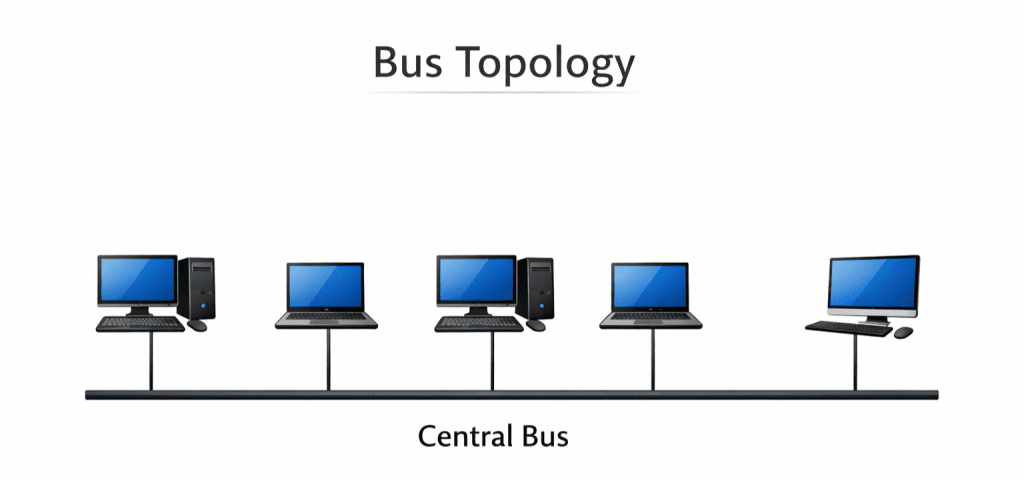
In bus topology, all devices connect to a single cable called the backbone. Terminators at both ends prevent signal reflection.
Pros:
- Simple to set up for small networks
- Requires less cable than other topologies
- Easy to extend by adding devices to the backbone
Cons:
- Entire network fails if the backbone cable breaks
- Performance degrades with many devices
- Troubleshooting is difficult because all devices share the same cable
Use cases: Bus topology is rarely used in modern enterprise networks. It may appear in small temporary networks or legacy installations. For most organizations, the single point of failure makes it unacceptable.
Star topology
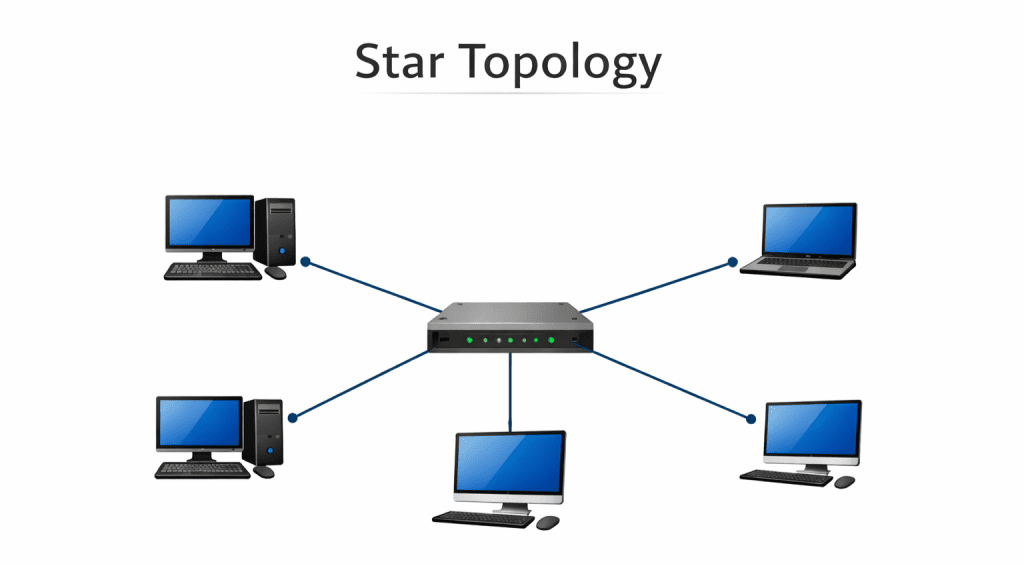
In star topology, all devices connect to a central hub or switch. The central device manages traffic between connected nodes.
Pros:
- Easy to install and manage
- Failure of one cable affects only that device
- Centralized troubleshooting
- Easy to add or remove devices without disrupting the network
Cons:
- Central hub is a single point of failure
- Requires more cable than bus topology
- Hub performance limits overall network speed
Use cases: Star topology is the most common design in enterprise networks. Office networks, school computer labs, and branch offices typically use star topology. It balances simplicity, cost, and reliability for most environments.
Ring topology
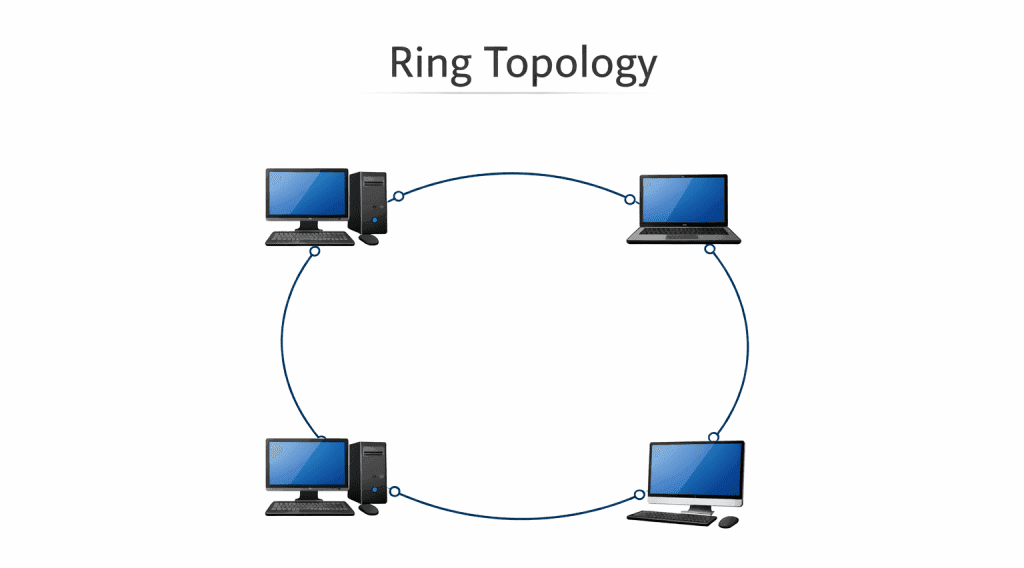
In ring topology, each device connects to two neighbors, forming a circular path for data. Data travels in one direction, passing through each device until it reaches its destination.
Pros:
- Predictable performance because each device gets equal access
- No collisions because data flows in one direction
- Handles high traffic loads well
Cons:
- Failure of one device can disrupt the entire ring
- Adding or removing devices requires network interruption
- Troubleshooting is complex
Use cases: Ring topology appears in some metropolitan area networks and legacy token ring installations. Modern enterprises rarely deploy pure ring topology, though some fiber optic networks use ring designs for redundancy.
Mesh topology
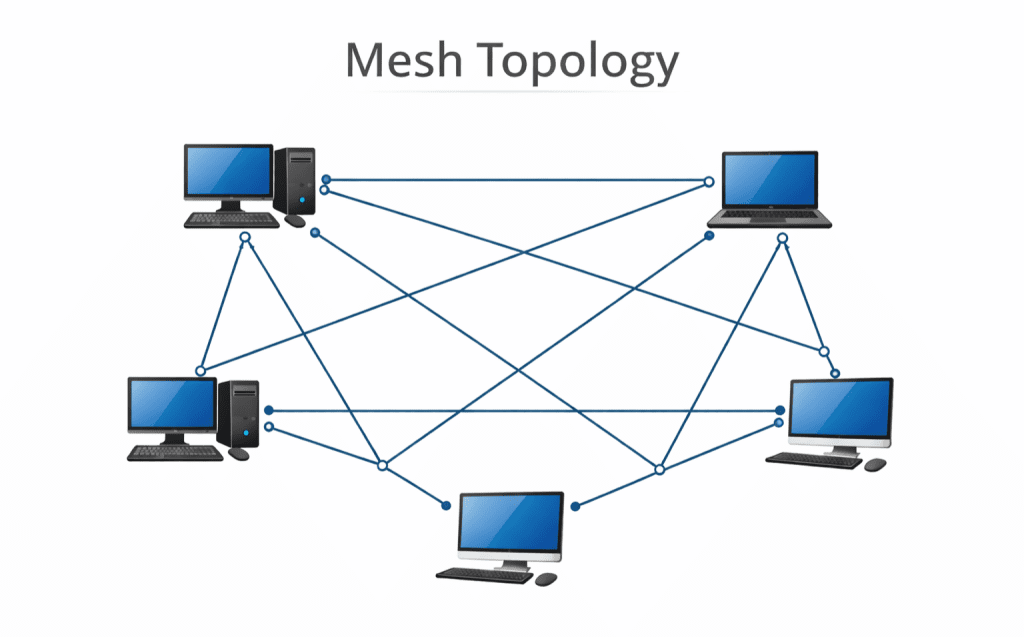
In mesh topology, devices connect to multiple other devices. Full mesh connects every device to every other device. Partial mesh connects devices selectively based on traffic patterns.
Pros:
- High redundancy with multiple data paths
- Excellent fault tolerance
- Optimal performance because traffic can use the best path
Cons:
- Very expensive due to extensive cabling
- Complex to configure and manage
- Difficult to scale
Use cases: Mesh topology is used where reliability is critical. Financial networks, military systems, and data center backbones often use partial mesh. Full mesh is typically limited to small, critical network segments due to cost.
Tree topology
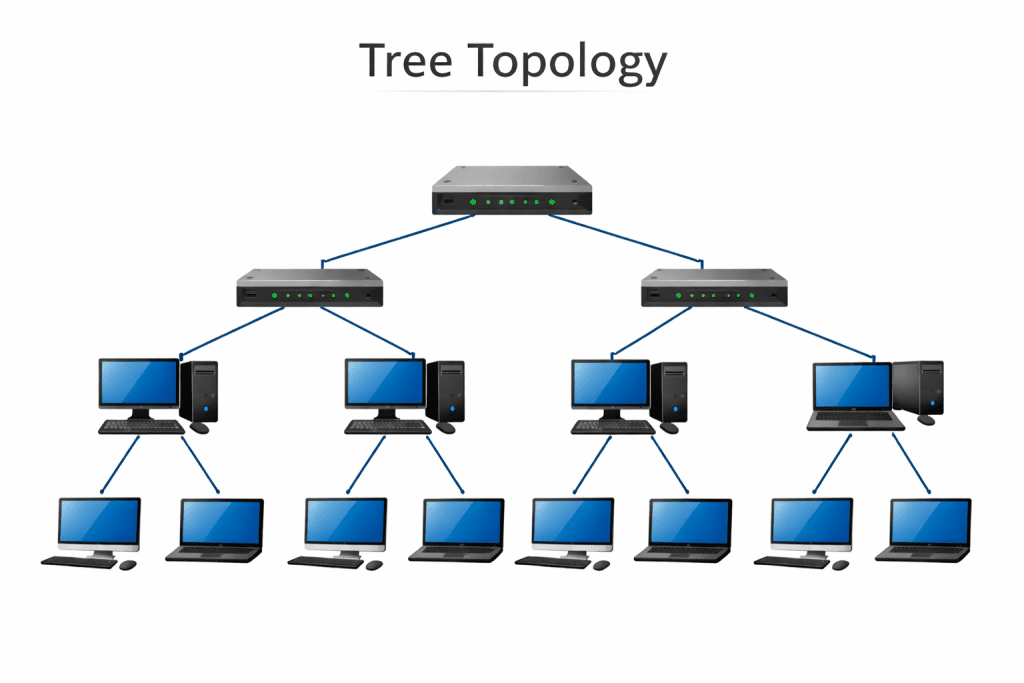
Tree topology combines multiple star networks connected to a central bus. It creates a hierarchical structure with root, branches, and leaves.
Pros:
- Scalable for large networks
- Easy to manage through segmentation
- Supports organized growth
Cons:
- Root node failure affects large portions of the network
- More cable required than bus or star
- Configuration complexity increases with size
Use cases: Tree topology is common in large campus networks, corporate headquarters, and university environments. It provides an organized structure for networks that must span multiple buildings or departments.
Hybrid topology
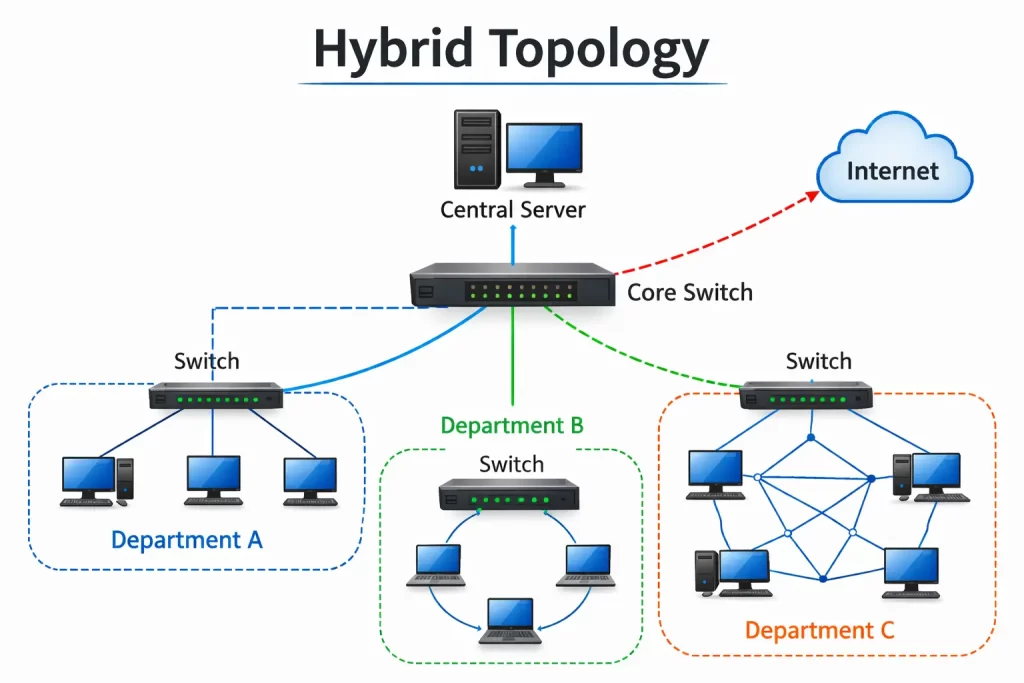
Hybrid network topology combines two or more different topologies. Organizations rarely use a single topology type. Most real-world networks are hybrid designs that mix star, mesh, and tree elements.
Pros:
- Flexible design tailored to specific needs
- Can optimize for cost, performance, and reliability
- Supports gradual evolution
Cons:
- Complex design and documentation
- Troubleshooting requires understanding multiple topology types
- Management tools must support hybrid environments
Use cases: Hybrid topology describes almost every enterprise network. A typical organization uses star topology in offices, mesh in data centers, and tree for campus connectivity.
Comparison Table: Network Topology Types
| Topology | Cost | Scalability | Fault Tolerance | Best For |
|---|---|---|---|---|
| Bus | Low | Poor | Low | Small temporary networks |
| Star | Medium | Good | Medium | Office networks, branch locations |
| Ring | Medium | Medium | Medium | Legacy systems, some MANs |
| Mesh | High | Poor | Very High | Critical infrastructure, data centers |
| Tree | Medium-High | Excellent | Medium | Campuses, large enterprises |
| Hybrid | Variable | Excellent | Variable | Most real-world networks |
How to Choose the Right Network Topology
- Company size drives network topology decisions. Small offices with 20 users can use simple star topology. Large enterprises with thousands of devices need tree or hybrid designs.
- Traffic volume determines capacity requirements. Video conferencing, large file transfers, and real-time applications demand higher bandwidth and lower latency. Mesh or partial mesh may be necessary for high-traffic segments.
- Security requirements influence segmentation choices. Regulated industries need topology that isolates sensitive data. Financial services, healthcare, and government agencies require careful network design.
- Budget constraints affect topology possibilities. Mesh provides excellent reliability but costs significantly more than star. Organizations must balance needs against available resources.
- Cloud adoption changes topology considerations. Networks must now connect on-premises resources to public cloud environments. Topology must account for these hybrid connections.
Common Network Topology Challenges
- Single point of failure exists in many network topologies. Star networks fail if the central switch fails. Bus networks fail if the backbone breaks. Identifying and mitigating these vulnerabilities is essential.
- Complex troubleshooting occurs when topology is poorly documented. When problems arise, teams waste time understanding how devices connect rather than fixing issues.
- High cabling cost affects mesh and partial mesh designs. Running cables between every device pair is expensive in materials and labor.
- Poor documentation creates long-term problems. Network diagrams become outdated as changes occur. New team members cannot understand the network they are responsible for.
- Lack of visibility prevents proactive management. Without real-time topology views, teams miss emerging issues until users report problems.
Regional challenges
- Multi-branch enterprises in India and Saudi Arabia must design topology that connects geographically dispersed locations. WAN links, VPNs, and SD-WAN add complexity to topology decisions.
- Cross-border latency in the UAE affects networks spanning Dubai, Abu Dhabi, and other emirates. Topology must account for physical distance and optimize traffic paths.
Best Network Topology Tools in 2026
Infraon provides auto-discovery and real-time network topology mapping. It supports hybrid environments and includes AI-powered detection for anomalies. Teams gain complete visibility without manual diagramming.
SolarWinds Network Topology Mapper automates network diagram creation. It discovers devices and maps connections, exporting to multiple formats for documentation.
Auvik offers cloud-based network monitoring with automatic network topology discovery. It maintains historical topology data for troubleshooting and compliance.
PRTG includes network mapping as part of its comprehensive monitoring platform. Sensors provide real-time visibility into device status and connections.
ManageEngine OpManager provides automated network mapping with Layer 2 and Layer 3 discovery. It includes visualization tools for physical and logical topology.
Key capabilities to look for include:
- Auto-discovery that finds all network devices without manual input
- Real-time mapping that updates as the network changes
- Hybrid support covering on-premises and cloud resources
- AI-powered detection that identifies anomalies and potential failures
Network Topology in Cloud and Hybrid Environments
- SD-WAN changes how topology works across distributed locations. Software-defined networking decouples topology from physical infrastructure, allowing dynamic path selection based on conditions.
- Micro-segmentation creates logical topology within physical networks. Workloads are isolated regardless of underlying hardware, improving security in cloud environments.
- Zero trust architecture assumes no device is trusted by default. Topology must support granular access controls and continuous verification.
- Kubernetes networking introduces new topology considerations. Containerized applications create dynamic, ephemeral connections that traditional topology tools struggle to map.
Real-World Use Cases by Industry
- BFSI uses mesh topology for critical transaction processing. Redundant paths ensure financial transactions are completed even during network failures. Additional segmentation isolates sensitive customer data.
- Telecom relies on hybrid topology combining mesh for core networks and star for access networks. Service providers must balance reliability with cost across massive infrastructure footprints.
- Government implements segmented topology with strict controls between classification levels. Physical and logical separation prevents unauthorized data movement between networks.
- IT services typically use star topology for offices and hybrid for client delivery. Managed service providers need visibility across multiple client environments with varying topology designs.
Network Topology Best Practices
- Document architecture thoroughly and keep diagrams updated. Use automated discovery tools to maintain accuracy as changes occur. Store documentation where all team members can access it.
- Monitor continuously with tools that provide real-time topology views. Alert on unexpected changes that could indicate configuration errors or security incidents.
- Avoid flat networks where all devices share the same broadcast domain. Segment by function, department, or security level to contain issues and improve performance.
- Segment critical assets into protected network areas. Place payment systems, sensitive databases, and industrial control systems in isolated segments with strict access controls.
- Simulate failure testing to validate redundancy. Regular drills ensure backup paths actually work when primary connections fail. Document lessons learned and adjust topology accordingly.
How Infraon Helps Visualize and Optimize Network Topology
Infraon NMS provides automatic topology mapping that discovers devices and connections across your entire infrastructure. No manual diagramming required. The network map updates in real time as devices are added, moved, or changed.
Hybrid network visibility extends from on-premises hardware to cloud resources. Teams see the complete picture regardless of where devices reside. This unified view simplifies troubleshooting and capacity planning.
Real-time alerts notify teams when topology changes occur unexpectedly. A new device appearing in a restricted segment triggers immediate investigation. A failed link generates alerts with impact analysis showing affected services.
Infraon NMS helps organizations implement topology best practices without adding overhead. Documentation happens automatically. Monitoring is continuous. Teams focus on optimizing rather than maintaining visibility.
FAQs About Network Topology
What is the most secure network topology?
No single topology guarantees security. Mesh provides redundancy that can aid security by maintaining connectivity during attacks. However, segmentation and access controls matter more than base topology. A well-segmented star network can be more secure than a flat mesh.
Which topology is best for enterprises?
Most enterprises use hybrid topology combining star for office connectivity, mesh for critical links, and tree for campus organization. The best topology matches specific business requirements rather than following a one-size-fits-all approach.
What is the difference between physical and logical topology?
Physical topology describes how devices are actually connected with cables and hardware. Logical topology describes how data flows between devices regardless of physical connections. They can be different. A network may be physically wired as a star but operate logically as a ring.
What is a network topology diagram?
A network topology diagram is a visual representation of device connections and data flows. It shows routers, switches, firewalls, servers, and endpoints with lines representing connections. Good diagrams include both physical and logical views.
What topology does cloud computing use?
Cloud providers use highly redundant mesh and hybrid topologies within their data centers. For customers, cloud networking appears as a logical topology that abstracts underlying physical complexity. Virtual networks, subnets, and peering connections define customer topology in the cloud.