


When IT leaders talk about service management, they tend to throw around terms like features, modules, and processes as if they are interchangeable. They are not. Features represent the specific capabilities within your ITSM platform that let you do particular things.
Think of them as the tools in your toolbox. Each feature serves a distinct purpose, whether that means logging a ticket, routing a request, or generating a performance report.
What Are ITSM Features? Why Do They Matter for Modern IT Teams?
The technology environment in 2026 is more distributed than ever. Your employees work from home offices, coffee shops, and co-working spaces. Your infrastructure spans multiple clouds and on-premises data centers. Your users expect instant responses, mobile access, and resolutions that happen without endless email chains. This reality places enormous demands on service desk teams.
The features you choose determine whether your IT team reacts to problems or prevents them. They decide if your agents spend their days copying and pasting information between systems or actually solving interesting technical challenges. They influence whether your end users feel supported or frustrated.
When your ITSM platform has the right features, your service desk becomes proactive. Incident patterns get spotted before they become major outages. Routine requests get fulfilled automatically. Complex changes get reviewed, approved, and implemented with minimal disruption. Your team stops fighting fires and starts improving the overall technology experience for the entire organization.
How ITSM features support ITIL best practices
ITIL provides the framework, but ITSM features provide the execution. Without proper features, even the well-documented ITIL processes remain theoretical.
- Incident management requires a system that captures, categorizes, and tracks incidents from detection through resolution.
- Problem management needs root cause analysis capabilities and a way to link problems to known errors and workarounds.
- Change management demands approval workflows, risk assessment tools, and automated scheduling.
Therefore, the features in your ITSM platform turn ITIL guidance into a daily operational reality. They enforce the discipline that keeps service management consistent and reliable.
ITSM Features vs. ITSM Modules: Understanding the Difference
| ITSM Features | ITSM Modules |
| Specific capabilities that perform discrete functions | Broader functional areas that contain multiple related features |
| Examples include ticket routing, SLA tracking, and knowledge article search | Examples include Service Desk, Asset Management, and Change Management |
| Features are the “what” you can do within the platform | Modules are the “where” those features are organized |
| Features can often be customized or configured independently | Modules represent logical groupings of features for specific service management disciplines |
What are ITSM features?
Features are the individual capabilities that let your team perform specific tasks. When you assign a ticket to a technician, that is a feature. When you set an SLA target and track whether you met it – that is a feature. When a user searches the knowledge base and finds a solution without creating a ticket, that is also a feature.
Features are granular. They represent the actual actions your team takes every day. The quality and depth of these features determine how efficiently your team works.
What are ITSM modules?
Modules are broader containers that group related features together. The service desk module includes incident management, request management, and the self-service portal. The asset management module contains asset discovery, inventory tracking, and lifecycle management features. Modules provide structure and organization, making it easier for administrators to configure and for agents to navigate.
How ITSM features and modules work together
Modules depend on features to deliver value. For instance, a change management module without approval workflows, risk assessment, and implementation scheduling features is just an empty shell. Conversely, features without the organizational structure of modules become chaotic and difficult to manage.
When evaluating ITSM platforms, you need to examine both levels. The list of modules tells you what functional areas the platform covers. The features within those modules reveal whether the platform actually does those things effectively.
15 Must-Have ITSM Features for Efficient Service Management
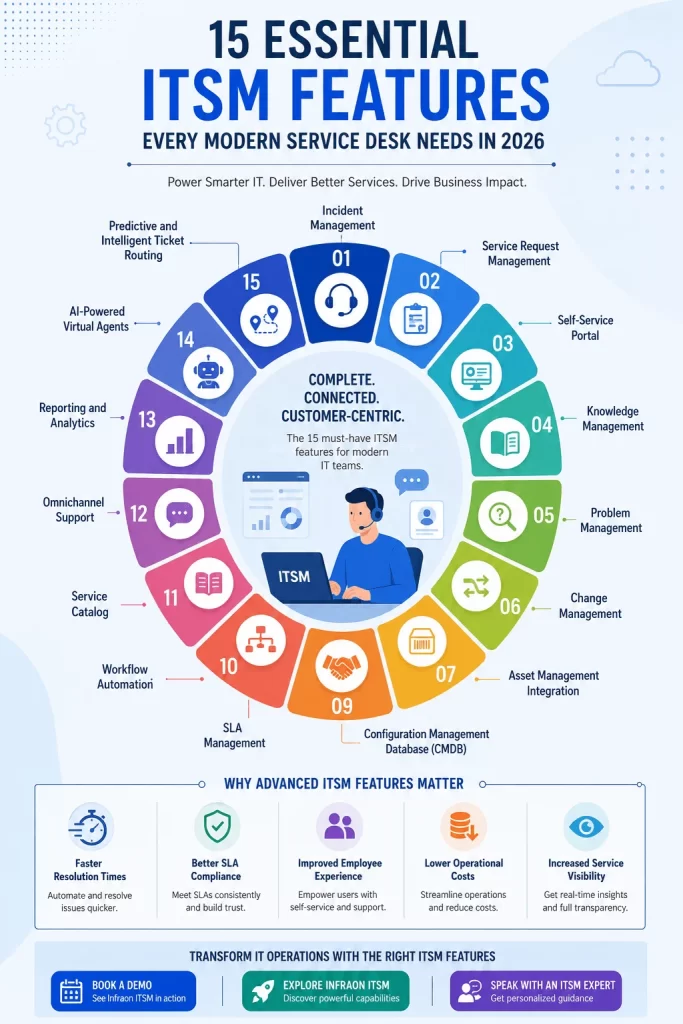
What Are The Must-Have ITSM Features?
- Incident Management
- Service Request Management
- Self-Service Portal
- Knowledge Management
- Problem Management
- Change Management
- Asset Management Integration
- Configuration Management Database (CMDB)
- SLA Management
- Workflow Automation
- Service Catalog
- Omnichannel Support
- Reporting and Analytics
- AI-Powered Virtual Agents
- Predictive and Intelligent Ticket Routing
1. Incident management
Incident management is the feature that keeps your business running when things go wrong. It captures every disruption, from a single user’s email problem to a network outage affecting hundreds of employees. The feature provides templates for quick logging, categorization to route tickets to the right team, and priority setting to ensure critical issues get immediate attention. Without robust incident management, your team has no visibility into what is broken or whether it is being fixed.
2. Service request management
Not every ticket is an incident. Employees routinely need new hardware, software access, or account changes. Service request management handles these routine asks with structured forms and automated fulfillment paths. The feature lets you define request types, build approval chains, and automate provisioning steps. When done right, service requests get fulfilled without agent intervention, freeing your team for more complex work.
3. Self-service portal
Your end users do not want to call the service desk for simple requests. They want to help themselves. The self-service portal gives them a single place to submit tickets, check status, and find answers. A good portal offers a clean interface, intuitive navigation, and mobile access. When users can resolve their own issues, ticket volume drops, and satisfaction rises.
4. Knowledge management
Knowledge management captures the collective expertise of your IT team and makes it available to everyone. This feature lets you create, organize, and publish knowledge articles. It integrates with the self-service portal so users can find solutions without creating tickets. It also suggests relevant articles to agents during ticket handling, accelerating resolution times. Organizations that invest in knowledge management reduce repeat incidents and enable faster onboarding of new agents.
5. Problem management
Incident management fixes symptoms. Problem management finds and eliminates root causes. This feature lets you group related incidents, investigate underlying issues, and document known errors. Problem management includes root cause analysis tools, workaround tracking, and a way to link problems to change requests. When you solve a problem once, you prevent countless future incidents.
6. Change management
Change management ensures that modifications to your IT environment happen with minimal risk. This feature provides structured workflows for submitting, reviewing, and approving changes. It includes risk assessment tools, scheduling capabilities, and post-implementation review tracking. Change management also integrates with your CMDB to show the impact of changes on other services and assets.
7. Asset management integration
Your service desk cannot support what it does not know about. Asset management integration brings hardware and software inventory into the service management workflow. When an incident occurs, the agent sees the user’s assigned devices and software licenses. When a change is planned, the system knows which assets will be affected. This integration eliminates guesswork and speeds resolution.
8. Configuration Management Database (CMDB)
The CMDB is the authoritative source of truth for your IT environment. It stores configuration items, their attributes, and their relationships. When an incident occurs, the CMDB shows which other services might be affected. When a change is proposed, it reveals downstream dependencies. The CMDB turns isolated incidents into an understanding of overall system health.
9. SLA management
Service level agreements define the promises your team makes to the business. SLA management tracks whether you are keeping those promises. This feature lets you set targets for response time, resolution time, and other metrics. It escalates tickets that are at risk of breaching targets. It also generates reports showing compliance rates. Without SLA management, you have no way to measure whether your service delivery meets expectations.
10. Workflow automation
Repetitive tasks consume an enormous amount of agent time. Workflow automation eliminates this waste. This feature lets you define rules that trigger automatic actions. When a high-priority incident is logged, automation can assign it to the appropriate team and send notifications. When a software request is approved, automation can provision the license and send the user instructions. The more workflows you automate, the more productive your team becomes.
11. Service catalog
The service catalog presents your IT offerings to the business in an organized, user-friendly way. It shows what services are available, who can request them, and what the associated costs and approval requirements are. The service catalog works hand in hand with request management, ensuring that users select the right service and provide the necessary information the first time.
12. Omnichannel support
Your users contact the service desk through many channels. Some prefer email. Others like chat. Some still call the phone. Some use Slack or Microsoft Teams. Omnichannel support brings all these channels together into a single interface. Your agents see the complete conversation history regardless of channel. Your users get consistent experiences whether they reach out by email or instant message.
13. Reporting and analytics
Data drives improvement. Reporting and analytics features give you visibility into every aspect of your service delivery. You can see ticket volumes by category, resolution times by team, and SLA compliance over time. You can identify bottlenecks, spot trends, and measure the impact of process changes. Good reporting transforms raw data into actionable intelligence.
14. AI-powered virtual agents
Virtual agents handle routine interactions without human involvement. These AI systems can answer common questions, reset passwords, and guide users through self-service options. They work around the clock, providing immediate responses when your agents are offline or busy. Virtual agents reduce ticket volume, lower response times, and free agents for more complex issues.
15. Predictive and intelligent ticket routing
Manual ticket assignment wastes time and creates delays. Predictive routing analyzes ticket content, user history, and agent expertise to automatically send each ticket to the right person. The system learns which agents have the skills to handle which types of issues. It also considers workload, ensuring that tickets get assigned to available agents. Intelligent routing gets tickets to the right place instantly, without any human intervention.
How ITSM Features Support Core ITSM Processes
Incident management process
The incident management process starts when a user reports a disruption. The self-service portal captures the initial information. Incident management features categorize and prioritize the ticket. SLA management sets expectations and tracks progress. Automated workflows route the ticket to the appropriate team. Knowledge management suggests potential solutions. If the incident recurs, problem management takes over to find the underlying cause.
Request fulfillment process
The request fulfillment process begins when a user selects an item from the service catalog. The request form collects all necessary information. Approval workflows route the request to the right managers. Automation provisions the requested resource. The user receives a notification when the request is complete. Throughout the process, the user can check the status through the self-service portal.
Problem management process
Problem management begins when multiple incidents point to a common root cause. The problem record consolidates information from related incidents. Agents investigate the issue, using CMDB data to understand dependencies. Workarounds get documented in the knowledge base. When a solution is found, a change request gets created to implement the fix. The entire process reduces future incidents and improves service stability.
Change enablement process
Change enablement starts when a need for change is identified. The change request captures the proposed modification, justification, and risk assessment. Approval workflows ensure proper oversight. Implementation schedules coordinate with affected stakeholders. The CMDB shows potential impacts on other services. Post-implementation review captures lessons learned. This process ensures that changes deliver their intended benefits without causing unexpected disruptions.
Knowledge management process
Knowledge management is ongoing. Agents create articles when they solve new problems. Users search the knowledge base when they encounter issues. Article feedback helps improve content quality. Outdated articles get retired. The knowledge base grows more valuable over time, reducing the need for agent intervention on routine issues.
Key ITSM Modules Every Organization Should Consider
Service desk module
The service desk module is where tickets live. It includes incident management, request management, and the self-service portal. This module is the daily workspace for your agents and the primary interface for your users. Every ITSM deployment needs a solid service desk module as its foundation.
Asset management module
Asset management tracks everything your IT team supports. This includes hardware devices, software licenses, and virtual resources. The asset management module handles discovery, inventory, and lifecycle tracking. It ensures that your team knows what is out there, who is using it, and when it needs to be replaced or renewed.
CMDB module
The CMDB module stores configuration items and their relationships. It shows how applications depend on servers, how networks connect sites, and how services rely on underlying infrastructure. A good CMDB module provides visualization tools, relationship mapping, and impact analysis capabilities.
Change management module
Change management provides structured workflows for IT modifications. This module handles change requests, risk assessments, approval processes, and implementation scheduling. It also includes change calendars to coordinate across teams and avoid conflicts.
Knowledge management module
Knowledge management captures, organizes, and publishes expertise. This module provides article authoring tools, categorization schemes, and search capabilities. It also includes analytics to measure article effectiveness and identify knowledge gaps.
Service catalog module
The service catalog presents IT offerings in an organized manner. This module lets you define services, request forms, and approval requirements. It also provides a user-friendly interface where employees can browse available services and submit requests.
How to Evaluate ITSM Tools Based on Features
Scalability
Your ITSM platform must grow with your organization. Look for features that support increasing ticket volumes, more users, and additional service offerings. The platform should handle performance under load and provide flexible licensing that aligns with your growth.
Automation capabilities
Automation separates modern ITSM platforms from basic help desk software. Evaluate the depth and flexibility of automation features. Can you define custom workflows? Can automation integrate with external systems? Does the platform provide a drag-and-drop interface for workflow design?
AI readiness
AI is transforming service management. Evaluate whether the platform supports AI features like virtual agents, predictive routing, and intelligent search. Also consider whether the platform will incorporate new AI capabilities over time.
Integration ecosystem
Your ITSM platform does not operate in isolation. It must integrate with monitoring tools, collaboration platforms, and business systems. Evaluate the available integrations and the ease of building custom integrations. A platform with a rich ecosystem saves time and reduces complexity.
Reporting and compliance
Data visibility is non-negotiable. Evaluate the reporting features for flexibility, depth, and ease of use. Can you build custom dashboards? Can you schedule automated report delivery? Does the platform support compliance requirements like audit trails and data retention?
User experience
Your agents and users will interact with the platform every day. Evaluate the interface for clarity, speed, and intuitiveness. A smartly-designed user experience reduces training time, increases adoption, and improves satisfaction.
ITSM Feature Checklist for Buyers
When evaluating ITSM vendors, use this checklist to ensure you cover all the bases.
Essential features
- Incident logging and tracking
- Service request fulfillment
- Self-service portal
- Knowledge base with search
- SLA target setting and monitoring
- Basic reporting and dashboards
- Email integration
- Ticket assignment and routing
Advanced features
- Workflow automation engine
- Service catalog with request forms
- Change management with approvals
- Problem management with root cause analysis
- Asset discovery and tracking
- Omnichannel support
- Mobile access
- Integration with collaboration tools
Enterprise features
- AI-powered virtual agents
- Predictive ticket routing
- Advanced analytics and predictive insights
- Multi-site and multi-tenant support
- Enterprise-grade security and compliance
- Extensive integration ecosystem
- Customizable reporting
- API access for custom development
Benefits of Choosing an ITSM Tool with Advanced Features
Faster resolution times
Automation eliminates manual steps. Knowledge management accelerates troubleshooting. Intelligent routing gets tickets to the right people instantly. These features combine to reduce the time from incident detection to resolution.
Better SLA compliance
SLA management provides visibility into performance against targets. Automated escalations prevent breaches. Reporting identifies areas where improvement is needed. With the right features, you can consistently meet or exceed your service level commitments.
Improved employee experience
Users want quick, easy interactions with IT. Self-service portals let them solve problems on their own schedule. Virtual agents provide instant responses to common questions. Omnichannel support lets them use their preferred communication method. A positive service experience increases employee satisfaction and productivity.
Lower operational costs
Automation reduces the need for manual work. Self-service decreases ticket volume. Knowledge management prevents repeat incidents. These efficiencies allow your team to handle more work with the same headcount. Over time, the cost savings from an advanced ITSM platform outweigh the investment.
Increased service visibility
Reporting and analytics reveal what is working and what is not. You can see which services generate the most tickets, which teams have the best resolution times, and where bottlenecks occur. This visibility supports data-driven decisions and continuous improvement.
Why Modern Enterprises Choose Infraon ITSM
Infraon ITSM delivers the features that modern service desks require. It combines comprehensive functionality with ease of use, making it accessible to organizations of all sizes.
Unified service management
Infraon ITSM brings together incident, request, change, and problem management in a single platform. Your team works in one interface, with consistent workflows and shared data. This unification eliminates silos and improves coordination across service management disciplines.
AI-powered automation
Infraon ITSM incorporates AI throughout the platform. Virtual agents handle routine interactions. Predictive routing sends tickets to the right agents. Intelligent analytics identify patterns and suggest improvements. These AI capabilities deliver tangible efficiency gains from day one.
Integrated asset and service management
Infraon ITSM connects asset management with service management. When incidents occur, agents see the relevant asset information. When changes are planned, the system shows potential impacts. This integration accelerates resolution and reduces risk.
Enterprise-grade reporting
Infraon ITSM provides comprehensive reporting and analytics. Pre-built dashboards give immediate visibility into performance. Custom reports support specific business requirements. Scheduled delivery ensures that stakeholders receive the information they need.
Frequently Asked Questions About ITSM Features
What are the most important ITSM features?
Incident management, service request management, and knowledge management form the foundation. Beyond these, SLA management, workflow automation, and the self-service portal deliver the most immediate value.
Which ITSM modules are essential?
Every organization needs the Service Desk module and Knowledge Management. Asset Management and Change Management are strongly recommended for most organizations. Additional modules depend on your specific requirements.
How do ITSM features improve service delivery?
Features automate routine tasks, provide visibility into performance, enable self-service, and ensure consistent processes. Each feature addresses a specific challenge, and together they transform service delivery.
What is the difference between ITSM tools and help desk software?
Help desk software handles basic ticket tracking. ITSM tools provide comprehensive service management capabilities, including change management, asset management, problem management, and automation. ITSM tools also support ITIL processes and provide enterprise-grade reporting.
Can small businesses benefit from ITSM software?
Small businesses need service management just as much as large enterprises. Many ITSM vendors offer scalable solutions that work for smaller teams. Cloud-based deployments reduce infrastructure requirements and make ITSM accessible to organizations of any size.
How does AI enhance ITSM processes?
AI automates routine interactions, predicts ticket routing, identifies patterns, and suggests improvements. These capabilities reduce manual work, speed resolution, and provide insights that would be difficult to obtain manually.
Transform IT Operations with the Right ITSM Features
The features you choose determine what your service desk can achieve. A platform with comprehensive features empowers your team to work efficiently, meet SLA targets, and deliver exceptional service. A platform with limited features creates bottlenecks, frustrates users, and leaves your team constantly fighting fires.
The 15 features outlined here represent the minimum standard for a modern service desk. Those who invest in these capabilities position themselves for operational excellence. Organizations that settle for less will struggle to keep pace.
After all, the right ITSM features are about enabling your people to do their best work.
Book a Demo to see Infraon ITSM in action.
Explore Infraon ITSM and discover how the right features can transform your service desk.
Speak with an ITSM Expert to discuss your specific requirements and challenges.