



ITSM implementation gives IT teams a practical way to turn scattered tickets, manual approvals, and informal service routines into one managed operating model. In many organizations, the service desk grows through urgency. New queues appear, approval rules live in email threads, and reporting depends on spreadsheet work.
That approach can carry a small team for a while, but it becomes fragile once users, assets, workflows, and vendors multiply. A planned ITSM rollout brings order to that growth through defined services, repeatable workflows, measurable SLAs, and a tool environment that connects people with process.
In this blog, we explain the key ITSM implementation steps, planning decisions, practices, common risks, and success metrics that help IT teams create a service desk that can scale with the business.
What is ITSM Implementation?
ITSM implementation is the process of putting IT service management practices, workflows, roles, SLAs, and tools into daily operation. It covers how incidents are logged, how requests are fulfilled, how changes are reviewed, how users receive updates, and how IT leaders measure service quality.
At a basic level, it turns service delivery from an informal helpdesk routine into an organized model. At an operational level, it connects process design, automation, monitoring, reporting, and user communication. The goal is simple. IT should know what work is coming in, who owns it, what priority it carries, and how quickly it must be completed.
Why ITSM Implementation Matters for Businesses
A service desk affects far more work than ticket handling. It affects employee productivity, software access, compliance evidence, asset control, vendor coordination, and customer experience. When service management runs through disconnected channels, IT teams spend too much time finding information before they can solve the actual issue.
- Cost control improves when repeat requests move through standard workflows instead of manual follow-ups.
- Service quality improves when SLAs, ownership, and escalation paths are visible to both IT and business teams.
- Operational control improves when incidents, requests, changes, assets, and reports draw from the same service management record.
ITSM implementation also creates a shared language between IT and the business. Finance can see service demand.
- HR can track onboarding requests
- Security can review access approvals
- Operations can plan change windows with less guesswork
What Are ITSM Implementation Steps?
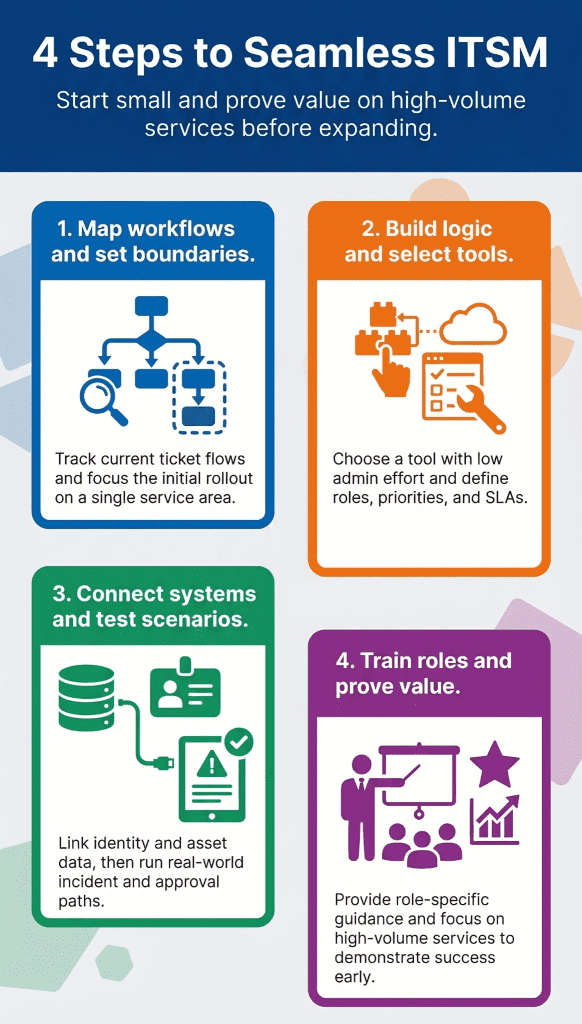
A good rollout follows a practical sequence. The order matters because tool setup alone leaves weak process design unresolved. Teams need to understand their current model, decide what has to change, and then configure the ITSM tool around real service needs.
- Assess current IT processes and map how tickets, requests, approvals, assets, and escalations move today.
- Define goals and scope so the first rollout has a controlled boundary, such as incident management, service requests, or change control.
- Choose the right ITSM tool by reviewing workflow depth, automation, integration, reporting, deployment model, and admin effort.
- Design workflows with roles, categories, priorities, SLAs, approval rules, and handoff points.
- Implement and integrate the tool with identity systems, email, monitoring, asset data, and business applications where needed.
- Test and improve workflows with real scenarios before broad launch.
- Train teams and launch with role-based guidance for agents, approvers, requesters, and service owners.
The main mistake is trying to digitize every old routine at once. A better path starts with high-volume services, proves value early, and then adds further processes once users and agents are comfortable.
What Is An Ideal ITSM Implementation Plan?
An ITSM implementation plan should connect business goals with operational work. It should define the rollout scope, ownership model, phase sequence, data needs, risk points, training approach, and success measures. The plan gives every stakeholder a shared view of what will change and how the team will manage that change.
Timeline planning
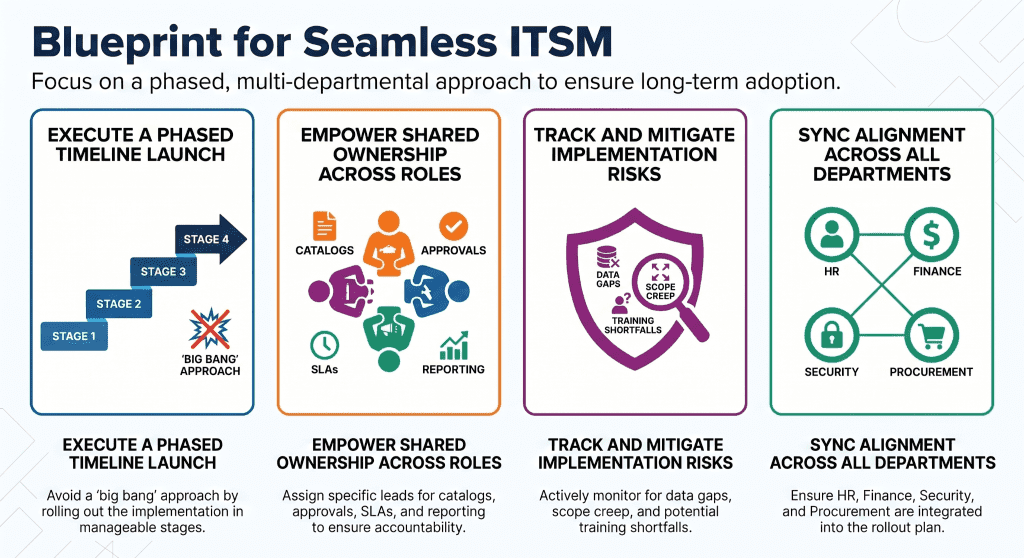
The timeline should follow readiness instead of ambition. A phased launch may begin with incident management and service requests, then add change management, asset integration, knowledge management, and advanced reporting. Each phase should have testing, agent training, requester communication, and post-launch review.
Resource allocation
A rollout needs process owners, tool admins, service desk leads, integration owners, trainers, and business stakeholders. Smaller teams can combine roles, but accountability still needs to be visible. A service request workflow, for example, needs someone to own the catalog item, approval rule, fulfillment group, SLA, and reporting view.
Risk management
Risk often comes from poor data, vague ownership, broad scope, and limited user training. The plan should list these risks early and assign owners. Change resistance also needs active handling through demos, short training sessions, and feedback loops after launch.
Stakeholder alignment
ITSM touches HR, finance, procurement, security, facilities, and business teams. Alignment means these teams agree on the service catalog, approval paths, service targets, and handoff rules before the launch. This prevents disputes after users begin submitting requests.
What Is An ITSM Tool Implementation Strategy?
The tool strategy should start with the service model, and then move into software evaluation. A tool can automate weak work, but confused ownership and poorly defined services still create issues. The right ITSM tool should make day-to-day work easier for agents and requesters while giving leaders reliable data for planning.
Tool selection criteria
Look at workflow configuration, service catalog depth, SLA handling, change management, knowledge management, asset linkage, dashboards, reporting, security controls, and admin effort. Also, review how easily non-technical users can submit requests and track progress.
Cloud and on-premises choice
Cloud-based ITSM can shorten setup and simplify upgrades. On-premises deployment may suit organizations with strict data residency, security, or network policies. Many enterprises evaluate both options based on governance, integration, internal capability, and regional compliance needs.
Integration with existing systems
ITSM gains value when it connects with monitoring tools, identity platforms, email, asset systems, endpoint data, and collaboration channels. These connections reduce manual updates and give agents a fuller view of the service environment.
Automation capabilities
Automation should handle repeatable work such as ticket routing, SLA alerts, approval reminders, request fulfillment steps, and incident escalation. Infraon can enter this discussion as a platform that brings automation, monitoring, and IT operations views into the same service management environment.
What is Service Request Management?
Definition
Service request management is the practice of handling routine user requests through defined workflows. In plain terms, it manages the everyday asks that come to IT, such as access to an application, a laptop request, software installation, password help, or information about a service.
In technical terms, service request management uses request catalogs, categories, approvals, fulfillment groups, SLAs, and closure rules to process low-risk, repeatable work. This separates routine demand from incidents, which involve a disruption or degradation in service.
Benefits of service request management
- Faster request handling through standard forms, assignment rules, and approval paths.
- A better user experience because employees know where to ask and how to track progress.
- Consistent workflows that reduce informal email-based handling and missed approvals.
Service request management process
The process begins when a user submits a request through a portal, email, chat, or service desk channel. The request is categorized, checked for required details, routed for approval when needed, fulfilled by the right team, and then closed after validation. A good process also captures timing, bottlenecks, and repeat request patterns for service improvement.
Types of service requests
- Access requests for applications, systems, VPN, shared folders, or role changes
- Information requests about policies, service availability, status, or documentation
- Service provisioning requests for onboarding, new accounts, licenses, or workspace setup
- Hardware and software requests for laptops, peripherals, installations, upgrades, or replacements
Best practices for service request management
- Use automation for routing, approvals, reminders, and fulfillment tasks
- Define SLAs by request type instead of using one target for every item
- Maintain a service catalog with plain-language request names, required fields, approval rules, and ownership
- Track performance through request volume, aging, SLA compliance, rejection rates, and user feedback
Common Challenges in ITSM Implementation
The common issues are rarely technical alone.
- Resistance to change appears when users lose familiar channels or agents feel the tool adds work
- Poor planning creates confusion around scope, owners, and launch timing
- Tool complexity slows adoption when administrators overconfigure workflows before teams understand the new process
- Data quality can also slow the rollout
- Old categories, duplicate services, stale approver lists, and missing asset records can create friction
The fix is disciplined scope control. Begin with a limited set of services, assign owners, test common scenarios, then expand with real usage data.
ITSM Implementation Best Practices
Start small and grow in phases. A focused first rollout helps teams learn the new operating model and avoids the pressure of launching every process at once. Align workflows with ITIL where it improves discipline, but keep the user journey simple.
- Create a service catalog that speaks the user language instead of internal IT terminology.
- Use SLAs that match business impact and team capacity.
- Train agents by role, then give requesters simple guidance through portal copy and short walkthroughs.
- Review dashboards after launch and adjust routing, approvals, categories, and article links based on actual demand.
Continuous improvement should be part of the rollout rhythm. Every month, review ticket trends, repeated requests, missed SLAs, aging queues, and feedback. These patterns show where the process needs adjustment.
Measuring ITSM Implementation Success
Success should be measured through service outcomes, agent workload, user experience, and leadership visibility. SLA compliance shows whether the team meets agreed-upon targets. Resolution time shows how quickly teams restore service or complete work. User satisfaction shows whether the process feels easy from the requester’s side.
| KPI | What it shows | How to use it |
| SLA compliance | Whether teams meet agreed service targets | Review by service type and priority |
| Resolution time | How quickly incidents and requests close | Compare by category, team, and channel |
| User satisfaction | How requesters rate the service journey | Use feedback to improve forms, communication, and routing |
These KPIs should be reviewed by service type. A password request, a new laptop request, and a change approval should each carry different expectations. Grouping them together hides bottlenecks and gives leaders a weak view of performance.
How Infraon Supports ITSM Implementation
Infraon ITSM can empower IT teams to bring automation, monitoring, and centralized operations into the ITSM rollout. Service teams can manage incidents, requests, approvals, SLAs, and operational signals through a connected environment instead of forcing agents to switch between separate systems.
For organizations moving from email queues and spreadsheets, this matters because implementation success depends on daily adoption. Agents need ticket context, requesters need simple channels, and IT leaders need reporting that reflects the real workload.
Infraon’s value is highest when teams want ITSM to connect with infrastructure visibility, asset data, workflow automation, and service desk operations.
Final Thoughts
ITSM implementation works when the process, tool, data, and people model move together. A careful rollout helps IT teams reduce manual work, improve service quality, control cost, and give the business a dependable route for requests, incidents, and changes.
Teams that begin with focused workflows, train users well, and measure the right KPIs can turn ITSM from a ticketing exercise into a service operating model.