



A Configuration Management Database gives IT teams a dependable record of the components that power business services. In many enterprises, that record is scattered across asset tools, spreadsheets, discovery scans, cloud consoles, network systems, and service desk records. The result is familiar to most IT leaders. Teams have data, but trust varies when an incident, audit, or change request arrives.
A modern CMDB solution connects configuration items, relationships, dependencies, and service context in one operating view. In this blog, we unravel what a CMDB is, why it matters in 2026, what commonly causes failure, which use cases create the most value, and how IT teams can choose CMDB tools that match their service management goals.
What is a CMDB?
CMDB meaning in plain English
A CMDB is a database that stores information about the technology components used to deliver IT services. These components are called configuration items, or CIs. A CI can be a server, laptop, router, application, virtual machine, database, cloud resource, business service, or a managed service item.
The main value of a CMDB comes from relationships. It should show how a server connects to an application, how that application connects to a business service, and which users or teams depend on that service. This makes the CMDB both an inventory and a service map.
Why CMDB exists in IT environments
IT teams use a CMDB because service decisions need reliable context. When an incident occurs, teams need to know which systems may be affected. When a change is planned, they need to know which services depend on the CI being changed. When an audit begins, they need evidence about ownership, configuration, and relationships.
Why CMDB Matters in 2026
Hybrid IT has made service context harder to manage. A single business service may depend on on-premises servers, cloud workloads, SaaS applications, network devices, databases, security tools, and third-party services. Each system can produce its own data, yet the service desk still needs one dependable view when users face disruption.
This is why the CMDB solutions have become a practical requirement for larger IT environments in Asia, the Middle East, and other fast-growing markets. Expansion across locations, outsourced service models, regional data rules, and cloud adoption all increase the need for accurate configuration records. A CMDB helps teams move from isolated asset records to service-aware operations.
Key Components of a CMDB
Configuration Items
Configuration items are the records tracked in the CMDB. Each CI should have useful attributes such as owner, location, status, version, business role, support group, vendor, warranty, environment, and service mapping. The goal is to record the data that helps IT make faster decisions.
Relationships and Dependencies
Relationships show how CIs connect. For example, a payroll application may depend on a database, a virtual machine, a storage volume, network access, identity integration, and a service owner. These links help IT teams assess impact during incidents and changes.
Data sources
A CMDB solution can receive data from discovery tools, IT asset management systems, cloud platforms, endpoint tools, monitoring systems, service desk records, and manual inputs. The best results come when data sources are selected based on trust level and ownership.
CMDB vs. ITAM vs. ITSM
CMDB, ITAM, and ITSM work together, but each one serves a different purpose. Confusion between them leads to weak ownership and poor data quality.
| Area | CMDB | ITAM | ITSM |
| Main purpose | Tracks CIs, relationships, dependencies, and service context | Tracks asset ownership, cost, lifecycle, warranty, and contracts | Manages incidents, requests, changes, problems, and service delivery |
| Primary users | Service desk, change teams, operations, compliance teams | Asset teams, procurement, finance, operations | Agents, service owners, IT leaders, requesters |
| Best use | Impact analysis, dependency mapping, service context | Asset control, license tracking, lifecycle planning | Service workflows, SLAs, user communication, reporting |
A CMDB database helps IT understand configuration and dependency. ITAM helps IT manage asset cost, ownership, contracts, and lifecycle. ITSM uses that information to handle incidents, requests, problems, changes, and service delivery.
Common CMDB Challenges
Most CMDB issues begin with trust. If teams doubt the data, they avoid using it. Once that happens, the CMDB becomes a static repository instead of an operational tool.
- Data inaccuracy appears when CI records are old, duplicated, incomplete, or owned by nobody
- Manual updates fail because teams rarely update records during urgent operational work
- Tool silos create separate truths across asset tools, monitoring systems, spreadsheets, and service desk platforms
- Integration issues prevent the CMDB from receiving data from cloud, endpoint, network, and service management systems
A second common issue is scope. Teams try to map every device, every attribute, and every relationship from day one. The better path is to begin with the CIs that matter most to incident, change, asset, and compliance work.
How a Modern CMDB Solves These Problems
Modern CMDB approaches use automation, discovery, real-time updates, and analytics to improve data health. Discovery tools can identify CIs and refresh attributes. Integrations can bring in ticket, asset, cloud, and monitoring data. Analytics can highlight missing fields, duplicate records, stale CIs, and relationship gaps.
AI and analytics also help teams find patterns that manual review can miss. For example, repeated incidents tied to the same application dependency may reveal a weak link.
A change failure may show missing dependency mapping. Over time, these signals help the CMDB become a working source for better decisions.
Real-World Use Cases of CMDB
Incident management
During an outage, a CMDB helps agents see affected services, related CIs, ownership, and dependency paths. This reduces the time spent searching for context and helps the right teams engage sooner.
Change management
Before a change is approved, teams can review related CIs, affected services, support groups, and dependency risks. This helps change advisory groups assess impact with better context.
Asset tracking
When CMDB and ITAM data work together, IT can connect ownership, lifecycle, warranty, location, and service dependency. This helps procurement, operations, and service desk teams work from the same record base.
Compliance
Regulated organizations in markets such as the UAE and Saudi Arabia often need evidence about ownership, service dependency, access paths, and change history. A CMDB can help produce that evidence when records are current and ownership is defined.
Best Practices for Implementing a CMDB
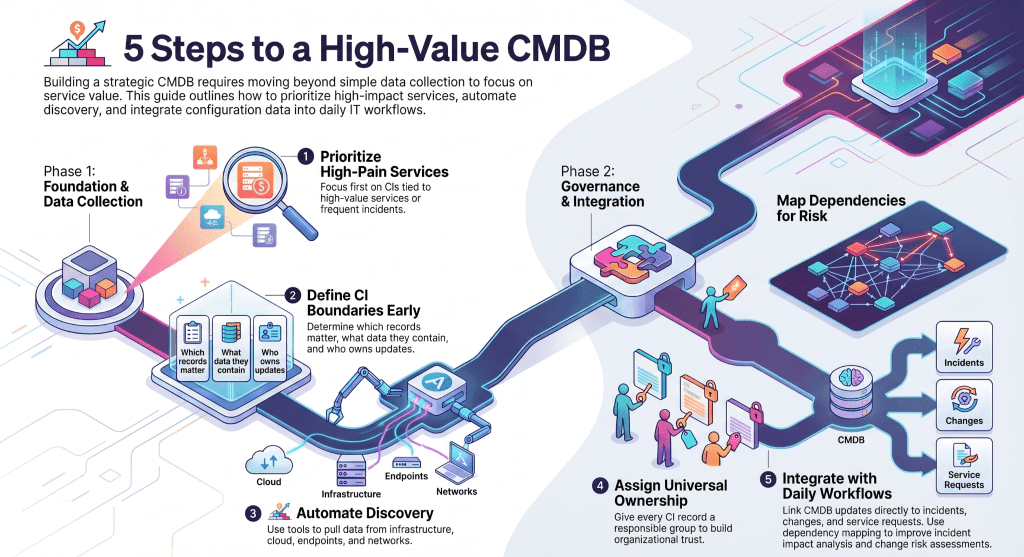
- Start small with CIs that support high-value services or frequent incidents
- Define CI scope so teams know which records matter and which attributes must be maintained
- Automate discovery for infrastructure, cloud, endpoint, and network data where possible
- Use ownership rules so every CI has a responsible team
- Keep updates continuous by linking CMDB work with incidents, changes, requests, and asset processes
A CMDB should grow through practical service value. If the first use case is incident impact analysis, focus on CIs and relationships that help incident teams. If the first use case is change risk, focus on dependency mapping and service ownership.
Best CMDB Tools in 2026
The best CMDB tool depends on the organization’s service model, infrastructure scale, integration needs, and ITSM maturity. The options below are common names in enterprise and mid-market conversations.
- Infraon works well for teams that want ITAM, CMDB, ITSM, discovery, and operations visibility in a connected platform
- ServiceNow is a major enterprise option for organizations with mature ITSM and ITOM practices
- Lansweeper is often considered for asset discovery and technology inventory, with CMDB use through connected workflows
- ManageEngine offers CMDB capabilities through its service management and asset management product ecosystem
Selection should focus on the operating model rather than brand recognition alone. Review discovery depth, relationship mapping, service desk integration, reporting, governance controls, deployment model, and admin effort.
How Infraon Helps You Create a Smarter CMDB
Infraon brings ITAM, CMDB, discovery, and ITSM work into a connected operating environment. This helps teams link assets, configuration records, incidents, service requests, changes, and monitoring context. For organizations that struggle with tool silos, this connection can reduce duplicate effort and improve trust in service data.
- Agents can view CI and asset context when handling tickets
- IT leaders can review service impact and operational data together
- Asset teams can connect lifecycle data with service dependency
- Change teams can review affected CIs before approval
Therefore, Infraon is an excellent option when teams want the CMDB to serve daily operations rather than remain a separate database.
When Do You Actually Need a CMDB?
A CMDB becomes useful when IT work depends on the service context that spreadsheets and asset lists lack. Small teams with simple infrastructure may begin with asset tracking and service desk records. As systems, locations, cloud services, and compliance requirements expand, the need for CI relationships grows.
- You need impact analysis before approving changes
- Incident teams spend too much time finding ownership and dependency data
- Asset records exist, but they lack service relationships
- Audits require evidence that is spread across too many systems
- Hybrid infrastructure has grown faster than the service management model
FAQs About CMDB
What is CMDB in ITIL?
In ITIL practice, a CMDB stores records about configuration items and their relationships. It helps service teams understand how technology components support services, which improves incident, change, asset, and service management decisions.
Is CMDB part of ITAM?
A CMDB and ITAM are related, but they handle different needs. ITAM focuses on asset ownership, cost, lifecycle, procurement, and contracts. A CMDB focuses on configuration, dependency, and service relationships.
How is CMDB different from asset inventory?
Asset inventory tells IT what exists. A CMDB tells IT how those items relate to services and each other. That relationship view is what makes the CMDB valuable for incident and change work.
Do small businesses need CMDB?
Small businesses may begin with asset inventory and service desk records. A CMDB becomes useful when dependency mapping, change risk, compliance, or hybrid infrastructure creates a need for deeper service context.
Final Thoughts
A CMDB is worth the effort when IT teams use it for real operational decisions. It should help agents solve incidents, help change teams assess risk, help asset teams maintain data, and help leaders understand service impact. Infraon can help teams simplify CMDB and IT asset management through connected discovery, service desk data, and operational visibility.