


An ITSM ticket system captures, tracks, manages, and resolves IT service requests. When an employee reports an issue, the system creates a digital ticket. Each ticket follows a clear workflow from creation to closure.
Unlike basic email or spreadsheet tracking, an ITSM ticketing tool applies rules automatically. It prioritizes urgent issues, assigns tickets to the right team, and escalates when response times slip. The tool maintains a complete history of every action taken.
Difference between IT ticketing vs. ITSM ticketing
A standard IT ticketing system logs requests. Someone submits a problem. Someone else fixes it. The ticket closes. That is the entire cycle.
An ITSM ticketing system deploys formal IT service management frameworks. It tracks incidents against service level agreements, links tickets to problem records for root cause analysis, and connects changes to assets. The system follows ITIL best practices. The difference lies in process depth and integration breadth.
Basic IT ticketing answers “what broke.” ITSM ticketing answers “what broke, who is affected, why it happened, and how to prevent recurrence.”
How an ITSM Ticket System Works
Ticket creation
Tickets enter through many channels. A user sends an email. Someone fills a web form. A chat triggers a ticket. An alert from monitoring software creates an incident. Even a voice call transcribed by AI becomes a ticket. The system captures every request without manual entry.
Ticket categorization and prioritization
Once created, the system classifies each ticket. The category identifies the issue type: hardware failure, software bug, access request, or service outage. Priority indicates urgency. If a single user can’t print, the system marks it as low priority. If the production database is offline, the system marks it as a critical priority.
Smart systems use machine learning to suggest categories and priorities. They learn from past tickets and reduce manual work for agents.
Assignment and escalation
The system routes each ticket to the appropriate team or individual. The network team handles network issues. The development team fixes application bugs. Level one support resets passwords.
If no one acknowledges a ticket in time, escalation starts. Level one support ignores a critical ticket for five minutes; the system escalates to level two. Ten minutes later, the system notifies the IT manager. Escalation chains keep tickets from falling through cracks.
Resolution and closure
The technician works the ticket, adds notes, communicates with the requester, and applies a fix. After resolution, the system asks the requester to confirm satisfaction; with confirmation, the ticket closes automatically.
Closed tickets feed the knowledge base. Future similar issues pull the resolution steps automatically. The system gets smarter with every closed ticket.
Real workflow example:
A sales director in Kuala Lumpur cannot access the customer relationship management system at 9 AM on a Monday.
Step one: The director clicks the help desk icon in her browser and submits a quick form. The form captures her name, the problem description, and a screenshot.
Step two: The ITSM ticket system recognizes keywords CRM, access denied, and sales. It categorizes the ticket as a software access issue. It sets priority to medium because sales directors affect revenue.
Step three: The system checks the skills-based routing table. CRM access issues belong to the applications team. The ticket lands in their queue. An automated acknowledgment message tells the director her ticket number and estimated response time.
Step four: The applications team member sees the ticket within two minutes. He checks the user permissions in the CRM system. He finds that the director’s license expired overnight. He renews the license.
Step five: The system sends the director a resolution notification. She confirms access is restored. The ticket closes. Total time from submission to closure is seven minutes. The entire process required zero phone calls, zero follow-up emails, and zero manual handoffs.
Key Features of ITSM Ticketing Tools

Automation and workflows
Automation rules handle repetitive decisions. A ticket about a printer automatically routes to the hardware team. A VIP user request automatically receives a priority boost. A ticket with the word emergency automatically pages the on-call engineer.
Workflow designers let you build multistep processes. A new employee onboarding request triggers hardware provisioning, account creation, and access approval in parallel. No one forgets a step.
SLA management
Service level agreements define promised response and resolution times. The ticketing system tracks every SLA commitment. It shows agents how much time remains before a breach. It alerts managers when tickets approach deadlines. It reports on compliance percentages for every team and customer.
Without SLA management, promises become guesses. With it, accountability becomes measurable.
Omnichannel support
Modern ticketing tools handle requests from any channel. Email, web portal, chat, SMS, phone, and even social media all feed into the same ticket queue. Agents work from a single interface. Requesters use whichever channel they prefer.
A user starts with chat, continues by email, and closes with a phone call. The ticket tracks the journey.
AI and self-service portals
Self-service portals let users find answers without submitting tickets. Knowledge bases contain articles written from resolved tickets. AI-powered search suggests relevant solutions as users type their problems.
When self-service works, ticket volumes drop by 30 to 50%. Users get instant answers. Agents focus on complex issues.
Reporting and analytics
Dashboards show real-time ticket status. Who is waiting? How long have tickets been open? Which teams are overloaded? Which issue types appear most frequently?
Historical reports reveal trends like monthly ticket volumes, average resolution time by category, and SLA breach patterns. Leaders use this data to optimize staffing, training, and tooling.
Benefits of Using an ITSM Ticket System
Faster resolution times
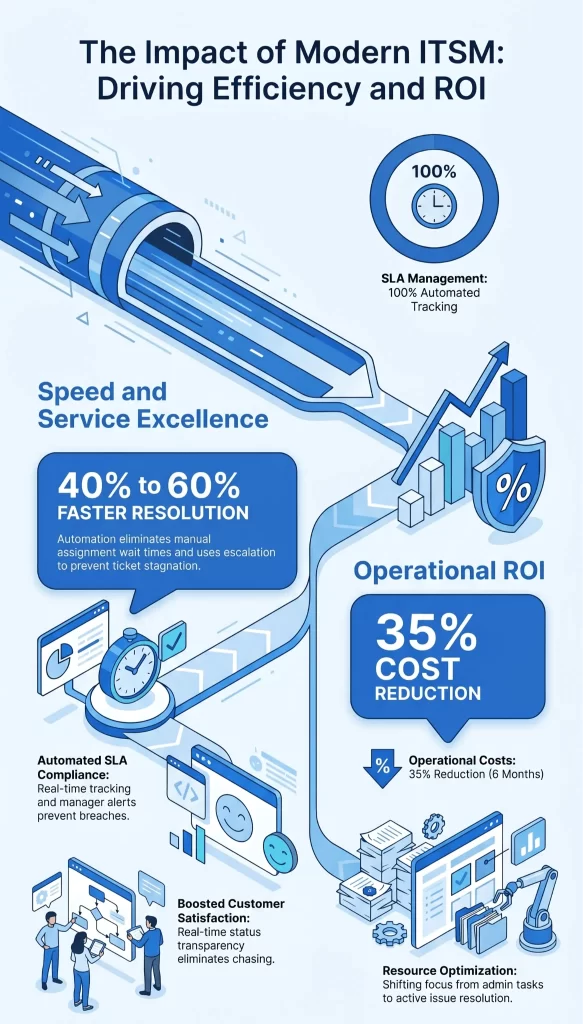
Automated routing eliminates waiting for manual assignment. Prioritization ensures urgent issues jump the queue. Escalation prevents stagnation. The result is measurable speed improvement. Organizations typically cut resolution time by 40 to 60% after implementing a proper ticketing system.
Improved SLA compliance
When the system tracks every SLA metric automatically, compliance rates rise. Agents know exactly how much time remains on every ticket. Managers receive alerts before breaches occur. Customers get the service levels they were promised.
Better customer satisfaction
Requesters appreciate transparency. They know their ticket exists. They know its status. They know when to expect a response. No more wondering if anyone saw their email. No more chasing for updates. Satisfaction scores increase alongside visibility.
Reduced operational costs
Manual ticket handling costs money. Every minute an agent spends categorizing, routing, and prioritizing is a minute not spent resolving issues. Automation cuts that waste. One enterprise client reduced their service desk operational costs by 35% within six months of implementing an ITSM ticketing system.
ITSM Ticketing System Use Cases By Region
India, IT services and outsourcing
Indian IT service providers manage multiple clients with different SLAs. A single ticketing system must segregate client data, apply different rules per client, and report separately for each contract. ITSM ticketing tools deliver multitenant architectures perfect for this model. One Indian MSP reduced ticket misrouting by 80% after switching to a unified ticketing platform.
Indonesia/Malaysia and growing enterprises
Enterprises in Southeast Asia face rapid scaling. One year, they supported 500 employees. The next year, they supported 1500. Ticketing systems that cannot scale become bottlenecks. Cloud-based ITSM ticketing tools allow these businesses to add users, locations, and workflows without infrastructure investments. A Malaysian logistics company expanded from three offices to twelve while maintaining the same ticket resolution standards.
UAE and Saudi Arabia (Digital Transformation and Compliance)
Gulf region enterprises operate under strict data protection and industry regulations. Ticketing systems must maintain audit trails for every action. They must store data within approved jurisdictions. They must support Arabic interfaces for local users. Advanced ITSM ticketing tools meet these requirements while enabling the rapid digital transformation goals of the region.
ITSM Ticketing Tools List (2026)
| Tool | Best For | Key Features | Ideal Company Size |
|---|---|---|---|
| Infraon ITSM | Enterprises needing unified ticketing plus asset management | Native asset integration, AI automation, omnichannel support, real time analytics | Mid-market to enterprise |
| ServiceNow | Global enterprises with complex IT environments | ITBM, SecOps, custom apps, massive ecosystem | Large and enterprise |
| BMC Helix ITSM | AI driven service management | HelixGPT, cognitive automation, multicloud support | Enterprise |
| Ivanti Neurons for ITSM | Unified endpoint and service management | Automated patching, zero touch deployment, risk assessment | Mid-market to enterprise |
How to Choose the Right ITSM Ticketing Tool
Business size considerations
Small teams need simplicity. Look for out-of-the-box templates and minimal configuration. Mid-sized organizations need depth without complexity. Look for flexible workflows and integration options. Enterprises need scale, security, and compliance. Look for multi-tenancy, audit trails, and enterprise-grade support.
Integration requirements
List every system your IT team uses daily. Monitoring tools, asset databases, chat platforms, email systems, and directory services. Ensure your chosen ticketing tool offers native connectors for these systems or open APIs to build your own. The most beautiful ticketing interface is worthless if it lives in isolation.
Budget and scalability
Pricing models vary widely, with tiers like per agent per month, per ticket volume, and per feature tier. Calculate your total cost for year one and year three. Ask about overage charges. Check whether the tool supports your growth without forcing a more expensive tier. A tool that fits today but breaks next year is a false bargain.
ITSM Ticketing Best Practices
Automate repetitive tasks
Identify every manual decision your agents make daily (priority assignment, categorization, and routing). Create automation rules for these decisions. Start with the top five most common ticket types.
Define SLA policies
Document the response and resolution expectations for every ticket category and priority level. Get a business agreement on these targets. Then configure the ticketing system to enforce them.
Use a knowledge base
Every resolved ticket contains a solution. Extract that solution into a knowledge article. Link the article to the ticket category. Next time a similar ticket arrives, offer the article before opening a new ticket.
Future of ITSM Ticket Systems
AI-driven ticketing
Large language models will transform how tickets are handled. AI will draft responses for agents. AI will summarize long ticket threads. AI will suggest solutions from across the entire ticket history of the organization.
Predictive issue resolution
Future systems will detect problems before users report them. An AI monitoring patterns will notice that slow logins often precede full outages. It will create proactive tickets. Engineers will fix issues while users remain unaware that anything was wrong.
Hyper automation
Tickets will trigger cascading automations across multiple systems. A single security ticket will lock user accounts, revoke access tokens, isolate compromised devices, and page the incident response team simultaneously. No manual coordination required.
Why Modern Enterprises Need Advanced ITSM Solutions
Basic ticketing solved yesterday’s problems. Today’s enterprises face hybrid work, cloud complexity, and security threats that old tools cannot handle. An advanced ITSM solution provides the automation, intelligence, and integration required to keep modern IT operations running smoothly.
Infraon ITSM delivers these capabilities in a unified platform designed for enterprises across Asia and the Middle East.
How Infraon ITSM Enhances Ticket Management
Unified dashboard
Agents see all tickets, assets, and knowledge articles in one interface. No switching between screens. No hunting for context.
AI-powered automation
Machine learning suggests priorities, routes tickets, and recommends solutions based on historical patterns. The system gets smarter over time.
Real-time analytics
Live dashboards show SLA compliance, agent workload, and ticket trends. Leaders make data-driven decisions instantly.
Conclusion
An ITSM ticket system is more than a request tracker. It is the central nervous system of modern IT operations. From automated routing to AI-driven predictions, these tools transform how IT teams work. The right system reduces costs, improves satisfaction, and prepares your organization for future challenges.
FAQs
What Is an ITSM Ticket System?
An ITSM ticket system is software that captures, tracks, and manages IT service requests and incidents through a defined workflow from creation to closure, applying ITIL best practices and SLA management.
How Is ITSM Different From Help Desk?
A help desk focuses on break-fix support. ITSM covers the full lifecycle, including incident, problem, change, asset, and service request management. Every help desk is part of ITSM, but not every ITSM is just a help desk.
What Are the Best ITSM Ticketing Tools?
Leading tools include Infraon ITSM for unified asset and ticket management, ServiceNow for global enterprise scale, and BMC Helix for AI-driven automation.
How Much Does ITSM Software Cost?
Pricing ranges from USD 20 to USD 150 per agent per month, depending on features, deployment, and company size. Enterprise solutions with custom requirements often negotiate annual contracts starting at USD 50,000.