


Software asset management best practices are becoming increasingly important as software enters businesses through SaaS sign-ups, cloud subscriptions, enterprise contracts, AI tools, and user-led purchases. With software spending spread across multiple channels, it can be difficult to maintain accurate records of licenses, access, ownership, usage, and renewal dates. Following effective software asset management best practices helps organizations improve visibility, control software costs, reduce compliance risks, and make better renewal decisions.
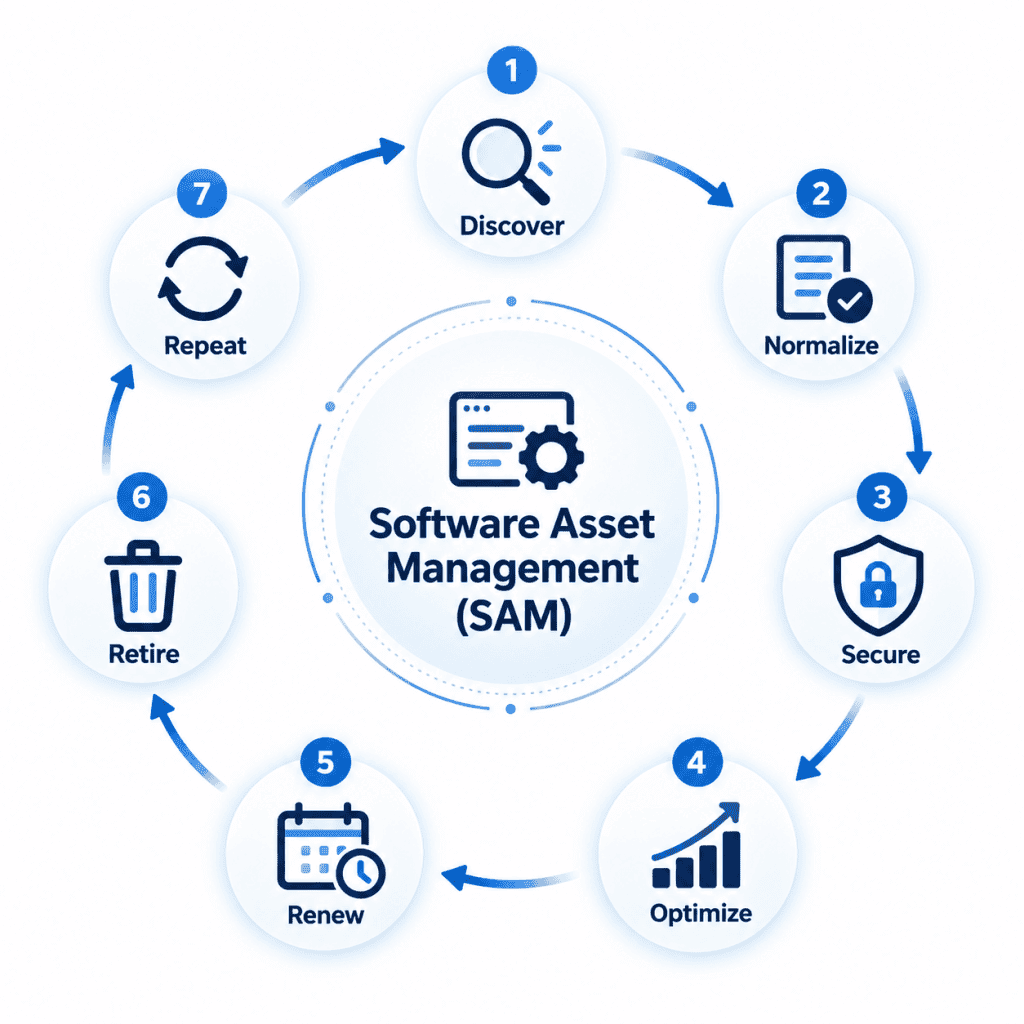
At its simplest, software asset management is the process of seeing what software the organization owns, uses, funds, renews, and retires. This playbook uses a 6S framework that moves through discovery, standardization, security, spend control, compliance, and retirement.
What Is Software Asset Management?
Software asset management in simple terms
Software asset management, or SAM, is the way an organization controls software through its working life. It connects software discovery, inventory, license rights, usage, contracts, renewals, compliance, and retirement so leaders can act with a reliable record.
The value of SAM comes from joining commercial, operational, and governance data. When those records stay connected, software decisions become easier to defend during renewal, audit, security review, and budget planning.
What does SAM actually manage?
SAM manages the records that explain what software exists, who uses it, which rights are owned, and which commercial commitments are attached. The scope includes several asset and contract types because modern software rarely follows a single buying or deployment route.
- SaaS subscriptions
- On-premises software
- Cloud software
- Licenses
- Entitlements
- Usage
- Contracts
- Renewals
SAM vs. ITAM vs. SaaS Management
SAM focuses on software assets, license rights, usage, and renewal control, while IT Asset Management covers the larger technology asset base. SaaS management concentrates on cloud application subscriptions, owners, usage, and renewal, which makes it a close partner to SAM.
These three often overlap because software decisions depend on asset context and subscription records. A simple comparison helps clarify where each discipline leads and where the records should connect.
| Area | SAM | ITAM | SaaS Management |
|---|---|---|---|
| Primary focus | Software assets, licenses, entitlements, usage, and renewals | Technology assets, lifecycle records, ownership, cost, and service context | Cloud applications, subscriptions, owners, access, usage, and renewals |
| Common records | Applications, contracts, license rights, usage data, and compliance evidence | Hardware, software, users, locations, warranties, and lifecycle stages | SaaS applications, plans, users, departments, spend, and renewal dates |
| Main decision | Which software should be bought, reclaimed, renewed, retired, or reviewed | Which assets should be procured, assigned, serviced, refreshed, or retired | Which subscriptions should be approved, consolidated, reduced, or renewed |
Why Software Asset Management Matters More in 2026
SaaS has made software estates harder to control
SaaS adoption makes software easy to start and harder to govern. A user or department can introduce a subscription before central records capture the owner, renewal date, usage level, or risk profile.
SAM gives that growth a control layer by bringing SaaS records into the same review cycle as other software. That helps leaders see duplication, unused access, renewal exposure, and ownership gaps before they become budget or governance issues.
AI is creating a new software-spend problem
AI tools introduce new cost patterns because usage can grow through individual accounts, department experiments, and consumption-based models. Spend may rise before procurement, finance, and IT have a complete view of access and activity.
SAM brings AI tools into the software portfolio so usage, owner, purpose, contract terms, and renewal status can be reviewed together. This makes AI spend part of normal governance rather than a separate exception handled after cost has already increased.
Consumption-based pricing is changing license management
Consumption-based pricing changes the SAM question from who has a license to how much value the usage creates. Costs can follow seats, transactions, storage, API calls, compute use, or other metered activity.
SAM needs usage records that explain demand over time and connect it with contract terms. Without that link, organizations may see the invoice after the spending pattern has already formed.
Shadow IT is becoming Shadow AI
Shadow IT grows when software enters the business outside central review. Shadow AI extends the same risk into AI applications where access, data exposure, output use, and variable costs may be unclear.
SAM cannot depend only on approved purchase records in that environment. It needs discovery, owner mapping, policy review, and usage analysis to bring unknown tools into a governed process.
Software security and SAM are converging
Security review increasingly depends on knowing which software exists, who can access it, and how it is being used. Unknown applications, unsupported versions, inactive accounts, and unapproved tools can create risk that license records alone will miss.
SAM supports security by giving reviewers a software inventory linked with ownership, usage, lifecycle status, and compliance evidence. The connection helps security, procurement, finance, and IT work from the same software record.
Renewals are becoming strategic cost events
Renewals now carry larger budget impact because SaaS subscriptions, enterprise agreements, and AI tools often renew before usage is fully reviewed. A missed review can lock the business into unused capacity or weak contract terms.
SAM turns renewal into a planned decision cycle. Usage, ownership, entitlement, cost, and business need can be checked before the organization commits to another term.
The 6S Software Asset Management Operating System
The 6S operating system gives SAM a repeatable way to move from visibility to action. Each stage strengthens the next one, so discovery leads to cleaner records, cleaner records support control, and control supports better renewal decisions.
1. See – Discover every software asset
The first step is to see every software asset that is installed, subscribed to, accessed, or consumed. Discovery should cover endpoints, SaaS, cloud software, contracts, procurement records, and identity signals where those sources exist.
This stage creates the baseline for every other SAM action. If software remains outside the record, license optimization, security review, renewal planning, and compliance evidence all start with a gap.
2. Standardize – Normalize your software inventory
Standardization turns raw discovery output into usable software records. Variations in titles, publishers, versions, editions, and product families need consistent naming so duplicate records do not weaken analysis.
Normalized inventory helps leaders compare usage, contracts, and license rights with less confusion. It also makes reporting cleaner when different systems describe the same application in different ways.
3. Secure – Control unauthorized and risky software
Security control begins by identifying software that has no clear owner, approval history, business purpose, or support status. Risk grows when unknown applications remain active without review.
SAM helps route those findings into approval, removal, or exception workflows. This gives security and IT a shared view of which software should stay, which needs review, and which should be removed.
4. Spend – Optimize licenses and subscriptions
Spend control depends on comparing what the organization pays for with what employees actually use. SAM can reveal inactive accounts, unused licenses, overlapping tools, and subscription tiers that exceed usage needs.
Optimization should happen before new purchases and renewals. Reclaiming licenses, reducing tiers, consolidating applications, and correcting assignments can free budget without disrupting genuine software demand.
5. Stay Compliant – Reconcile usage with entitlements
Compliance depends on comparing usage with entitlement records, contracts, and license terms. A reliable license compliance view helps the organization prepare evidence for internal review, vendor audits, and governance reporting.
Reconciliation should happen throughout the year instead of only during audit pressure. This gives SAM owners time to correct gaps, investigate exceptions, and document the software position clearly.
6. Sunset – Retire software you no longer need
Retirement removes software that is unused, duplicated, risky, unsupported, or replaced by another tool. Sunset decisions should include access removal, license recovery, contract review, user communication, and record closure.
This stage protects the software portfolio from gradual buildup. When retirement is part of the operating cycle, the organization avoids paying for tools that no longer support current work.
12 Software Asset Management Best Practices
1. Build a single source of truth for software assets
A single source of truth keeps software titles, owners, licenses, contracts, renewals, usage, and compliance records connected. It reduces the confusion that appears when procurement, finance, security, and IT each maintain separate views of the same application.
The source of truth does not need to replace every system involved in software decisions. It needs to define the trusted record and the data ownership rules that keep that record current.
2. Automate software discovery
Discovery should capture installed applications, SaaS activity, cloud software, and relevant usage signals without relying only on manual entries. Automated discovery helps uncover software that appears through new devices, user activity, or department purchases.
The goal is to reduce blind spots early. Once discovery results are reviewed and classified, SAM owners can decide what requires approval, optimization, removal, or further investigation.
3. Normalize software titles, versions and editions
Normalization brings different software names, editions, publishers, and versions into a common structure. This matters because the same application can appear under several labels across discovery tools, invoices, contracts, and user records.
A normalized record supports better comparison between deployment, entitlement, and usage. It also keeps reports from overstating software variety because of naming differences.
4. Map every software asset to an owner
Each software asset should have an accountable owner who can confirm business need, usage, renewal decisions, and access changes. Without ownership, SAM findings may sit unresolved because no one can approve the next step.
Ownership should connect to a department, function, budget, or application owner. That link becomes valuable during renewals, security reviews, contract negotiations, and retirement planning.
5. Track entitlements
Installations show where software appears, but entitlements explain what the organization has the right to use. SAM needs both views so usage can be compared with license rights and contract rules.
Entitlement records should include license type, quantity, term, user rights, device rights, vendor terms, and contract references. This gives compliance and renewal discussions a stronger evidence base.
6. Measure actual software usage
Usage data shows which software is active, inactive, underused, or assigned beyond actual demand. It helps SAM owners move from ownership records to value assessment.
Usage should be reviewed with role, department, contract, and business context. A low-use tool may still be needed for a small specialist group, while a high-use tool may still carry avoidable waste if the plan tier is wrong.
7. Reclaim unused and underused licenses
License reclamation returns unused or underused licenses to the available pool. This can reduce new purchases and create savings before renewal discussions begin.
Reclamation works best through governed workflows with user notice, manager review, and exception handling. That keeps the process fair for users and defensible for SAM owners.
8. Bring Shadow IT and Shadow AI into SAM
Shadow IT and Shadow AI should be discovered, reviewed, and assigned ownership instead of ignored until renewal or audit pressure appears. These tools can carry cost, access, data, and compliance questions that require a normal governance path.
The first step is visibility, followed by review of purpose, user group, data exposure, vendor terms, and overlap with approved software. Once reviewed, the organization can approve, replace, consolidate, or retire the tool.
9. Connect SAM with procurement and finance
SAM decisions become stronger when purchase records, invoices, contracts, renewals, and budgets connect with software usage. Procurement and finance can then evaluate cost against actual adoption and business need.
This connection also improves renewal preparation. SAM owners can enter negotiations with evidence on consumption, inactive users, duplicate tools, and contract coverage.
10. Build a 90-day renewal process
A 90-day renewal process gives enough time to review owner, usage, cost, entitlement, risk, and future demand before the renewal date. Waiting until the final weeks usually reduces negotiation room.
The process should include data review, owner confirmation, reclamation, tier analysis, vendor discussions, and approval. That turns renewal from a calendar reminder into a managed cost decision.
11. Make SAM audit-ready continuously
Audit readiness should be built into daily SAM activity. Discovery, entitlement, usage, contract, and assignment records need ongoing review so evidence can be produced without a scramble.
Continuous readiness also helps internal governance. Leaders can see where compliance gaps exist and act before vendor review or policy pressure increases.
12. Measure SAM with business KPIs
SAM measurement should focus on outcomes such as utilization, reclamation, renewal savings, audit preparation time, compliance rate, and software spend per employee. Activity counts alone do not prove that the software estate is under control.
KPIs should be reviewed with procurement, finance, IT, security, and business owners. Shared measurement keeps SAM connected to cost control, risk reduction, and software value.
How to Implement a Software Asset Management Program
Phase 1: Discover
Discovery creates the first reliable view of the software estate. The phase should identify known software, unknown software, SaaS subscriptions, cloud tools, and user-led purchases that need review.
- Inventory endpoints, SaaS and cloud software: Inventory work should cover endpoints, SaaS applications, cloud software, and high-cost enterprise tools. The result should show what exists, where it appears, who uses it, and which records need cleanup.
- Find unknown and unauthorized applications: Unknown and unauthorized applications should be separated from approved software so they can be reviewed. Each finding needs an owner, business purpose, risk review, and decision path.
Phase 2: Normalize
Normalization prepares discovery data for real SAM decisions. It reduces duplicate titles, inconsistent publisher names, and unclear version or edition records.
- Standardize software titles: Standard titles make reports easier to read and reconcile. They also reduce the risk that one application appears as several separate products.
- Map versions, editions and publishers: Version, edition, and publisher mapping helps identify license rules and support status. It also supports security and renewal review because older versions or higher editions may need different action.
Phase 3: Reconcile
Reconciliation compares actual software use with the rights the organization owns. It brings installations, subscriptions, usage, contracts, and entitlement records into the same review.
- Compare installations with entitlements: Installation and subscription data should be checked against entitlement records. This shows whether the organization has unused capacity, potential overuse, or unclear rights.
- Identify compliance gaps: Compliance gaps should be recorded with the reason, owner, risk level, and next action. Clear records help SAM owners close issues before audits or renewals create pressure.
Phase 4: Optimize
Optimization uses usage, entitlement, and cost data to reduce waste. The phase should focus on actions that create measurable value without disrupting genuine software demand.
- Reclaim unused licenses: Unused licenses should be reviewed for reclamation through a governed workflow. The process should include user notice, manager confirmation, and exception handling.
- Downgrade over-licensed users: Some users may need access but not the highest plan or edition. Downgrading those users can reduce spend while preserving the software support they need.
- Eliminate duplicate applications: Duplicate applications create avoidable cost, training load, security review, and renewal work. Consolidation should compare usage, contracts, business fit, and owner approval before tools are removed.
Phase 5: Govern
Governance keeps SAM decisions consistent after the first cleanup. It defines ownership, approval routes, procurement links, and policy rules for software entering or leaving the environment.
- Establish software ownership: Software ownership should be assigned to people or functions that understand the business need. Owners should approve access changes, renewals, retirements, and exceptions.
- Create approval workflows: Approval workflows give software requests a governed path from request to review, procurement, assignment, and closure. Good workflow automation keeps that path visible without forcing users into scattered follow-ups.
- Integrate procurement and IT: Procurement and IT should share request, contract, vendor, deployment, and ownership data. This keeps buying decisions connected with usage, security review, and lifecycle control.
Phase 6: Continuously improve
SAM should improve through regular review of usage, spend, compliance, adoption, and renewal outcomes. Each review should lead to cleanup actions, policy updates, automation changes, or owner follow-up.
- Monitor KPIs: KPIs should show whether software visibility, usage, reclamation, compliance, and renewal readiness are improving. A focused set of measures keeps the program tied to business results.
- Review renewals: Renewals should be reviewed before the commercial deadline. Usage, owner confirmation, entitlement position, contract terms, and future need should guide the decision.
- Update policies: Policies should change when software buying patterns, AI usage, SaaS adoption, or security expectations change. Policy review keeps SAM aligned with the way software actually enters the business.
A Practical 30-60-90 Day SAM Implementation Plan
A staged implementation helps the organization move from visibility to control without trying to fix every SAM issue at once. The first 90 days should create a software baseline, match it with license data, and begin high-value optimization.
| Period | Priority | Outcome |
|---|---|---|
| Days 1–30 | Discovery | Software inventory baseline |
| Days 31–60 | Reconciliation | License/usage visibility |
| Days 61–90 | Optimization | Reclaim + renewal savings |
| 90+ days | Governance | Continuous SAM |
First 30 days: Find out what you have
The first month should focus on software discovery and baseline creation. SAM owners should identify endpoints, SaaS subscriptions, cloud tools, contracts, owners, and applications that require review.
The output should be a working inventory rather than a perfect record. Cleanup can continue once the organization can see the software estate with enough confidence to prioritize action.
Days 31–60: Find out what you’re paying for
The second month should connect software records with contracts, licenses, invoices, and entitlement data. This gives the organization a clearer view of what is owned, what is assigned, and what is actually used.
This stage also helps locate compliance gaps and renewal risks. The focus should be on the contracts and tools that carry high spend, broad usage, or higher governance exposure.
Days 61–90: Start optimizing
The third month should turn findings into action. Unused licenses, duplicate tools, inactive users, wrong tiers, and near-term renewals are strong starting points.
Optimization should be tracked with clear outcomes. Reclaimed licenses, avoided purchases, renewal savings, and corrected ownership records show early program value.
After 90 days: Make SAM continuous
After the first 90 days, SAM should become part of routine software governance. Discovery, reconciliation, renewal review, reclamation, audit readiness, and policy updates should repeat through an agreed operating rhythm.
This stage prevents the software record from drifting back into disorder. Continuous review also helps the organization respond to new SaaS, AI tools, and consumption-based costs faster.
How to Measure SAM Success
SAM measurement should show whether software control is improving in ways the business can recognize. A balanced set of KPIs should cover utilization, ownership, spending, compliance, renewal value, shadow software, and audit readiness.
Software utilization rate
Software utilization rate shows how much assigned software is actively used. Low utilization can point to license waste, wrong assignment, duplicate tools, or weak adoption.
License reclamation rate
License reclamation rate shows how often unused or underused licenses are recovered. A rising rate can show that SAM is turning usage insight into budget action.
Software spend per employee
Software spend per employee connects software cost with the size of the workforce. It helps leaders review cost trends and compare spend across departments or time periods.
Percentage of software with assigned owners
This measure shows how much of the software portfolio has clear accountability. A low percentage means renewal, usage, security, and retirement decisions may stall.
License compliance rate
License compliance rate compares usage with entitlement and contract terms. It helps leaders understand audit readiness and areas that need correction.
Renewal savings
Renewal savings show the value created by renegotiation, reclamation, tier changes, consolidation, or retirement before contract renewal. This metric gives SAM a clear cost-control story.
Shadow IT discovery rate
Shadow IT discovery rate shows how often SAM finds software outside approved channels. It helps the organization measure how quickly unknown tools are being brought into review.
Time to produce an audit-ready position
This measure shows how long the organization needs to gather reliable software evidence. Shorter preparation time usually points to stronger discovery, entitlement, usage, and contract records.
Software inventory accuracy
Software inventory accuracy shows how closely the software record matches what exists and is used. It depends on discovery quality, normalization, ownership review, and regular reconciliation.
Common Software Asset Management Mistakes
Managing software only during renewal season
Renewal season is too late to discover usage gaps, ownership confusion, or contract issues. SAM needs an ongoing review cycle so data is ready before commercial decisions begin.
A renewal-only approach often gives vendors stronger control of the timeline. Earlier review gives the organization time to reclaim, consolidate, renegotiate, or retire software.
Tracking installations but not usage
Installations show presence, while usage shows value. A tool may be installed or assigned to many users even when very few people actively use it.
Usage measurement helps identify reclamation, downgrade, retirement, and training opportunities. It also gives renewals a factual basis instead of relying on assignment counts.
Relying on spreadsheets as the system of record
Spreadsheets can help early SAM work, but they become weak when data changes quickly. Version confusion, manual updates, and missing history can reduce trust in the record.
The issue becomes larger when discovery, licenses, usage, renewals, and approvals need to stay connected. At that point, a spreadsheet becomes a reporting file rather than a controlled operating record.
Ignoring SaaS purchased outside IT
SaaS purchased outside IT can create hidden spend, duplicate applications, unclear ownership, and risk exposure. SAM needs ways to discover these subscriptions and route them into review.
The goal is to make SaaS visible without blocking business speed. Once discovered, each tool can be approved, consolidated, governed, or retired.
Treating AI tools as ordinary SaaS
AI tools can carry different usage, cost, data, and governance questions from ordinary SaaS subscriptions. Consumption patterns may change quickly, and access may spread through individual accounts.
SAM should review AI tools as a distinct software category. Ownership, purpose, spend model, data use, and renewal terms should be visible before adoption expands.
Failing to connect SAM and procurement
Procurement sees contracts and costs, while SAM sees discovery, usage, entitlement, and compliance context. If those records stay separate, purchase and renewal decisions may miss important evidence.
A connection between SAM and procurement improves buying discipline. It also helps ensure that new purchases happen after available licenses, existing contracts, and usage data are reviewed.
Measuring activity instead of outcomes
SAM activity can look busy without creating business value. Counting discovered titles or completed reviews says little unless the program reduces waste, risk, audit pressure, or renewal cost.
Outcome metrics keep SAM grounded in results. Reclamation, utilization, compliance, renewal savings, ownership coverage, and audit readiness provide a stronger view of progress.
When Should You Automate Software Asset Management?
Manual SAM vs. automated SAM
Automation becomes valuable when the software environment changes faster than people can update records by hand. SaaS growth, frequent user changes, renewal volume, compliance pressure, and shadow software are common signs.
Manual SAM may still support a small and stable software base. Automated SAM becomes the stronger option when discovery, usage review, reconciliation, renewals, and reporting need a reliable operating rhythm.
| Capability | Spreadsheet/manual | Automated SAM |
|---|---|---|
| Discovery | Periodic | Continuous |
| Inventory | Manual | Automated |
| License reconciliation | Manual | Automated |
| Usage analysis | Limited | Continuous |
| Renewals | Calendar/spreadsheet | Workflow |
| Compliance | Reactive | Continuous |
| Reporting | Manual | Real-time |
| Shadow IT | Difficult | Automated discovery |
What to Look for in Software Asset Management Software
Automated software discovery
The software should discover installed applications, SaaS subscriptions, cloud tools, and other software signals that need review. Discovery depth matters because SAM decisions start with visibility.
Software inventory and normalization
Inventory and normalization should turn raw software data into consistent records. Titles, versions, editions, publishers, owners, and categories need structure before reporting and reconciliation can work well.
License management
License management should store entitlement details, usage rights, license models, quantities, terms, and contract references. Those records help compare owned rights with actual use.
Usage analytics
Usage analytics should show active, inactive, underused, and growing software use. The data should help SAM owners reclaim, downgrade, consolidate, or renew with better evidence.
Compliance monitoring
Compliance monitoring should compare deployment and usage with entitlement terms. It should also help prepare evidence for internal review and vendor audits.
Lifecycle management
Lifecycle management should cover request, approval, procurement, deployment, usage, renewal, reclamation, and retirement. A lifecycle view prevents software records from becoming static lists.
SaaS and Shadow IT discovery
SaaS and Shadow IT discovery should identify applications that appear outside formal purchase routes. The system should help route findings to ownership, approval, security review, or retirement.
Renewal management
Renewal management should track dates, notice periods, owners, usage evidence, costs, and contract terms. This gives organizations time to prepare before renewal decisions are due.
Workflow automation
Workflow automation should support approvals, reclamation, renewal review, exception handling, notifications, and request fulfillment. The best workflows keep ownership visible at each step.
Reporting and dashboards
Reporting and dashboards should connect software inventory with usage, spend, compliance, renewals, owners, and reclamation. Reports should point to actions rather than only display totals.
Integrations with ITSM, CMDB, ERP and identity systems
Integrations should connect SAM with ITSM, CMDB, ERP, identity, HR, procurement, finance, security, and reporting systems. The connection helps software records reflect user changes, service context, purchases, contracts, and access data.
How Infraon Supports Software Asset Management
Infraon Assets comes with a software asset management solution, offering automated discovery and inventory, usage insights, license reconciliation, compliance-risk identification, RBAC, and audit trails. These capabilities help bring software records, access, usage, and governance into a shared operating view.
Automated software discovery
Infraon helps discover software assets so organizations can reduce gaps in the software record. Discovery gives SAM owners a clearer starting point for classification, ownership, compliance review, and optimization.
Centralized software inventory
A centralized inventory gives users a common view of software titles, versions, owners, users, and related records. This helps reduce duplicate entries and supports better lifecycle control.
Software license management
Software license management connects entitlements, assignments, contracts, renewals, and usage context. That makes it easier to review compliance risk and take action before purchase or renewal decisions.
Usage and utilization visibility
Usage visibility helps leaders see where software is active, underused, unused, or ready for review. Utilization insights support reclamation, tier changes, renewal decisions, and cost control.
Compliance and audit readiness
Compliance and audit readiness depend on having discovery, entitlement, usage, and assignment records in one controlled view. Infraon supports evidence-building through records that can be reviewed and acted on during governance checks.
Software lifecycle management
Software lifecycle management connects request, deployment, usage, renewal, reclamation, and retirement activity. This helps SAM owners manage software as an operating cycle rather than a one-time inventory exercise.
Reporting and analytics
Reporting and analytics help leaders review spend, usage, compliance risk, renewals, reclamation, and ownership. These views support decisions on which software should be bought, optimized, retired, or governed with closer review.
Explore: Infraon’s IT Asset Management
Explore: Infraon’s Software Asset Management
Frequently Asked Questions About Software Asset Management
What are the best practices for software asset management?
The best practices include building a single source of truth, automating discovery, normalizing records, assigning owners, tracking entitlements, measuring usage, reclaiming licenses, and preparing for renewals early. They also include bringing Shadow IT and Shadow AI into governance, connecting procurement with IT, staying audit-ready, and measuring business outcomes.
What are the five steps of software asset management?
A simple five-step approach is to discover software, normalize records, reconcile usage with entitlements, optimize licenses, and govern the lifecycle. The 6S model in this playbook adds a separate security step because unauthorized and risky software now needs closer review.
How does SAM reduce software costs?
SAM reduces costs by finding unused licenses, underused subscriptions, duplicate tools, wrong tiers, and renewals that need renegotiation. It also helps organizations reclaim licenses before buying new ones.
What is the difference between SAM and ITAM?
SAM focuses on software assets, licenses, entitlements, usage, contracts, renewals, compliance, and retirement. ITAM covers the larger IT asset base, including hardware, software, ownership, lifecycle, service context, and cost.
How often should software licenses be audited?
Software licenses should be reviewed through an ongoing reconciliation process rather than only once a year. High-cost tools, high-risk applications, broad deployments, and near-term renewals should receive closer review.
What should a SAM policy include?
A SAM policy should cover approved software, request paths, ownership, procurement rules, license usage, entitlement records, SaaS review, AI tool review, renewals, audits, and retirement. It should also define who approves exceptions and how software decisions are documented.
What features should SAM software have?
SAM software should include automated discovery, inventory normalization, license management, usage analytics, compliance monitoring, lifecycle management, SaaS discovery, renewal management, workflows, reports, and integrations. These capabilities help SAM owners move from recordkeeping to action.
How does SAM help with SaaS management?
SAM helps SaaS management by tracking applications, owners, subscriptions, usage, renewals, and spend. It also helps identify unused access, duplicate tools, shadow applications, and renewal risks.
How does SAM manage Shadow IT?
SAM manages Shadow IT by discovering applications outside approved channels and bringing them into review. Each application can then be assigned an owner, checked for risk, compared with existing tools, and approved or retired.
How is AI changing software asset management?
AI is changing SAM by helping identify software patterns, usage anomalies, renewal risks, reclamation opportunities, and procurement recommendations. AI tools also create a new software category that SAM must govern through usage, ownership, cost, and data-risk review.
Conclusion: Make SAM a Continuous Operating Process
Software asset management works best when it becomes part of daily governance instead of a rushed renewal or audit exercise. The 2026 software estate needs discovery, reconciliation, optimization, and policy review to happen through a repeatable operating cycle.
Discover more, reconcile continuously, optimize before renewal, and finally – govern every software decision with due diligence.