


Over time, SLAs have moved from static documents into operational controls. Teams use them to guide response priorities, manage service commitments, and evaluate delivery quality across IT and business services. This shared definition reduces ambiguity and creates a common yardstick for service discussions.
What Is a Service Level Agreement (SLA)?
A Service Level Agreement defines how a service gets delivered, measured, and reviewed between a provider and a customer. It sets expectations around service scope, performance targets, and accountability so delivery teams and business owners work from the same reference point. Instead of informal promises, SLAs convert service delivery into measurable commitments tied to outcomes.
Why SLAs matter in service delivery
SLAs translate service promises into operational terms. They define what success looks like, how performance gets measured, and when corrective action becomes necessary. As a result, service teams gain clarity on priorities, while customers gain visibility into delivery standards.
Beyond measurement, SLAs influence daily execution. Response targets guide ticket handling, uptime goals shape infrastructure planning, and reporting cycles drive continuous review. When written and managed well, SLAs empower predictable service delivery.
Who uses SLAs? A quick look at common scenarios
- IT service providers for application availability, incident response, and resolution timelines
- Internal IT teams for business units with defined service expectations
- Managed service partners for infrastructure, network, or cloud operations
- Support organizations for customer requests with committed response windows
Key Components of an SLA
An SLA breaks service delivery into measurable parts that teams rely on during daily execution. Each part defines ownership, measurement logic, and review cadence so service discussions remain grounded in agreed terms.
Service scope and responsibilities
- Services covered under the agreement
- Activities excluded from service delivery
- Ownership for delivery, approvals, and escalation
- Dependencies on vendors, tools, or upstream services
Performance metrics and KPIs

- Response time targets by request or incident type
- Resolution timelines mapped to priority
- First-contact resolution tracking
- Backlog aging bands used for risk visibility
- Reopen rates as a quality indicator
Uptime commitments and response times
- Availability targets defined as percentages over a stated period
- Priority models that link severity to response timelines
- Coverage windows defining support hours
Reporting, reviews, and documentation
- Scheduled performance reports shared with stakeholders
- Metric definitions covering timer start, pause, and stop logic
- Data sources used for measurement and validation
- Review cycles focused on trends and recurring gaps
- Historical records retained for audits
Penalties, breach clauses, and escalations
- Escalation paths triggered after threshold breaches
- Remedial actions tied to missed commitments
- Breach analysis sessions with follow-up actions
- Governance steps for repeated misses
Different Types of SLAs
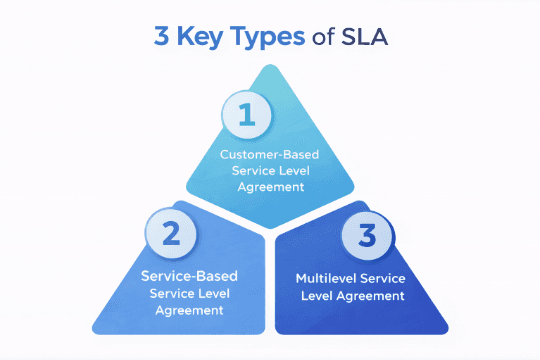
Customer-based SLA
A customer-based SLA applies to a single customer or internal business unit while covering several services under one agreement. It works well when expectations vary by account and delivery priorities differ across consumers. This model places emphasis on customer outcomes. Reviews usually focus on how well service commitments meet business needs.
Service-based SLA
A service-based SLA applies one set of commitments to a single service delivered to many consumers. It brings consistency to delivery by keeping targets uniform across all users of that service. Since measurement remains identical for every consumer, service owners gain clearer visibility into performance trends and recurring gaps. This structure enable scale when service delivery remains standardized.
Multilevel SLA
A multilevel SLA introduces layered commitments that operate together. Enterprise-level terms define organization-wide expectations, while lower layers address customer and service execution details. These layers remain connected, which helps escalation and reporting flow upward. Operational teams work against service-level targets, while leadership reviews broader commitments tied to delivery outcomes.
Industry examples of SLAs
- In IT environments, SLAs usually focus on incident handling, resolution timelines, and service availability
- Telecom providers emphasize uptime targets and fault restoration windows tied to network performance
- Cloud services rely on availability commitments combined with response expectations
- Support organizations use agreements around request handling timelines and workload management
How to Create an SLA
Steps to build an SLA from scratch
- Define the service clearly: Start by documenting what the service delivers, who consumes it, and which outcomes matter to the business. This step frames every commitment that follows.
- Set measurable commitments: Choose metrics that reflect delivery reality. Response times, resolution targets, and availability percentages work best when measurement logic stays unambiguous.
- Assign ownership and review cycles: Every commitment needs an owner and a review rhythm. Ownership clarifies accountability, while reviews keep agreements relevant as demand grows.
Common SLA mistakes to avoid
- Using vague metrics that leave room for interpretation
- Skipping severity definitions for incidents and requests
- Overloading SLAs with unrealistic targets
- Ignoring review cadence and escalation paths
- Treating SLAs as static documents
SLA templates
- Standardized starting points: Templates provide a structured base that speeds up agreement creation. They usually include predefined sections for scope, metrics, reporting, and escalation, reducing setup time.
- Consistency across services: Using templates helps teams maintain uniform structure across services while adjusting commitments based on service criticality.
Real-world examples of SLAs
Internal IT services
An internal helpdesk SLA may define response targets by request category, resolution timelines by priority, and reporting cycles shared with business stakeholders.
Managed services
A managed infrastructure SLA often combines availability commitments, incident response thresholds, and monthly performance reviews tied to service credits.
How SLA Performance Is Measured
Tracking KPIs, availability, and resolution times
Measurement starts with timers tied to service events such as ticket creation, assignment, and closure. These timers feed performance views that show how services perform against agreed thresholds.
Availability tracking focuses on service uptime within defined service windows. Resolution tracking follows the full lifecycle of incidents and requests, helping teams spot recurring pressure points as volumes rise.
- Response timers linked to intake events
- Resolution clocks aligned to priority levels
- Availability calculations tied to service windows
- Aggregated views for trend analysis
What happens when SLAs are met?
When commitments are met, teams gain a baseline for planning and improvement. Performance reviews move beyond firefighting and focus on workload distribution, tooling gaps, and service demand patterns. Meeting targets also builds trust with stakeholders. Reports serve as evidence during reviews, budget discussions, and capacity planning sessions.
SLA vs. KPI: What’s the difference?
An SLA defines a commitment agreed between service provider and consumer. A KPI tracks performance signals that inform that commitment.
KPIs feed into SLAs, while SLAs frame accountability. Together, they connect operational activity with service expectations.
The Rise of SLA Tech and Modern Tools
What Is SLA technology?
SLA technology moves service agreements from static documents into live operational systems. Commitments get embedded into ticketing, monitoring, and reporting layers so service targets influence daily execution rather than quarterly reviews. As service volumes increase, manual tracking breaks down. Technology steps in to keep measurement consistent, visible, and actionable across teams.
Why businesses are moving to automated SLA systems
- Manual tracking fails once request volume scales
- Human accuracy struggles with overlapping service windows
- Spreadsheet-based reporting delays corrective action
- Escalations trigger too late to protect commitments
Automation addresses these gaps by keeping timers, thresholds, and escalations running in the background while teams focus on resolution.
Benefits of SLA software for IT and support teams
- Continuous visibility into at-risk commitments
- Prioritization driven by service impact
- Reduced dependency on manual follow-ups
- Faster review cycles backed by system data
- Better alignment between service owners and delivery teams
How SLA Management Software Works
Real-time SLA tracking dashboards
Dashboards present live views of service commitments across incidents, requests, and changes. Timers update continuously as work progresses, giving service owners instant visibility into items approaching breach thresholds. Views usually segment data by service, priority, or assignment group. This layout helps teams spot pressure areas early and redirect effort before commitments slip.
Automated alerts and breach notifications
With thresholds approaching, alerts trigger automatically. These notifications reach the right roles based on severity and service rules. Alerts reduce reliance on manual checks and help teams respond earlier during high-volume periods. Escalation messages follow predefined paths so accountability remains clear.
Workflow automation and ticket prioritization
SLA rules influence how work flows through the system. Tickets reorder automatically based on urgency and remaining time. Automation routes items to the right queues, applies priority logic, and adjusts handling paths as conditions change during resolution.
Analytics, reporting, and audit logs
Reporting tools compile Service Level Agreement performance across services and time periods. Teams review compliance trends, recurring gaps, and workload patterns during service reviews. Audit logs capture changes, escalations, and timing events. These records ensure internal governance, reviews, and external checks.
How Infraon Helps You Manage SLAs Effortlessly
Built-in SLA monitoring and automation
Infraon’s software modules run SLA tracking directly inside incident, request, and change records. Timers start automatically based on predefined Service Level Agreement rules, keeping response and resolution targets visible throughout ticket progress. Risk indicators highlight items approaching breach thresholds during execution. This keeps service owners informed early while work remains in progress.
Easy configuration for service catalog items
Service Level Agreement rules in Infraon’s software modules connect directly to service catalog entries. Each service carries its own response and resolution targets based on priority and coverage requirements. Working hours and holiday calendars factor into SLA calculations. Measurement follows defined service windows instead of raw clock time.
Custom reports and insights for teams
Infraon’s software modules provide built-in SLA reports covering incidents, service requests, and changes. Performance views group results by service, category, priority, and time period. Historical data drives compliance reviews and internal audits. Patterns across breaches help service owners adjust rules or handling workflows using recorded performance trends.
Why Do Companies Choose Infraon To Simplify SLAs?
Infraon’s software modules brings SLA definition, tracking, escalation, and reporting into one operational flow. SLA rules connect with service catalogs, ticket workflows, and performance views, which removes manual coordination across systems. Teams rely on this structure to manage service commitments across growing volumes while keeping visibility consistent.
Features:
- SLA rules stay linked to services instead of individual tickets
- Live dashboards highlight at-risk commitments during execution
- Escalations follow predefined paths based on severity and timing
- Reports enable reviews, audits, and service planning cycles
SLA Best Practices for Better Service Delivery
Set clear, measurable metrics
Strong SLAs rely on metrics that teams can track during daily work. Response and resolution targets work best when they connect directly to ticket events and service definitions. This keeps measurement grounded in operational data instead of post-review interpretation.
Metrics gain value when service owners understand how timers start, pause, and complete. Clear definitions reduce disputes during reviews and keep performance discussions focused on delivery outcomes.
Review SLAs regularly
SLAs need periodic review as service demand, volume, and tooling change. Regular reviews surface patterns across breaches, workload spikes, and recurring delays that remain invisible in single-month reports.
Reviews also support adjustment of targets and service definitions. This keeps agreements aligned with current delivery realities.
Align SLAs with business goals
SLAs work best when they reflect business priorities instead of generic service promises. High-impact services benefit from tighter response commitments, while lower-impact services can follow broader targets.
Alignment improves when service owners, operations teams, and business stakeholders review performance together. Shared visibility helps connect service delivery with outcomes such as productivity, availability, and customer experience.

Final Thoughts
Service Level Agreement succeed when they operate as living controls inside service delivery – without static reference material. Clear commitments, defined thresholds, and visible ownership turn SLAs into day-to-day decision guides for service teams.
Today, timers, thresholds, and escalation logic require system support to remain consistent across incidents, requests, and changes. When SLA tracking runs inside operational workflows, teams gain earlier visibility into risk and can respond while outcomes remain recoverable.
Modern Service Level Agreement management places performance signals directly in front of service owners and delivery teams. This approach shifts reviews away from justification and toward improvement.
Organizations that embed Service Level Agreement tracking into service operations gain clearer priorities, fewer surprises during reviews, and stronger alignment between delivery activity and business expectations.
FAQs
1. What does an SLA actually define in service delivery?
An Service Level Agreement defines how a service gets delivered, measured, and reviewed between a provider and a customer. It sets expectations around scope, performance targets, and accountability. These commitments convert service promises into measurable outcomes.
2. How do SLAs influence daily IT operations?
SLAs guide response priorities, resolution timelines, and escalation decisions during daily execution. Timers and thresholds influence how tickets move through workflows. This turns service commitments into operational controls.
3. What are the main components included in an SLA?
Core components include service scope, performance metrics, uptime targets, reporting cycles, and escalation clauses. Each component defines ownership, measurement logic, and review cadence. Together, they keep service discussions grounded in agreed terms.
4. How are SLA breaches identified and handled?
Breaches surface when response or resolution targets exceed defined thresholds. Escalation paths trigger remedial actions and review sessions. Repeated breaches lead to governance steps and corrective follow-ups.
5. How does SLA technology differ from manual tracking?
Service Level Agreement technology embeds commitments directly into tickets and workflows. Timers, alerts, and dashboards run continuously in the background. This provides early visibility into risk instead of delayed spreadsheet-based reviews.