

Asset tracking becomes difficult once assets move between people, offices, warehouses, departments, field sites, and service records. A laptop can be issued to an employee, a tool can leave a storeroom, a vehicle can move between routes, and equipment can change status during repair. When those changes depend on scattered entries, businesses lose trust in the record.
Asset tracking software gives that record a working structure. It identifies each asset, records ownership and location, follows movement, and gives managers a clearer view of what the organization owns, who uses it, and which items need action.
What Is Asset Tracking?
What Does Asset Tracking Mean?
Asset tracking is the process of identifying assets and following their location, ownership, use, condition, and movement through their lifecycle. The asset may be a laptop, server, tool, medical device, vehicle, warehouse item, or any resource that the business needs to control.
The purpose is simple. The organization should know what it owns, where each item is, who has responsibility for it, and which record explains its current status.
How Asset Tracking Works
A tracking process usually begins with an asset record. The record captures an asset ID, category, location, owner, purchase details, lifecycle status, and any tag or identifier used for scanning. Each movement or change updates that record so the asset history remains useful.
Software can connect scans, discovery data, check-in activity, maintenance notes, assignments, and audit results. That connection reduces guesswork during daily work and gives managers a dependable trail during review.
Why Businesses Track Their Assets
Businesses track assets because assets carry cost, operational value, risk, and responsibility. Lost or unused assets can affect budgets, service quality, compliance, and employee readiness. Poor tracking can also create duplicate purchases because people buy items that already exist elsewhere.
A reliable record helps users answer common questions quickly.
- Which assets are available for issue
- Which employee or location owns an item
- Which assets are due for service, return, renewal, or disposal
- Which records need correction before the next audit
Asset Tracking vs Asset Management
Asset tracking focuses on visibility, location, assignment, movement, and status. Asset management covers a wider lifecycle that includes planning, procurement, financial control, maintenance, risk, compliance, retirement, and renewal decisions.
The two functions work best together. Tracking gives asset management accurate operational data, while asset management gives tracking a business purpose.
Types of Asset Tracking
IT Asset Tracking
IT asset tracking covers laptops, desktops, servers, network equipment, peripherals, mobile devices, software-linked devices, and other technology assets. The record usually includes user assignment, location, warranty, lifecycle stage, service history, and security status.
Physical Asset Tracking
Physical asset tracking follows tangible items such as furniture, tools, office devices, machines, fixtures, and field equipment. The main goal is to maintain a current view of item location, condition, and ownership.
Equipment Tracking
Equipment tracking is used for assets that support operations, maintenance, field service, healthcare, construction, manufacturing, or facilities work. These assets often need usage history, maintenance schedules, and check-out records in addition to location details.
Vehicle and Fleet Tracking
Vehicle and fleet tracking connects vehicle identity, location, usage, driver assignment, maintenance, and availability. It helps organizations manage mobile assets that spend most of their working life outside a fixed location.
Warehouse Asset Tracking
Warehouse asset tracking helps businesses follow pallets, containers, storage equipment, handheld devices, tools, and movable items within facilities. Location naming, scan discipline, and movement history are central to accuracy.
Enterprise Asset Tracking
Enterprise asset tracking brings records from several departments, sites, and asset categories into a common structure. This is useful when finance, IT, facilities, operations, procurement, and compliance functions need the same ownership and status data.
Asset Tracking Technologies
Barcode Tracking
Barcode tracking uses printed labels that can be scanned during assignment, transfer, audit, return, or disposal. It is widely used because the method is familiar, affordable, and easy to introduce into asset workflows.
QR Code Tracking
QR code tracking works in a similar way but can carry or point to richer information. A scan can open the asset record, service history, ownership field, or request path, depending on how the system is configured.
RFID Asset Tracking
RFID asset tracking uses tags and readers to identify items through radio frequency signals. It can support faster audits and bulk reads in controlled environments where tag cost, reader placement, and process design make sense.
GPS Tracking
GPS tracking is used for assets that move outdoors or between locations, such as vehicles, containers, field equipment, and mobile machinery. It adds location awareness to assets that would be difficult to verify through a fixed-site scan.
NFC Tracking
NFC tracking uses close-range scanning, often through supported mobile devices. It suits situations where users need to confirm physical presence at the asset before updating a record.
Bluetooth Low Energy (BLE) Tracking
Bluetooth Low Energy (BLE) tracking uses beacons or tags to support location awareness within facilities. It can help locate assets by zone or proximity when full GPS visibility is unavailable indoors.
IoT-Based Asset Tracking
IoT-based asset tracking connects sensors, devices, and software so assets can share movement, status, environment, or usage data. This is useful when assets need monitoring that goes further than a scan-based update.
How an Asset Tracking System Works
Asset Identification
Every asset needs a clear identity. The system assigns or records a unique asset ID so users can distinguish one item from another, even when several assets share the same model, location, or owner.
Asset Tagging
Tags connect the physical item to the digital record. Labels, QR codes, RFID tags, NFC tags, BLE beacons, or other identifiers can be used depending on asset value, location, and tracking needs.
Asset Registration
Registration creates the main record for each asset. Common fields include asset type, serial number, purchase date, location, warranty, user, department, status, and lifecycle stage.
Location and Movement Tracking
The system updates records as assets move between rooms, buildings, sites, warehouses, users, or service locations. Each update should capture where the asset moved, when it moved, and who handled the change.
Asset Assignment
Assignment connects an asset to a user, department, location, or cost center. A clear assignment record reduces confusion during support, audits, returns, and replacement planning.
Monitoring and Alerts
Monitoring helps users see assets that require attention. Alerts can flag overdue returns, missing assets, warranty expiry, maintenance schedules, unauthorized movement, or records with incomplete data.
Reporting and Auditing
Reports turn asset records into information for audits, utilization reviews, lifecycle planning, loss analysis, and compliance checks. Audits compare system data with physical assets to keep the record trustworthy.
Key Features of Asset Tracking Software
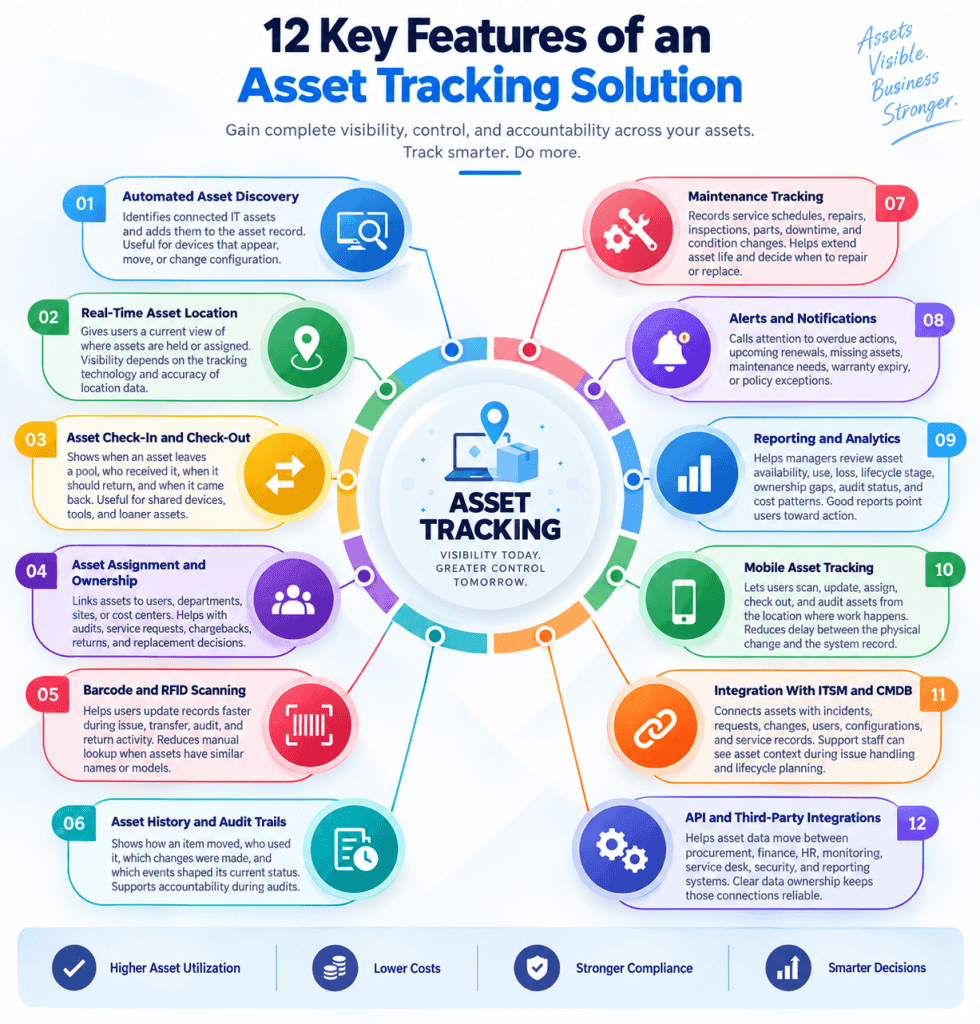
Strong asset tracking software should help users capture asset changes quickly, maintain reliable records, and support action when ownership, status, or location needs attention.
- Discovery and registration should reduce manual record creation
- Scanning and mobile access should simplify updates near the asset
- Reports should help managers act on lifecycle, audit, and utilization data
Automated Asset Discovery
Automated asset discovery identifies connected IT assets and adds them to the asset record. This is useful for devices that appear, move, or change configuration within the IT environment.
Real-Time Asset Location
Real-time asset location gives users a current view of where assets are held or assigned. The degree of visibility depends on the tracking technology, update process, and accuracy of location data.
Asset Check-In and Check-Out
Check-in and check-out records show when an asset leaves a pool, who received it, when it should return, and when it came back. This is useful for shared devices, tools, accessories, and loaner assets.
Asset Assignment and Ownership
Assignment and ownership features link assets to accountable users, departments, sites, or cost centers. This helps audits, service requests, chargebacks, returns, and replacement decisions.
Barcode and RFID Scanning
Barcode and RFID scanning help users update records faster during issue, transfer, audit, and return activity. Scanning also reduces dependence on manual lookup when assets have similar names or models.
Asset History and Audit Trails
Asset history shows how an item moved, who used it, which changes were made, and which events shaped its current status. Audit trails support accountability when records are questioned.
Maintenance Tracking
Maintenance tracking records service schedules, repairs, inspections, parts, downtime, and condition changes. It helps organizations extend asset life and decide when repair or replacement is the stronger choice.
Alerts and Notifications
Alerts and notifications call attention to overdue actions, upcoming renewals, missing assets, maintenance needs, warranty expiry, or policy exceptions. Their value depends on rules that reflect actual operating priorities.
Reporting and Analytics
Reporting and analytics help managers review asset availability, use, loss, lifecycle stage, ownership gaps, audit status, and cost patterns. Good reports point users toward action rather than leaving them with static summaries.
Mobile Asset Tracking
Mobile asset tracking lets users scan, update, assign, check out, and audit assets from the location where work happens. This reduces delay between the physical change and the system record.
Integration With ITSM and CMDB
Integration with ITSM and CMDB connects assets with incidents, requests, changes, users, configurations, and service records. Support staff can see asset context during issue handling and lifecycle planning.
API and Third-Party Integrations
API and third-party integrations help asset data move between procurement, finance, HR, monitoring, service desk, security, and reporting systems. Clear data ownership keeps those connections reliable.
Benefits of Asset Tracking
Improved Asset Visibility
Improved visibility means users can see what assets exist, where they are, who owns them, and which status applies. That view helps daily work as well as planning, audits, and support.
Reduced Asset Loss and Theft
Loss and theft become easier to detect when each asset has an owner, location, movement trail, and audit status. Gaps can be investigated earlier because the record shows where control was lost.
Better Asset Utilization
Utilization improves when unused or underused assets can be found and reassigned. This helps businesses avoid unnecessary purchases and put available assets back into circulation.
Faster Audits
Audits move faster when asset records, tags, ownership data, and location history are already organized. Staff can confirm records through scans and focus review time on exceptions.
Lower Operational Costs
Lower costs come from reducing duplicate purchases, shortening search time, improving utilization, and retiring assets with better timing. Cost control depends on accurate records that support buying and lifecycle decisions.
Improved Maintenance Management
Maintenance management improves when service schedules, repair history, condition notes, and downtime records are connected to the asset. This helps staff plan service before failures create disruption.
Better Compliance
Compliance work becomes easier when ownership, location, use, lifecycle stage, and audit data are traceable. This is useful for regulated assets, IT equipment, high-value tools, and devices with data or safety implications.
More Accurate Asset Records
Accurate records come from consistent tagging, controlled updates, regular audits, and discovery. When physical assets and digital records match, decisions carry lower risk.
Improved Employee Productivity
Productivity improves when employees spend less time searching for equipment, confirming ownership, or correcting records. A shared asset record gives them the information needed to complete requests faster.
Common Asset Tracking Use Cases
IT Asset Tracking
IT asset tracking connects technology assets with users, locations, lifecycle status, and service records. It helps IT staff manage devices from procurement through retirement.
Laptops and Computers
Laptop and computer records show assignment, location, user, serial number, warranty, configuration, and return status. This helps onboarding, support, refresh planning, and audit readiness.
Servers and Network Equipment
Servers and network equipment need records that connect hardware, location, ownership, configuration, support status, and lifecycle planning. These assets often link closely with CMDB and service operations data.
Software and Licenses
Software and license tracking helps organizations connect applications, entitlements, usage, renewals, and compliance status. It can also support reclamation when assigned software is unused.
Manufacturing Equipment Tracking
Manufacturing environments track equipment so production, maintenance, and operations staff know which assets are available, in use, due for service, or under repair.
Production Equipment
Production equipment tracking links machines with location, maintenance history, downtime, and operational status. This helps reduce disruption when equipment condition changes.
Tools and Machinery
Tools and machinery can move between operators, lines, shifts, and storage locations. Tracking keeps ownership and return status visible.
Healthcare Asset Tracking
Healthcare asset tracking helps facilities locate medical equipment, mobile devices, and supplies that support care delivery and regulated operations.
Medical Equipment
Medical equipment records may include serial numbers, location, ownership, calibration, maintenance, status, and audit history. Accuracy matters because availability can affect clinical work.
Mobile Devices
Mobile devices in healthcare settings need clear assignment and location records. Tracking helps support device recovery, access control, service handling, and replacement planning.
Construction Asset Tracking
Construction assets often move between job sites, storage yards, vehicles, and crews. Tracking helps managers maintain visibility despite constant movement.
Tools and Equipment
Tool and equipment tracking records issue, return, job-site location, condition, and ownership. It reduces search time and supports accountability.
Vehicles and Machinery
Vehicles and machinery require tracking for location, assignment, usage, maintenance, and availability. This helps planning when equipment demand changes between sites.
Warehouse and Logistics Tracking
Warehouse and logistics tracking follows assets such as containers, scanners, pallets, equipment, and movable resources. Location accuracy and movement history help staff control assets inside busy facilities.
Education and Campus Asset Tracking
Education and campus environments track computers, lab equipment, classroom devices, AV systems, furniture, and shared resources. Asset records help departments issue, recover, repair, and audit items across buildings.
Asset Tracking Software vs Manual Tracking
| Area | Manual Asset Tracking | Spreadsheet-Based Tracking | Automated Asset Tracking |
|---|---|---|---|
| Record updates | Entered after asset activity by users | Entered in shared or local files | Captured through scans, discovery, workflows, or system updates |
| Location control | Depends on memory and local notes | Shows location only when files are current | Maintains location records through controlled movement updates |
| Audit readiness | Requires heavy physical verification | Requires file cleanup before audit work | Uses history, tags, ownership, and reports to speed review |
| Visibility | Limited to whoever maintains the record | Varies by file access and update timing | Shared view across authorized users and functions |
| Decision support | Slow and difficult to verify | Useful only when entries are current | Driven by current records, alerts, and reports |
Manual Asset Tracking
Manual asset tracking uses paper notes, local registers, email updates, and memory to follow assets. This can work for a small asset base, but errors grow as ownership, locations, and movement increase.
Spreadsheet-Based Tracking
Spreadsheet-based tracking gives users a simple record, but control depends on update discipline, version handling, access rights, and reconciliation. A spreadsheet can list assets, yet it usually struggles with movement history and audit depth.
Automated Asset Tracking
Automated asset tracking connects tagging, scanning, discovery, assignments, alerts, workflows, and reports. The system creates a stronger record because asset events are captured closer to the point of activity.
When Should You Move to Asset Tracking Software?
A move to asset tracking software makes sense when the current record starts slowing down the work it is meant to support.
- Assets are missing during audits
- Employees spend time searching for shared items
- Spreadsheets disagree across departments
- Purchases happen before available assets are checked
- Ownership, location, or lifecycle status is unclear
How to Choose the Best Asset Tracking Software
Define Your Asset Tracking Requirements
Start by defining the asset categories, user groups, locations, approval steps, audit needs, and reporting questions the software must support. Clear requirements keep evaluation focused on the work that causes the greatest tracking risk.
Identify the Assets You Need to Track
List the assets that need tracking and group them by value, movement frequency, ownership model, and lifecycle stage. A laptop, vehicle, RFID-tagged tool, and warehouse item may require different data fields and update methods.
Evaluate Tracking Technologies
Evaluate barcode, QR code, RFID, GPS, NFC, BLE, and IoT-based options against the asset environment. The chosen method should match item value, movement pattern, scan feasibility, and audit expectations.
Check Automation Capabilities
Check how the software handles discovery, assignments, alerts, approvals, audit reminders, maintenance schedules, and data updates. Automation should reduce repetitive work while keeping exceptions visible for review.
Review Integration Options
Review connections with ITSM, CMDB, HR, procurement, finance, monitoring, and reporting systems. Integration design should clarify which system owns each field so asset data stays consistent.
Assess Security and Access Controls
Assess role-based access, data visibility, approval controls, audit history, and security settings. Asset data can expose device location, user assignment, and business-critical equipment details, so access should match responsibility.
Consider Scalability
Consider future growth in users, assets, locations, categories, integrations, and audit volume. A tool that works for one site should still support multi-location control as the asset base expands.
Compare Pricing and Total Cost
Compare subscription, license, implementation, migration, integration, support, training, tag, scanner, and device costs. Total cost should be judged against the operating value created by better tracking.
Evaluate Vendor Support
Evaluate support channels, response practices, training, documentation, implementation help, upgrade process, and product roadmap. Strong vendor support matters when asset tracking becomes part of everyday work.
Best Practices for Asset Tracking
Create a Standard Asset Naming System
Use a naming system that makes asset categories, locations, and identifiers easy to understand. Common naming reduces duplicate records and confusion during audits.
Use Consistent Asset Tags
Apply tags consistently and place them where users can scan or inspect them. Tag standards should consider surface type, asset movement, durability, and security.
Maintain Accurate Asset Records
Keep asset fields current as assets move, change owner, enter repair, return to stock, or reach retirement. A record loses value when lifecycle events are missing.
Assign Clear Asset Ownership
Every asset should have a responsible user, department, site, or function. Ownership supports accountability during support, return, audit, and replacement.
Automate Asset Discovery
Use automated discovery where assets connect to the IT environment. This helps detect devices that were missed during manual registration.
Conduct Regular Asset Audits
Run audits to compare the system record with physical assets. Audit results should lead to corrections, investigation, recovery, or disposal action.
Track Asset Movement
Record movement as assets change location, status, or custody. Movement history helps explain current records and resolve disputes.
Integrate Asset Data With Other Systems
Connect asset data with service, procurement, finance, HR, and configuration records where those systems depend on asset context.
Review Asset Data Regularly
Review asset data for gaps, duplicates, inactive items, missing owners, and aging records. Regular review keeps the system reliable.
Asset Tracking Implementation Guide
Define Your Asset Inventory
Define which assets will be tracked first, which fields each record needs, and who owns the inventory baseline. This creates the starting point for software setup.
Categorize Your Assets
Group assets by type, value, location, risk, and lifecycle requirements. Categories help determine fields, workflows, tags, and reports.
Select a Tracking Method
Choose the tracking method that fits each asset category. Some items may need barcode scanning, while others may require RFID, GPS, NFC, BLE, IoT, or automated discovery.
Tag and Register Assets
Apply tags and create asset records with required details. Registration should include enough information to support assignment, movement, service, and audit work.
Configure Tracking Software
Configure fields, roles, workflows, alerts, integrations, reports, and dashboards. The setup should mirror the asset process rather than force users into unclear workarounds.
Assign Asset Ownership
Assign each asset to a responsible person, department, location, or cost center. Ownership should be visible during audits and daily service activity.
Train Employees
Train users on scanning, assignment, transfer, return, repair, and audit steps. Training should explain how each update affects the shared asset record.
Monitor and Improve the Process
Review adoption, record quality, audit results, and exception trends after launch. Use those findings to refine workflows and controls.
Common Asset Tracking Challenges
Inaccurate Asset Data
Asset data becomes inaccurate when movements, assignments, repairs, or disposals are missed. Regular audits and controlled updates reduce the gap between the system and physical assets.
Missing or Unassigned Assets
Missing or unassigned assets create ownership confusion. Each asset should have a current status, location, and accountable owner or function.
Manual Data Entry
Manual entry increases delay and error risk. Scanning, discovery, integrations, and mobile updates help users capture changes closer to the physical event.
Poor Asset Tagging
Poor tagging makes scans difficult and audits slower. Tags should be durable, readable, consistently placed, and suited to the asset environment.
Siloed Asset Information
Siloed records create conflicting answers for IT, finance, procurement, facilities, and operations. Integration and shared data standards reduce those conflicts.
Low Employee Adoption
Adoption suffers when users see tracking as extra administration. Simple workflows, mobile access, and clear ownership help build better usage.
Tracking Assets Across Multiple Locations
Multi-location tracking requires consistent location names, transfer rules, ownership standards, and audit practices. Without common rules, every site can create its own version of the record.
Role of AI and Automation in Asset Tracking
AI and automation strengthen asset tracking when they help users find assets, classify records, detect exceptions, and act on lifecycle signals faster. The value comes from converting asset data into next steps.
AI-Powered Asset Discovery
AI-powered asset discovery can support identification of connected devices, software-linked assets, and asset patterns that need classification or review.
Automated Asset Classification
Automated classification groups assets by type, ownership, risk, location, or lifecycle stage based on available data. This reduces cleanup work when asset records grow quickly.
Intelligent Asset Alerts
Intelligent alerts can flag missing assets, unusual movement, inactive devices, warranty risk, delayed returns, or ownership gaps. Alerts should focus on action-worthy exceptions.
Predictive Maintenance
Predictive maintenance uses history and asset signals to identify items that may need service before failure disrupts work. This is useful for high-value equipment and operational assets.
Asset Anomaly Detection
Anomaly detection looks for asset records or movement patterns that differ from normal activity. Users can then review possible loss, misuse, data errors, or process gaps.
Automated Audit and Reconciliation
Automated audit and reconciliation compare discovered assets, scanned assets, assigned assets, and existing records. The result is a faster path to verified data.
Measuring Asset Tracking Performance
Asset Utilization Rate
Asset utilization rate shows how well available assets are being used. Low utilization can reveal excess purchases, idle equipment, or reassignment opportunities.
Asset Accuracy Rate
Asset accuracy rate compares asset records with verified physical assets. It is a useful measure of record trust and audit quality.
Lost Asset Rate
Lost asset rate shows how often assets become missing or unrecoverable. A rising rate points to ownership, movement, or control issues.
Audit Completion Time
Audit completion time measures how long it takes to verify asset records. Shorter audit cycles usually show stronger tagging, location data, and record discipline.
Maintenance Cost
Maintenance cost shows how much the organization spends to keep assets in working condition. It helps compare repair history with replacement timing.
Asset Recovery Rate
Asset recovery rate shows how often missing, overdue, or former employee assets are recovered. This is useful for IT, shared equipment, and mobile assets.
Asset Lifecycle Cost
Asset lifecycle cost captures the cost of purchase, use, support, maintenance, storage, and disposal. It helps managers judge the full cost of ownership.
Future Trends in Asset Tracking
AI-Powered Asset Intelligence
AI-powered asset intelligence will help organizations move from asset lists to recommendations on utilization, risk, maintenance, recovery, and lifecycle decisions.
IoT-Based Tracking
IoT-based tracking will expand the type of asset data available, including movement, condition, location, environment, and usage signals.
Real-Time Location Systems
Real-time location systems will help organizations track assets inside facilities, campuses, hospitals, warehouses, and field environments with stronger location context.
Predictive Maintenance
Predictive maintenance will keep growing as asset systems combine service history, usage, and condition data to reduce unexpected downtime.
Automated Asset Management
Automated asset management will connect tracking with approvals, workflows, audits, reclamation, and reporting so routine actions move with less manual effort.
Connected Enterprise Assets
Connected enterprise assets will link IT, facilities, finance, procurement, service, and operations records through shared asset data. This will make asset tracking part of broader business control.
Frequently Asked Questions
What is asset tracking?
Asset tracking is the process of identifying assets and recording their location, owner, status, movement, and history through the asset lifecycle.
How does asset tracking work?
Asset tracking works by assigning each asset a record and updating that record through tagging, scanning, discovery, assignment, movement tracking, alerts, reports, and audits.
What are the different types of asset tracking?
Common types include IT asset tracking, physical asset tracking, equipment tracking, vehicle and fleet tracking, warehouse asset tracking, and enterprise asset tracking.
What is the difference between asset tracking and asset management?
Asset tracking focuses on location, ownership, movement, and status. Asset management covers the wider lifecycle, including planning, procurement, maintenance, compliance, cost, and retirement.
What is the best asset tracking software?
The best asset tracking software depends on the asset types, locations, tracking technologies, integrations, security needs, audit requirements, automation depth, and vendor support the business needs.
What features should asset tracking software have?
Useful features include automated discovery, real-time location, check-in and check-out, assignment, scanning, audit trails, maintenance tracking, alerts, reporting, mobile access, ITSM integration, CMDB integration, and APIs.
Which technology is best for asset tracking?
The best technology depends on the use case. Barcode and QR code scanning suit many controlled workflows, while RFID, GPS, NFC, BLE, and IoT-based tracking suit specialized location or automation needs.
Can asset tracking software track IT assets?
Yes. Asset tracking software can track laptops, desktops, servers, network equipment, peripherals, mobile devices, ownership, location, warranty, lifecycle status, and related IT records.
How much does asset tracking software cost?
Cost depends on licenses, users, assets, implementation, integrations, tags, scanners, support, training, and required modules.
How do businesses implement an asset tracking system?
Businesses implement an asset tracking system by defining the asset inventory, categorizing assets, selecting tracking methods, tagging and registering assets, configuring workflows, assigning ownership, training users, and reviewing results.