


IT teams now work under a heavier service load. Employees expect fast answers, business teams depend on digital services, and IT leaders need a better view of work moving through the service desk. Older help desk models often rely on email chains, manual assignment, and scattered status updates. That creates delay, weak ownership, and missed SLA targets.
IT ticket management gives this work a structured path. Every issue, request, question, and service need becomes trackable from intake to closure. With AI and automation added to the process, teams can classify tickets faster, route work to the right queue, and give agents the data they need before a backlog grows.
What Is IT Ticket Management?
How IT ticket management works
IT ticket management is the process of capturing, categorizing, assigning, tracking, and closing IT requests through a controlled system. A user may report a laptop issue, request software access, ask for a password reset, or raise an application outage. The IT ticket management software records the request, adds ownership, sets priority, links the ticket to an SLA, and keeps the service team and user aligned through closure.
Differences between a help desk and an ITSM ticketing system
A help desk focuses mainly on user issues and quick fixes. An ITSM ticketing system connects those tickets with broader IT service processes such as incident, problem, change, service request, asset, and CMDB workflows. That broader connection matters because many tickets have a dependency. A slow application may relate to an infrastructure event, an expired license, or a recent change. ITSM gives agents the surrounding data needed to act faster.
Typical IT ticket lifecycle
- Intake through portal, email, chat, phone, or monitoring alert
- Classification by service type, urgency, user group, and business impact
- Assignment to the right queue, agent, or automated workflow
- SLA tracking, escalation, communication, and status updates
- Resolution, closure, user confirmation, and knowledge capture
Why IT Ticket Management Matters for Modern Enterprises
For enterprise IT teams, ticket management affects daily service quality and long-term operating cost. A ticket queue is also a record of what employees struggle with, which systems create repeat issues, and where automation can remove repetitive work. When that data remains buried in inboxes, leaders lose the ability to spot trends and fix recurring service gaps.
A mature ITSM ticketing system improves incident response, SLA governance, and employee experience. Agents can see ticket priority, service history, asset details, and related incidents in one workflow.
Managers gain better visibility into workload, breached SLAs, aging tickets, and high-volume categories. Finance and operations leaders benefit through reduced rework, fewer avoidable escalations, and better use of IT staff time.
Core Features of IT Ticket Management Software
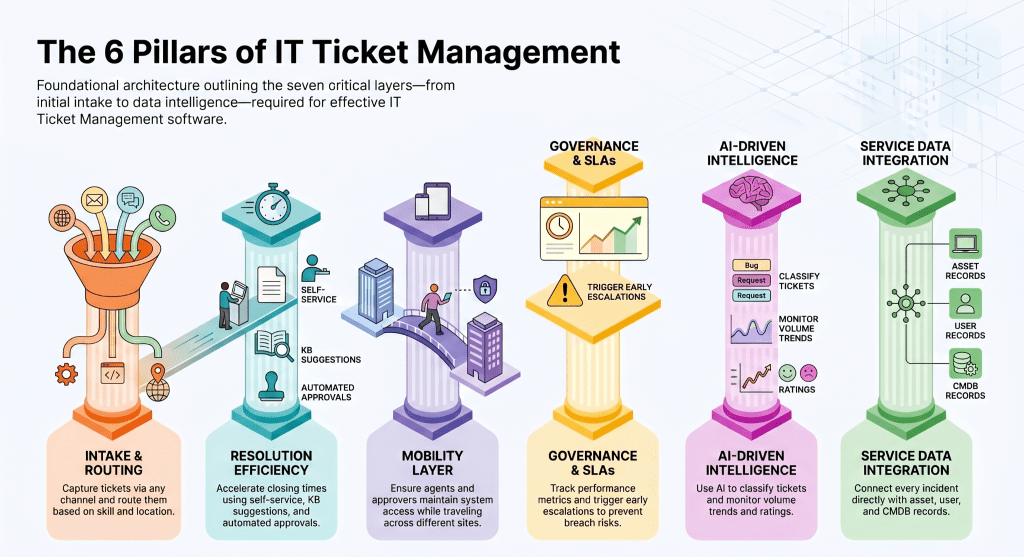
The right IT ticket management software needs enough depth to manage high-volume requests while keeping the agent and employee experience practical. The core feature set should cover intake, routing, governance, automation, insight, and integration.
- Automated ticket routing that sends work to the right queue based on category, location, service, impact, and agent skill
- SLA and escalation management that tracks commitments, flags delay risk, and moves tickets before breach points
- Omnichannel ticket intake through portal, email, chat, phone, and monitoring systems
- Self-service portal access for common requests, status checks, and knowledge base articles
- Knowledge base integration that suggests articles to users and agents during intake and resolution
- Workflow automation for approvals, fulfillment, task assignment, and recurring service actions
- AI-powered ticket categorization that reduces manual triage and improves routing quality
- Reporting and analytics that show SLA performance, volume trends, backlog, and user satisfaction
- CMDB and asset management integration that links incidents to devices, users, services, and dependencies
- Mobile access so agents and approvers can handle work while moving across locations
How an ITSM Ticketing System Improves IT Operations
Incident management
When an incident enters the system, the ITSM ticketing system can classify severity, identify affected services, check linked assets, and trigger escalation paths. This reduces the time agents spend looking for ownership details and gives managers a live view of service impact.
Problem management
Recurring incidents can point to a deeper problem. Ticket patterns help teams identify repeat failure points, compare related events, and create root cause actions. This turns the ticket queue into an input for service improvement rather than a list of one-off fixes.
Change management
Tickets often connect to planned or recent changes. An ITSM workflow can link incidents, affected CIs, approvals, and change records. This helps teams judge risk, maintain audit records, and trace service issues back to recent updates.
Service request management
Requests such as access, devices, software, and onboarding can move through preapproved workflows. Standard request paths reduce back-and-forth communication, improve user experience, and give IT a repeatable way to fulfill common needs.
Asset visibility and tracking
When a ticket links to an asset record, agents can view device owner, warranty, location, history, and related incidents. This avoids guesswork and helps teams decide whether to repair, replace, approve access, or escalate to another group.
Common Challenges in IT Ticket Management
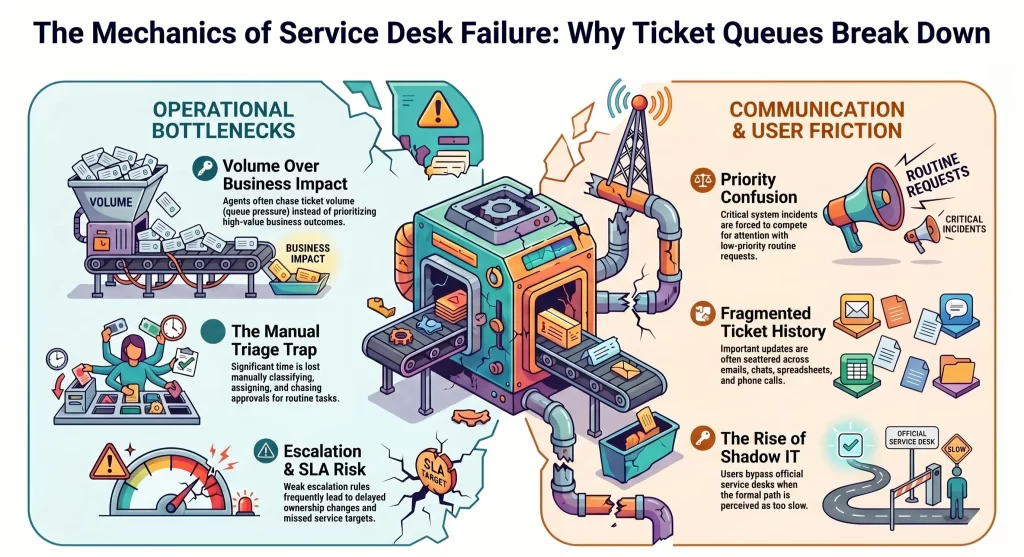
Ticket management breaks down when volume rises faster than process maturity. Many teams start with simple queues and later face complexity from hybrid work, multiple service channels, and different business units using separate communication habits.
- Ticket overload that leaves agents reacting to queue size rather than business impact
- Poor prioritization that treats routine requests and urgent incidents too similarly
- Limited automation that keeps agents busy with repetitive classification and approval work
- Communication silos that split updates between email, chat, spreadsheets, and calls
- Missed SLAs caused by weak escalation rules and delayed ownership changes
- Shadow IT, where users bypass formal request channels because the official path feels slow
Best Practices for Better IT Ticket Management
Define SLAs that agents can use
SLA policy should be easy for service teams to apply during live work. Define response and resolution targets by service type, urgency, and business impact. Keep escalation paths visible so agents know when a ticket needs manager attention or specialist review.
Automate repetitive workflows
Automation should remove low-value manual actions such as ticket assignment, approval reminders, password reset paths, and status updates. This helps agents spend time on diagnosis, user communication, and service restoration.
Use AI for ticket prioritization
AI can read ticket text, detect intent, recommend a category, and assign priority based on impact signals. Teams still need governance, but AI improves speed during intake and helps newer agents handle complex queues with better guidance.
Connect CMDB and monitoring tools
Tickets become richer when they connect with monitoring alerts, asset records, and service dependencies. This gives agents technical context, helps incident managers assess impact, and gives leaders better insight into service health.
Track ITSM KPIs
Useful KPIs include first response time, MTTR, SLA compliance, reopened tickets, backlog age, ticket deflection, user satisfaction, and category volume. Review these metrics by service, region, queue, and team so improvement work remains grounded in real demand.
AI and Automation in Modern IT Ticket Management
AI and automation change ticket management by helping the system act earlier in the request lifecycle. Instead of waiting for an agent to read every incoming ticket, the platform can classify, route, recommend, and trigger workflows as soon as the request arrives.
- AI ticket classification reads request language and maps tickets to categories with higher speed
- Predictive incident management flags patterns that may lead to service disruption
- Intelligent routing assigns tickets by skill, availability, region, and service ownership
- Conversational assistance gives users guided answers before a ticket reaches an agent
- Workflow orchestration connects approvals, notifications, fulfillment steps, and closure tasks
For IT leaders, the value is control. Automation reduces repeated manual work while AI improves decision speed at intake. The best results come when teams pair these capabilities with well-defined workflows, good knowledge content, and disciplined SLA governance.
How to Choose the Right IT Ticket Management Software
Tool selection should start with the work your service teams handle every day. A platform may look attractive in demos, but selection should focus on workflow depth, integration reach, reporting needs, security controls, and the cost of running the system after launch.
- Check scalability by reviewing agent volume, business unit needs, region coverage, and workflow growth.
- Review implementation effort, including configuration, data import, user training, and admin skills.
- Evaluate integrations with monitoring, CMDB, asset management, identity, email, collaboration, and endpoint tools.
- Inspect reporting depth for SLA, MTTR, backlog, category trends, agent workload, and user satisfaction.
- Compare automation depth across routing, approvals, alerts, knowledge suggestions, and repetitive requests.
- Assess security and compliance through access controls, audit trails, data handling, and admin governance.
- Review total cost of ownership across licenses, configuration, training, integrations, admin effort, and growth.
Why Modern Enterprises Choose Infraon ITSM
Infraon ITSM gives enterprises a unified platform for ticket management, workflows, SLA governance, and connected service operations. It brings service desk activity together with automation, asset visibility, CMDB links, and dashboards so IT leaders can manage daily demand and long-term service quality from one operating view.
For ticket-heavy teams, Infraon can help automate routing, escalation, and service request paths while giving agents the data they need during resolution. AI-powered workflows can reduce manual triage, while real-time dashboards help managers track SLA risk, queue load, and recurring issues. Asset and CMDB integration adds useful service context, which matters when incidents involve devices, applications, users, locations, or dependencies.
This approach works well for enterprises that need ticket management tied to wider IT operations rather than a separate queueing layer. Internal link anchors can point to Infraon ITSM, CMDB, IT asset management, and incident management pages during CMS upload.
Future Trends in IT Ticket Management
Autonomous service desks
Service desks will handle routine requests through automated paths that classify, approve, fulfill, and close common ticket types with agent oversight. Password resets, access requests, software provisioning, and status checks are natural starting points.
AI copilots
AI copilots will assist agents with summaries, likely causes, related tickets, knowledge suggestions, and next action guidance. This can reduce time spent reading long histories and improve consistency across agent teams.
Hyperautomation
Ticket management will connect with monitoring, identity, asset, HR, and collaboration tools to reduce handoffs. The aim is a service flow where the platform handles repeatable work and agents handle judgment-heavy issues.
Predictive IT operations
Ticket history, monitoring alerts, and service data can reveal patterns before users report broad disruption. Predictive signals can help teams act earlier and reduce repeated incidents.
Experience-centered ITSM
IT leaders will measure service value through user experience, request speed, communication quality, and outcome tracking. Ticket closure alone will carry less weight than whether employees can keep working with minimal friction.
Conclusion
IT ticket management has moved from basic queue handling to a core operating system for enterprise service delivery. A mature ITSM ticketing system helps teams classify work, protect SLAs, automate routine requests, and connect tickets with assets, services, and business impact.
Infraon ITSM helps modern teams improve service operations, reduce MTTR, and manage ticket volume through automation, AI-powered workflows, and centralized visibility. Explore Infraon ITSM to modernize IT service operations with a platform that connects tickets, assets, CMDB, and service workflows.
Frequently Asked Questions
What is IT ticket management?
IT ticket management is the process of recording, categorizing, assigning, tracking, and closing IT requests through a structured system. It gives every request an owner, priority, SLA, status, and resolution path so IT teams can manage work consistently.
What is an ITSM ticketing system?
An ITSM ticketing system is a service management platform that handles tickets across incident, problem, change, service request, asset, and CMDB workflows. It connects user requests with broader IT operations data.
How does IT ticket management software work?
IT ticket management software captures requests from multiple channels, creates tickets, classifies them, assigns ownership, tracks SLAs, triggers workflows, and records the full resolution history.
What are the benefits of IT ticketing systems?
Key benefits include faster incident response, better SLA control, lower manual effort, centralized service visibility, improved employee experience, and better reporting for IT leaders.
What features should IT ticket management software include?
Look for automated routing, SLA management, self-service, knowledge base links, workflow automation, AI categorization, reporting, CMDB integration, asset visibility, and mobile access.
How does AI improve IT ticket management?
AI can classify tickets, detect intent, suggest priority, recommend knowledge articles, route work, and assist agents with summaries and next action guidance.
What is the difference between a help desk and an ITSM system?
A help desk handles user issues and requests. ITSM connects those tickets to wider service processes such as incident, problem, change, asset, and service request management.
How do SLAs work in ticket management?
SLAs define response and resolution targets for each ticket type. The system tracks time, warns teams before breach risk, and escalates tickets based on policy.