


ITSM management becomes important when business users depend on technology for daily work but service handling is spread across emails, chats, calls, and disconnected tools. Incidents take longer to resolve, requests lack status visibility, and changes carry risk because ownership and data are unclear.
A structured ITSM approach gives IT services a common operating model. It defines how services are requested, delivered, supported, measured, improved, and connected with business outcomes.
What Is ITSM?
What Does ITSM Mean?
ITSM means IT Service Management. It refers to the way IT services are designed, delivered, supported, and improved for users and business functions.
What Is IT Service Management?
IT Service Management is the discipline of managing IT as a service. It covers the processes, tools, roles, workflows, data, and policies used to handle incidents, requests, changes, assets, knowledge, service levels, and continual improvement.
How ITSM Works
ITSM works by turning user needs and IT events into controlled workflows. A request is logged, categorized, routed, approved when needed, resolved, closed, and measured. The same structure can apply to incidents, access needs, hardware requests, software requests, onboarding, and changes.
Why ITSM Matters to Modern Businesses
Modern businesses need IT services that are dependable, visible, and aligned with work priorities. ITSM helps reduce service friction, improve response quality, control risk, and give leaders evidence for service decisions.
How Does ITSM Work?
Identify and Manage IT Services
The process begins by identifying the IT services users rely on. This can include service desk support, access management, applications, devices, network connectivity, collaboration tools, and business systems.
Handle Service Requests and Incidents
ITSM separates service requests from incidents so each follows the right workflow. A request asks for a service, while an incident reports a disruption. Clear intake and routing help staff respond with the right context.
Manage Changes and Risks
Change management gives IT a controlled path for assessing, approving, scheduling, and reviewing changes. This reduces the chance that a service update creates avoidable disruption.
Monitor Service Performance
Service performance is monitored through SLA compliance, MTTR, backlog, availability, CSAT, and other measures. Monitoring helps managers spot service strain before it becomes a wider business issue.
Improve Services Continuously
ITSM should improve through repeated review. Service data, user feedback, incident trends, and workflow bottlenecks show where processes need adjustment.
- Plan: Define the service goal, workflow, ownership, and success measures before changes are made.
- Deliver: Provide the service through agreed channels, processes, approvals, and service commitments.
- Operate: Run the service daily, handle requests and incidents, and maintain the supporting records.
- Measure: Review SLA performance, user experience, resolution patterns, backlog, and operational risk.
- Improve: Use the findings to refine workflows, automation, knowledge, routing, and service ownership.
Types of ITSM
Cloud-Based ITSM
Cloud-based ITSM runs through a provider-hosted platform accessed by web or application interfaces. It can support distributed users, faster deployment, and easier access across locations.
On-Premise ITSM
On-premise ITSM runs within infrastructure controlled by the organization. It can suit businesses with strict internal hosting, integration, or administrative control needs.
Enterprise ITSM
Enterprise ITSM supports large organizations with multiple functions, sites, services, approval paths, reporting needs, and governance requirements.
AI-Powered ITSM
AI-powered ITSM uses AI to classify tickets, route work, suggest resolutions, support virtual agents, assist service desk staff, and identify service risks.
Managed IT Service Management
Managed IT Service Management involves external providers handling service desk, infrastructure, user support, or process operations under agreed service terms.
Core ITSM Service Management Processes
Incident Management
Incident management restores services after disruption. It gives staff a standard path to log, assess, route, resolve, and review issues that affect users or business operations.
Detect and Log Incidents
Incidents are captured through portals, email, phone, monitoring alerts, or integrations. The record should include symptoms, impact, affected service, user, device, and time.
Categorize and Prioritize
Categorization helps route incidents to the right group, while priority reflects urgency and business impact. Strong intake reduces delays caused by missing information.
Assign and Resolve
Assignment moves the incident to the right owner. Resolution work may include troubleshooting, escalation, knowledge use, automation, or coordination with other support functions.
Close and Review
Closure confirms that the incident is resolved and documented. Review helps identify recurring issues, knowledge gaps, or process delays.
Problem Management
Problem management focuses on root causes behind recurring or high-impact incidents. It helps IT reduce repeat disruption through investigation, known error records, workarounds, and permanent fixes.
Change Management
Change management controls service changes through assessment, approval, scheduling, implementation, and review. It protects service stability while supporting needed updates.
Service Request Management
Service request management handles standard user needs such as access, software, devices, information, and routine service actions. Catalogs and workflows make request handling clearer for users and IT staff.
Knowledge Management
Knowledge management captures answers, procedures, fixes, policies, and service guidance. A useful knowledge base supports faster resolution and self-service adoption.
Service Level Management
Service level management defines service commitments and tracks performance against them. SLA data helps managers review delivery quality and risk.
IT Asset Management
IT Asset Management connects IT services with the devices, software, licenses, and infrastructure that support them. This gives service staff asset context during incidents, requests, and changes.
Configuration Management
Configuration management maintains information about configuration items and their relationships. A CMDB helps staff understand service dependencies before incident or change work.
Continual Improvement
Continual improvement uses service data and feedback to refine processes, reduce bottlenecks, and strengthen service outcomes over time.
Key Features of an IT Service Management Tool
An IT Service Management tool should bring request intake, incident handling, workflows, knowledge, assets, SLAs, reporting, and automation into a shared system.
- User intake should be simple enough for daily use
- Workflow rules should reflect service ownership and approvals
- Reporting should help managers act on service performance
Ticket and Case Management
Ticket and case management captures issues and requests, organizes them by category and priority, assigns ownership, and tracks progress through closure.
Service Catalog
A service catalog gives users a clear menu of available services, request forms, approvals, and expected fulfillment paths.
Workflow Automation
Workflow automation routes tickets, sends approvals, triggers notifications, updates statuses, and handles repeatable service steps.
Self-Service Portal
A self-service portal gives users a place to request services, report issues, search knowledge, check status, and reduce dependence on direct agent contact.
Knowledge Base
A knowledge base stores articles, troubleshooting steps, policies, FAQs, and service guidance for users and support staff.
SLA Management
SLA management tracks commitments, deadlines, escalation rules, breach risk, and service performance by category or priority.
CMDB
A CMDB stores configuration items and relationships that help IT understand dependencies, impact, and change risk.
Asset Management
Asset management connects tickets with devices, software, users, locations, warranties, and lifecycle records.
Reporting and Analytics
Reporting and analytics show performance trends, backlog, SLA risk, resolution time, request demand, and service quality.
Omnichannel Support
Omnichannel support captures service interactions from portals, email, chat, phone, monitoring tools, and other channels in a shared workflow.
Integrations and APIs
Integrations and APIs connect ITSM with monitoring, identity, HR, asset, CMDB, collaboration, and business systems.
AI-Powered Service Desk
An AI-powered service desk can classify tickets, suggest answers, support virtual agents, summarize cases, and assist agents during resolution.
Benefits of ITSM
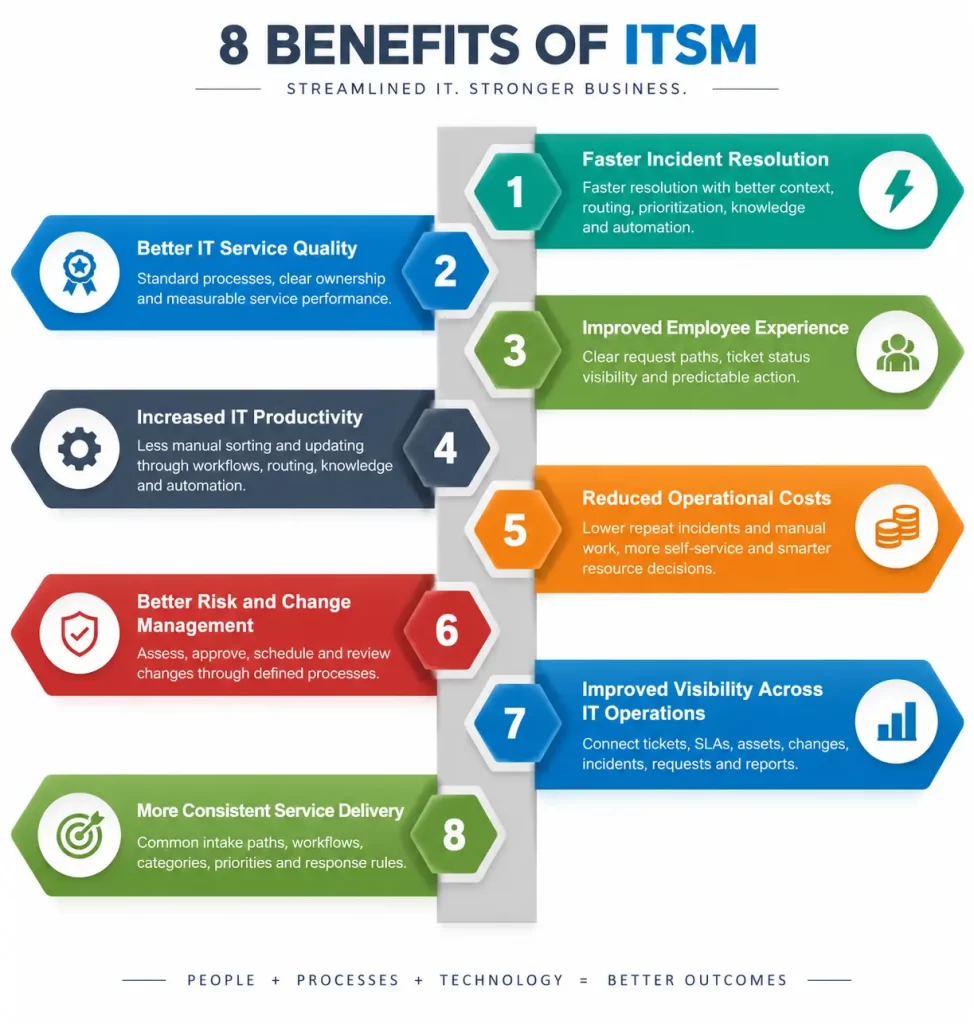
Faster Incident Resolution
Resolution becomes faster when incidents are logged with useful context, routed correctly, prioritized by impact, and supported by knowledge and automation.
Better IT Service Quality
Service quality improves when work follows standard processes, ownership is clear, and service performance is reviewed through agreed measures.
Improved Employee Experience
Employees get a better experience when they know where to request help, what status their ticket holds, and when action is expected.
Increased IT Productivity
IT staff spend less time sorting incomplete requests or repeating manual updates when workflows, routing, knowledge, and automation handle routine work.
Reduced Operational Costs
Costs can fall when recurring incidents decline, manual work is reduced, self-service use grows, and service data supports smarter resource decisions.
Better Risk and Change Management
Risk control improves when changes are assessed, approved, scheduled, and reviewed through a defined process linked to service and configuration data.
Improved Visibility Across IT Operations
Visibility improves when tickets, SLAs, assets, changes, incidents, requests, and reports live in one operating view.
More Consistent Service Delivery
Service delivery becomes consistent when users follow the same intake paths and IT staff use common workflows, categories, priorities, and response rules.
Use Cases of ITSM
IT Help Desk Management
IT help desk management centralizes user issues, requests, assignments, knowledge, escalations, and service status in a controlled workflow.
Incident and Outage Management
Incident and outage management helps IT respond to service disruption, assess impact, coordinate ownership, and communicate status until service is restored.
Employee Onboarding
Onboarding workflows coordinate devices, accounts, access, applications, approvals, and checklists so new employees can start work with the right services.
Access Request Management
Access request management captures user role, system, reason, approval, security review, fulfillment, and audit history.
Software and Hardware Requests
Software and hardware requests can flow through catalogs, approvals, license checks, procurement, installation, assignment, and closure.
IT Asset Management
IT Asset Management use cases connect support tickets with asset ownership, warranty, lifecycle, configuration, location, and compliance data.
Change Management
Change management use cases cover service updates, infrastructure changes, application releases, approvals, scheduling, risk review, and post-change validation.
Enterprise Service Management
Enterprise Service Management extends service workflows to departments such as HR, facilities, finance, and administration using the same request and fulfillment principles.
ITSM vs ITIL
What Is the Difference Between ITSM and ITIL?
ITSM is the discipline of managing IT services. ITIL is a widely used framework that gives guidance for service management practices, continual improvement, and service value.
How ITIL Supports ITSM
ITIL supports ITSM by giving organizations a structured way to think about incidents, changes, service requests, service levels, knowledge, assets, configurations, and improvement.
Can You Implement ITSM Without ITIL?
Yes. A business can implement ITSM processes using its own operating model. ITIL-based guidance is useful when the organization wants a recognized framework and common service management language.
When Should Businesses Use an ITIL-Based Approach?
An ITIL-based approach is useful when services span many functions, governance requirements are strong, service consistency matters, and the organization wants a repeatable model for improvement.
How to Choose the Right IT Service Management Tool
Define Your ITSM Requirements
Start with the services, users, processes, channels, integrations, SLAs, reports, and governance needs the tool must support.
Evaluate Core ITSM Features
Evaluate ticketing, catalog, workflow, knowledge, SLA, CMDB, asset, reporting, omnichannel, API, and AI service desk capabilities against daily service work.
Check Automation Capabilities
Check how the tool handles routing, approvals, notifications, escalations, status updates, incident creation, and repeatable fulfillment steps.
Review Integration Options
Review integrations with identity, HR, monitoring, asset, CMDB, collaboration, email, endpoint, and business systems.
Assess Security and Compliance
Assess access controls, audit logs, data handling, approval records, role permissions, and governance features.
Consider Scalability
Consider future growth in users, tickets, services, locations, departments, workflows, and data volume.
Compare Pricing and Total Cost
Compare license cost, implementation, integrations, migration, support, training, administration, and any paid modules needed for routine work.
Evaluate Vendor Support
Evaluate implementation help, support availability, response channels, documentation, training, escalation practices, and roadmap clarity.
How to Implement ITSM
Assess Your Current IT Processes
Review current request paths, incident handling, approvals, service data, reporting, pain points, and user feedback.
Define ITSM Goals
Define goals that connect to service quality, response speed, SLA performance, user experience, cost control, and risk reduction.
Prioritize High-Impact Processes
Start with processes that create the highest service friction, such as incident handling, service requests, access, onboarding, or change control.
Select an ITSM Tool
Choose a tool that supports required workflows, integrations, reporting, automation, security, and future growth.
Configure Workflows and SLAs
Configure request forms, routing rules, approvals, priorities, categories, SLA targets, escalations, and dashboards.
Train IT Teams and Users
Train IT staff and users on request paths, forms, ticket updates, knowledge use, approvals, and service expectations.
Launch and Monitor
Launch with close monitoring of usage, backlog, SLA risk, routing issues, and user questions.
Continually Improve
Use service data and feedback to refine workflows, knowledge, automation, categories, and reporting after launch.
Best Practices for ITSM
Standardize ITSM Processes
Use common intake, categorization, priority, routing, approval, escalation, and closure rules so service work stays consistent.
Automate Repetitive Work
Automate repeatable steps such as routing, approvals, notifications, status changes, and routine fulfillment checks.
Build a Strong Knowledge Base
Create useful articles for common incidents, requests, policies, and service guidance. Review content based on ticket trends and user search data.
Use Self-Service Where Possible
Use self-service for common requests, status updates, and knowledge access so users can complete simple actions quickly.
Define Clear SLAs
Define SLA targets by service, priority, impact, and urgency. Escalation rules should show ownership before breach risk rises.
Keep CMDB and Asset Data Accurate
Keep configuration and asset data current so incidents, changes, and requests carry the right context.
Measure Service Performance
Measure MTTR, FCR, SLA compliance, CSAT, backlog, deflection, availability, and change success to understand service health.
Focus on Business Outcomes
Connect ITSM reporting with user experience, productivity, risk control, service continuity, and operational cost.
Common ITSM Challenges
Low User Adoption
Low adoption happens when users find the process slow, confusing, or disconnected from how they work. Clear catalogs, useful forms, and fast status updates help adoption.
Siloed IT Processes
Siloed processes create gaps between incidents, assets, changes, knowledge, and monitoring. Shared workflows and data reduce those gaps.
Poor Service Data
Poor service data weakens reporting, routing, automation, and improvement. Intake forms, required fields, and regular review improve data quality.
Manual Workflows
Manual workflows slow service handling and increase handoff risk. Automation should address routine routing, approvals, status updates, and reminders.
Complex Integrations
Complex integrations can create data conflicts when systems use different identifiers or ownership rules. Clear integration design reduces confusion.
Resistance to Change
Resistance grows when new processes feel like extra work. Training, user input, visible benefits, and simple workflows help build acceptance.
Lack of Clear ITSM Metrics
Unclear metrics make improvement difficult. A focused set of measures should connect service activity with user experience and business impact.
AI and Automation in ITSM
AI and automation now play a larger role in ITSM because service desks handle high ticket volume, recurring issues, and faster business expectations. The strongest use cases connect AI with triage, knowledge, incident prediction, workflow execution, and agent support.
AI-Powered Ticket Classification
AI-powered classification can read ticket content and suggest categories, priorities, and affected services. This helps reduce sorting delays and improves routing quality.
Intelligent Ticket Routing
Intelligent routing uses ticket context, service ownership, skills, workload, and history to send work to the right resolver group.
AI Service Desk and Virtual Agents
AI service desk and virtual agents can answer common questions, guide users through requests, recommend knowledge, and gather context before human support is needed.
Automated Incident Resolution
Automated resolution can run approved actions for common incidents, such as account unlocks, password resets, service restarts, or standard configuration fixes.
Predictive Incident Management
Predictive incident management uses service patterns and operational data to identify likely disruption before users are widely affected.
AI-Powered Knowledge Management
AI-powered knowledge management can suggest articles, find gaps, summarize cases, and recommend content updates based on ticket trends.
Agent Assist for IT Teams
Agent assist tools can summarize ticket history, suggest next actions, retrieve related knowledge, and reduce time spent reading long case records.
AI-Driven Change Risk Analysis
AI-driven change risk analysis can review change context, past incidents, affected services, and dependency data to highlight risk before implementation.
ITSM and AIOps: How They Work Together
ITSM vs AIOps
ITSM manages services, requests, incidents, changes, and workflows. AIOps analyzes operational data, alerts, events, and patterns so IT can detect issues earlier and reduce noise.
Connecting Monitoring With ITSM
Connecting monitoring with ITSM turns infrastructure and application signals into service workflows. This gives incident records better context and reduces the delay between detection and action.
Automated Incident Creation
Automated incident creation converts qualified alerts into tickets with service, device, impact, severity, and event data. This improves intake quality and reduces manual logging.
Alert Correlation and Noise Reduction
Alert correlation groups related signals so staff can focus on the underlying issue rather than reviewing many separate alerts from the same event.
Proactive Incident Prevention
Proactive prevention uses trends, thresholds, anomalies, and dependency data to identify risk early enough for action before a service incident spreads.
Measuring ITSM Success
Mean Time to Resolution (MTTR)
MTTR measures the average time required to resolve incidents. It helps managers review response speed and process friction.
First Contact Resolution (FCR)
FCR measures how often issues are resolved during the first support interaction. Higher FCR can show strong knowledge, routing, and agent readiness.
SLA Compliance
SLA compliance shows how often service work meets agreed targets. It is a core measure for service reliability and breach risk.
Customer Satisfaction (CSAT)
CSAT captures how users rate their service experience. It adds user sentiment to operational measures.
Ticket Backlog
Ticket backlog shows unresolved work. Backlog trends can reveal demand surges, staffing strain, routing issues, or process bottlenecks.
Ticket Deflection Rate
Ticket deflection rate shows how often users solve issues through self-service or knowledge before raising a ticket.
Service Availability
Service availability shows how consistently services remain usable. It connects service management with business continuity.
Change Success Rate
Change success rate shows how often changes are completed as planned without causing incidents or rollback.
Future Trends in ITSM
AI-Driven Service Management
AI-driven service management will keep expanding into classification, routing, knowledge, prediction, recommendations, and workflow execution.
Agentic ITSM
Agentic ITSM will use AI agents to complete defined service actions with governance, approvals, and visibility built into the workflow.
Hyperautomation
Hyperautomation will connect workflow automation, AI, integrations, analytics, and orchestration so service processes can handle routine work with less manual effort.
Predictive Service Management
Predictive service management will use data patterns to identify likely incidents, SLA risks, workload spikes, and user-impacting issues earlier.
Enterprise Service Management
Enterprise Service Management will continue extending ITSM workflow models into departments outside IT, including HR, facilities, finance, and administration.
Low-Code ITSM Automation
Low-code ITSM automation will help administrators create request flows, approvals, notifications, and service processes with reduced development effort.
Proactive IT Operations
Proactive IT operations will connect monitoring, AIOps, ITSM, and automation so service issues can be detected and handled earlier.
Frequently Asked Questions
What is ITSM?
ITSM is the discipline of managing IT services through defined processes, tools, workflows, roles, data, and service measures.
What is IT service management?
IT service management means managing IT as a service for users and business functions. It covers incidents, requests, changes, knowledge, SLAs, assets, configurations, and improvement.
What does an IT service management tool do?
An IT service management tool helps organizations log tickets, manage requests, automate workflows, track SLAs, maintain knowledge, connect assets, report performance, and support service desk work.
What are the main ITSM processes?
Main ITSM processes include incident management, problem management, change management, service request management, knowledge management, service level management, IT asset management, configuration management, and continual improvement.
What are the benefits of ITSM?
Benefits include faster incident resolution, better service quality, improved employee experience, increased IT productivity, reduced costs, stronger change control, and better visibility.
What is the difference between ITSM and ITIL?
ITSM is the discipline of managing IT services. ITIL is a framework that guides service management practices and continual improvement.
How do I choose an IT service management tool?
Choose a tool by reviewing requirements, core ITSM features, automation, integrations, security, scalability, pricing, total cost, and vendor support.
Can ITSM tools automate service desk tasks?
Yes. ITSM tools can automate routing, approvals, notifications, escalations, incident creation, status updates, password resets, request fulfillment, and reporting.
How does AI improve ITSM?
AI improves ITSM through ticket classification, routing, virtual agents, incident prediction, knowledge recommendations, agent assist, and change risk analysis.
What KPIs should be used to measure ITSM performance?
Useful KPIs include MTTR, FCR, SLA compliance, CSAT, ticket backlog, ticket deflection rate, service availability, and change success rate.