



What is ITIL Problem Management?
ITIL problem management is the ITSM practice responsible for identifying and eliminating the root causes of recurring incidents. Where incident management focuses on restoring service quickly, problem management digs deeper to find and fix whatever is driving those incidents in the first place.
In ITIL 4, problem management exists within the service management practice group. A problem is formally defined as a cause, or potential cause, of one or more incidents. Problem management is the structured process of investigating, documenting, and resolving those causes.
ITIL definition
A problem is the cause, or potential cause, of one or more incidents. Problem management addresses both reactive investigation of problems that have already caused incidents and proactive identification of weaknesses before they cause disruption.
Goals of problem management
The practice has three core objectives. First, reduce the number and impact of incidents by addressing their underlying causes. Second, maintain accurate records of known errors and their workarounds to speed up future incident resolution. Third, support continuous improvement by identifying patterns and trends across the incident landscape.
Why organizations need it
Without problem management, IT teams spend most of their time restoring services repeatedly without getting ahead of the root issues. The same failures resurface monthly or weekly, consuming engineering capacity and frustrating users. Problem management breaks that cycle by turning reactive firefighting into structured root cause elimination.
How ITIL Problem Management Differs from Incident Management
Incident management and problem management are closely related but serve fundamentally different purposes. Conflating them leads to teams that restore service quickly but never get ahead of recurring failures.
| Incident Management | Problem Management | Change Management | |
|---|---|---|---|
| Purpose | Restore service as fast as possible | Identify and remove root cause | Implement controlled modifications |
| Trigger | User report, monitoring alert | Recurring incidents, trend analysis | Problem resolution, improvement request |
| Timeframe | Immediate response | Medium-term investigation | Planned and scheduled |
| Output | Service restored | Known error, permanent fix | Updated configuration or service |
| Owner | Service Desk | Problem Manager | Change Manager |
| ITIL 4 Practice | Incident Management | Problem Management | Change Enablement |
When to use each
Incident management is activated the moment a service failure is detected. The goal is speed. Problem management activates when incidents recur, when a single incident has a major impact, or when trend analysis reveals an underlying weakness. Change management follows once a problem’s root cause has been identified and a fix is ready to be deployed.
The ITIL Problem Management Process Explained
The problem management process moves through ten distinct stages. Each stage has a specific purpose and output that feeds the next.
| 01 | Problem Detection Problems surface through several channels. Service desk staff spot patterns across multiple incidents. Monitoring tools flag recurring anomalies. Technical teams identify weaknesses during maintenance. Proactive trend analysis can also surface problems before incidents occur at all. |
| 02 | Problem Logging Every problem requires a formal record containing the symptoms, affected services, associated incidents, initial categorization, and priority. Thorough logging at this stage prevents critical details from getting lost during long investigations. |
| 03 | Categorization Problems are categorized by service, system, component, and type. Consistent categorization enables trend analysis over time and helps route problems to the right technical teams for investigation. |
| 04 | Prioritization Priority is assigned based on the impact of associated incidents and the urgency of finding a resolution. High-impact problems with recurring incidents or significant business exposure receive dedicated resources. Lower-priority problems may be scheduled for investigation during standard maintenance cycles. |
| 05 | Investigation and Diagnosis The technical investigation phase involves gathering detailed data about the affected components, reviewing logs and configuration records, analyzing the CMDB for dependency relationships, and working through structured RCA techniques to isolate the fault. |
| 06 | Root Cause Analysis Root Cause Analysis moves past symptoms to identify the actual fault. Techniques like the 5 Whys, Fishbone diagrams, and Fault Tree Analysis help teams avoid stopping at surface-level explanations and reach the fundamental cause driving the problem. |
| 07 | Known Error Creation Once the root cause is confirmed, the problem becomes a known error. The known error record documents the confirmed cause alongside any available workarounds. This record is added to the Known Error Database so the service desk can apply workarounds during future incidents while the permanent fix is being developed. |
| 08 | Workaround Identification A workaround is a temporary measure that reduces or eliminates the impact of a known error without removing the underlying cause. Good workarounds allow incident management to resolve individual tickets faster while the problem team works on a permanent solution. |
| 09 | RFC Creation Implementing a permanent fix typically requires a formal Request for Change. The RFC documents the proposed change, its expected impact, testing plan, and rollback procedure. The Change Enablement process then reviews and approves the RFC before implementation. |
| 10 | Problem Closure After the change is implemented and verified, the problem record is closed. Closure documentation includes the root cause, resolution actions taken, and any lessons learned that should feed back into the service improvement cycle. |
Reactive vs. Proactive Problem Management
Reactive approach
Reactive problem management begins after incidents have already occurred. The trigger is typically a pattern of repeated incidents or a single major incident that demands root cause investigation. The focus is on stopping the same failure from happening again.
Proactive approach
Proactive problem management runs continuously in the background, analyzing incident trends, monitoring data, and infrastructure health to identify weaknesses before they cause incidents. Teams surface potential problems from trend reports and infrastructure reviews rather than waiting for failures to repeat.
When to use each
| Aspect | Reactive Problem Management | Proactive Problem Management |
|---|---|---|
| Trigger | After incidents have occurred | Before incidents happen |
| Data source | Incident records and tickets | Trend reports, monitoring, risk assessments |
| Goal | Stop recurring failures | Prevent future failures before they occur |
| Timing | Post-incident investigation | Continuous background activity |
| Resource demand | Concentrated, event-driven | Steady, distributed across operations |
| Output | Known error, permanent fix | Preventive action, architecture improvement |
Most mature IT operations rely on both. Reactive problem management handles failures as they surface. Proactive problem management reduces the overall volume of incidents over time, shifting the balance progressively toward stability.
Key Roles and Responsibilities
Problem manager
- Owns the problem management practice
- Responsible for logging and prioritizing problems, driving RCA investigations, maintaining the KEDB, coordinating with change management, and reporting on problem management performance
Service desk
- First to detect patterns that indicate a problem exists
- Responsible for linking incident tickets to open problem records, applying workarounds from the KEDB, and flagging recurring issues to the Problem Manager
Change manager
- Reviews and approves RFCs raised by the problem management process
- Coordinates the scheduling and implementation of permanent fixes through the Change Enablement process to avoid service disruption
Technical teams
- Subject matter experts who perform the hands-on investigation and RCA work
- Includes infrastructure engineers, application developers, network specialists, and database administrators – depending on the problem domain
ITIL Problem Management Workflow
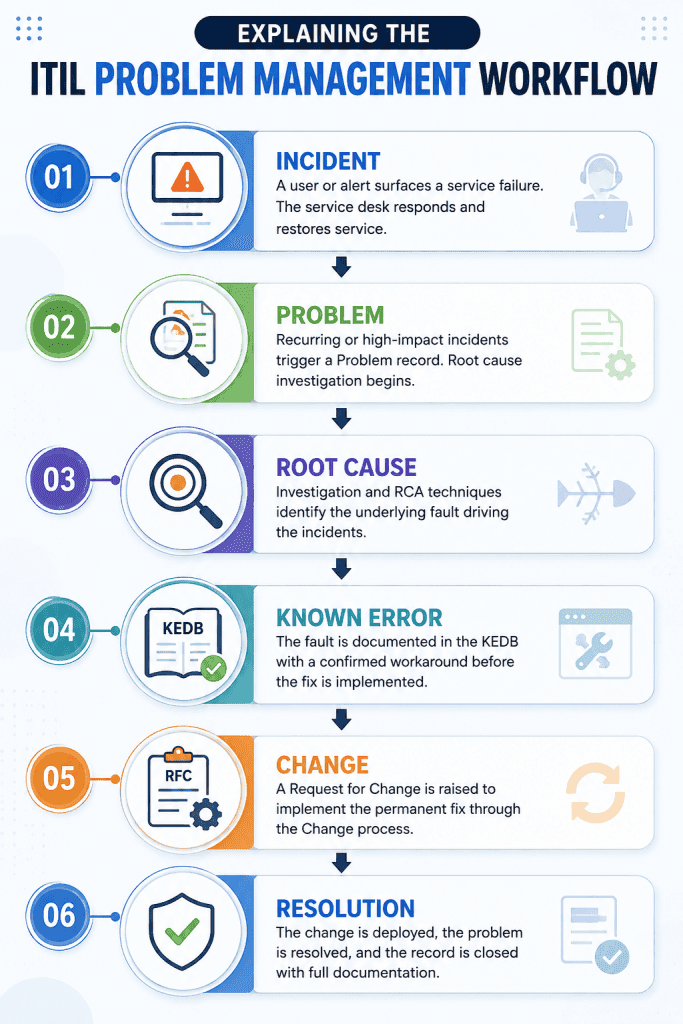
The workflow below shows how a problem moves from initial detection through to resolution. Each stage feeds the next and must be completed before the process advances.
Root Cause Analysis Techniques
5 Whys
The 5 Whys technique works by asking why a problem occurred and then asking why again about each answer until the root cause is reached. Developed at Toyota, the method is effective for problems with a clear causal chain. Teams typically find that five iterations of asking “why” brings them to the fundamental issue, though complex problems may require more.
Example: Server response times spiked. Why? Database queries were slow. Why? An index was missing. Why? A recent schema update removed it. Why? The change review process did not include a database administrator. Why? The change classification did not flag it as a database-impacting change. Root cause: classification criteria in the change process.
Fishbone diagram
Also called the Ishikawa or cause-and-effect diagram, the Fishbone approach maps potential causes across several categories such as People, Process, Technology, Environment, and Materials. Teams brainstorm contributing factors in each category and then investigate which ones actually contributed to the failure. This technique works well for problems where the cause is not immediately obvious and multiple factors may be at play.
Pareto analysis
Pareto Analysis applies the 80/20 principle to identify which causes are driving the largest proportion of incidents. By plotting incident categories by frequency or impact, teams can identify the small number of root causes responsible for the majority of service disruptions. This prioritization technique is particularly useful in organizations with high incident volumes where investigation resources are limited.
Fault tree analysis
Fault Tree Analysis starts with a defined undesirable outcome and maps all possible causal pathways that could lead to it using a tree structure. Each branch represents a failure condition, and branches are connected by AND and OR logic gates. This technique is common in high-stakes environments like manufacturing, aviation, and critical infrastructure where comprehensive failure analysis is required.
Known Error Database (KEDB)
What is KEDB?
The Known Error Database is a structured repository that stores records of confirmed known errors. Each entry documents the root cause, the affected services and components, available workarounds, and the current resolution status. The KEDB sits within the Service Knowledge Management System and is accessible to both problem management teams and the service desk.
When a new incident arrives that matches an existing KEDB entry, the service desk can apply the documented workaround immediately rather than investigating from scratch. This reduces Mean Time to Resolve for recurring incidents significantly.
Benefits
- Service desk teams resolve recurring incidents faster by applying documented workarounds without starting fresh each time.
- Problem managers avoid duplicating investigation work on issues that have already been diagnosed.
- Technical teams can see which known errors are still open and awaiting permanent fixes, making prioritization clearer.
- SLA performance improves because the resolution time for incidents linked to known errors drops substantially.
- Knowledge stays in the system rather than in individual engineers’ heads, reducing the impact of staff turnover.
Best Practices
- Create the known error record as soon as the root cause is confirmed, before the fix is implemented.
- Keep workaround instructions detailed enough for the service desk to apply them without contacting the problem team.
- Set a review date on every KEDB entry so records do not become stale after the original problem context is forgotten.
- Link KEDB entries to open incident tickets so the service desk knows which workaround applies to active issues.
- Archive resolved known errors rather than deleting them so historical data remains available for trend analysis.
Benefits of ITIL Problem Management
Reduced recurring incidents
By eliminating root causes rather than repeatedly restoring service, problem management progressively reduces the volume of incidents hitting the service desk. Teams that run a mature problem management practice consistently report lower incident rates over time as known error resolutions remove failure sources permanently.
Improved SLA performance
The KEDB accelerates the resolution of recurring incidents by giving the service desk documented workarounds. Faster resolution times translate directly into better SLA compliance figures, particularly for organizations with strict availability commitments.
Lower operational costs
Every hour an engineer spends on a recurring incident that could have been permanently resolved represents wasted operational spend. Problem management redirects that effort toward root cause elimination, reducing the cumulative cost of repetitive incident handling over time.
Better user experience
Users experience fewer outages and faster resolutions when problem management is functioning well. Repeat failures on the same systems erode confidence in IT. A visible reduction in recurring issues demonstrates that the IT organization is improving rather than just reacting.
Higher service availability
Removing root causes raises baseline availability across affected services. Organizations with mature problem management practices see measurable improvement in uptime metrics as the backlog of known errors gets resolved and preventive problem management identifies weaknesses before they cause incidents.
ITIL Problem Management Best Practices
Automate RCA
Manual root cause analysis is slow and depends heavily on individual expertise. Modern ITSM platforms like Infraon ITSM apply machine learning to incident and event data to accelerate the identification of patterns and probable root causes. Automating the initial correlation work gives problem investigators a head start and reduces the time between incident detection and root cause confirmation.
Build and maintain the KEDB
A KEDB that goes stale quickly loses its value. Assign ownership of KEDB hygiene to the Problem Manager and establish a regular review cadence. Every entry should have an owner, a review date, and a clear status indicating whether a permanent fix is pending, in progress, or deployed.
Trend analysis
Run regular trend analysis across incident categories, affected services, and time periods. Monthly or weekly trend reports surfaced in problem review meetings give teams the data needed to identify emerging patterns and trigger proactive problem records before failures escalate.
Link incidents to problems
Every incident linked to an open problem should carry that reference in the ticket. This connection drives two outcomes. First, it gives the service desk access to any applicable KEDB workarounds. Second, it builds a data trail that quantifies the business impact of the open problem and supports prioritization decisions.
Review recurring issues
Recurring incidents that have not yet been converted into formal problem records represent a gap in the process. A weekly review of high-frequency incident categories by the Problem Manager helps catch these gaps and triggers problem logging before the pattern becomes severe.
Measure KPIs
Problem management without measurement tends to drift. Tracking a small set of meaningful KPIs gives teams visibility into whether the practice is improving service quality or stagnating. The KPIs section below covers the most important ones to monitor.
Problem Management KPIs to Track
- Recurring incident rate: The proportion of all incidents that are repeat occurrences of a known failure pattern. A high recurring incident rate signals that problem management is not keeping pace with root cause elimination.
- Mean Time to Root Cause (MTTRC): The average elapsed time between a problem being logged and the root cause being confirmed. This metric measures investigation efficiency and highlights where the diagnosis process is slowing down.
- Problem backlog: The number of open problem records at any point in time. A growing backlog indicates that problems are being raised faster than they are being resolved, which typically leads to increasing incident volumes over time.
- Known errors resolved: The number of known errors closed through a permanent fix within a given period. This metric tracks the throughput of the problem management process and shows whether open known errors are actually getting resolved or accumulating.
- Problem resolution rate: The percentage of problems closed within their target resolution timeframe. This SLA-equivalent metric for problem management reflects whether investigation and change resources are being allocated effectively.
| KPI | What It Measures | Target / Benchmark |
|---|---|---|
| Recurring Incident Rate | Share of incidents that are repeat failures | Below 20% for mature organizations |
| Mean Time to Root Cause | Speed of root cause identification after problem logging | Target varies by priority; P1 under 4 hours |
| Problem Backlog | Open problem records at a given point in time | Declining quarter over quarter |
| Known Errors Resolved | Permanent fixes applied to KEDB entries per period | At least 80% within agreed target dates |
| Problem Resolution Rate | Problems closed within target timeframe | Above 90% for high-priority problems |
Common Challenges and How to Overcome Them
Poor categorization
Challenge
Inconsistent categorization makes trend analysis unreliable and routes problems to the wrong teams. When different analysts categorize the same type of failure differently, aggregated reports fail to surface meaningful patterns.
Solution
Define a clear categorization taxonomy aligned to services and components, and enforce it through the ITSM tool’s category fields. Train service desk staff on the taxonomy and review categorization accuracy in monthly quality checks.
Incomplete RCA
Challenge
Investigation stops at an obvious contributing factor rather than the true root cause. Teams declare a fix, the same failure recurs weeks later, and the problem is reopened. This pattern wastes investigation effort and undermines confidence in the process.
Solution
Mandate the use of a structured RCA technique for all high-priority problems. Require the problem record to document the RCA method used and the chain of reasoning that led to the root cause conclusion, before the problem can be classified as a known error.
Lack of ownership
Challenge
Problem records get opened and then stagnate because no one is formally accountable for driving them to resolution. Without clear ownership, problems sit in the backlog indefinitely while associated incidents keep occurring.
Solution
Assign a named owner to every problem record at the time of logging. The Problem Manager should review the open backlog weekly and escalate records where no progress has been made within the agreed investigation window.
Disconnected ITSM tools
Challenge
When incident management, problem management, change management, and the CMDB run in separate tools, the data needed for effective problem investigation is scattered. Analysts spend time stitching together information manually rather than investigating.
Solution
Consolidate onto a unified ITSM platform that links incidents, problems, changes, and configuration records in a single data model. The relationship between these records should be navigable within the tool without manual cross-referencing.
How Modern ITSM Software Improves Problem Management
AI-powered root cause analysis
Modern ITSM platforms apply machine learning to event and incident data to surface probable root causes faster than manual analysis allows. By correlating signals from monitoring, logs, and incident tickets simultaneously, AI-powered RCA engines reduce the time between problem logging and root cause confirmation from days to hours.
Incident correlation
Automated incident correlation groups related incident tickets under a common problem record in real time. When the monitoring system generates thirty alerts from the same underlying fault, correlation logic collapses them into a single problem rather than creating thirty separate work items for the service desk to manage individually.
Workflow automation
Automation handles the administrative steps in the problem management process, including problem record creation from recurring incident patterns, KEDB entry generation on root cause confirmation, and RFC drafting from resolution details. Teams spend their time on investigation rather than data entry.
Knowledge management
Integrated knowledge management ties the KEDB directly to the incident resolution workflow. When an analyst opens an incident ticket, the system surfaces matching KEDB entries automatically. This makes the workaround application faster and reduces the volume of repeated investigations.
CMDB integration
A connected CMDB gives problem investigators a map of service dependencies and configuration relationships without having to build that picture manually during each investigation. When a problem affects a specific component, analysts can immediately see which other services depend on it and which changes were recently applied to it.
Dashboards
Problem management dashboards give the Problem Manager and IT leadership real-time visibility into the open backlog, KPI trends, KEDB coverage, and problem aging. Dashboards that surface this data without manual report compilation allow faster decision-making and earlier escalation of stalled investigations.
How Infraon Makes ITIL Problem Management Easier
Infraon at a glance
Unified Incident, Problem, and Change Management on a single platform. AI-assisted RCA. Automated workflows. Integrated CMDB. Real-time SLA and performance dashboards.
Automation
Infraon automates the repetitive stages of problem management, from detecting incident patterns and creating problem records to generating KEDB entries and drafting RFC documentation. Automation reduces the manual overhead that makes problem management difficult to sustain in organizations without dedicated problem management staff.
Integrated incident and problem management
Infraon links incident tickets to problem records natively. Analysts investigating a ticket see related open problems and KEDB entries in context. Problem managers see the full incident history behind each problem record without switching tools. This integration removes the data silos that undermine root cause analysis in fragmented tool environments.
SLA tracking
Infraon tracks resolution targets for incident and problem records side by side, giving teams visibility into SLA performance across both practices simultaneously. Alerts surface when problem records approach their investigation deadlines, preventing SLA breaches from going unnoticed.
Asset and CMDB integration
Infraon’s built-in CMDB provides problem managers with accurate asset records and service dependency maps during investigations. Configuration history is available directly within the problem record, making it easier to connect a recent change to a new failure pattern without external lookups.
Reporting and analytics
Infraon’s problem management dashboards track recurring incident rates, MTTRC, backlog health, and known error resolution progress out of the box. Teams can generate compliance-ready reports for service reviews without building custom report templates from scratch.
Explore Infraon’s ITSM Platform
Case Study: Manufacturing Company Reduces Recurring Outages by 60%
A mid-sized manufacturing company with production facilities across three sites was experiencing persistent network outages affecting shop floor operations. The service desk was resolving each incident individually, restoring connectivity within the agreed SLA window, but the same outages returned every two to three weeks.
The Problem
No formal problem records existed for the recurring outages. Each incident was treated as a standalone event. Engineering capacity was being consumed by repeat restorations rather than root cause investigation. The incident rate across network-related categories had risen 40% over eighteen months.
The Approach
The IT team implemented formal problem management, opening problem records for the three highest-frequency incident categories and assigning a Problem Manager to lead the investigation. A Fishbone analysis of the most severe outage category identified two root causes: aging switch firmware across production floor switches and a VLAN misconfiguration that was causing periodic spanning tree loops.
Both findings were documented as known errors with workarounds added to the KEDB. RFCs were raised to update firmware across all affected switches and correct the VLAN configuration. The changes were implemented across a planned maintenance window.
The Result
Network-related incidents dropped by 60% in the three months following resolution. The service desk handled fewer repeat tickets. Engineering time previously consumed by incident restoration was redirected toward scheduled infrastructure improvements. The KEDB now carries fourteen entries covering the most common failure patterns across all three sites.
Frequently Asked Questions
What is ITIL problem management?
ITIL problem management is the practice of identifying and eliminating the underlying causes of incidents. Rather than simply restoring service after a failure, problem management investigates why the failure occurred and takes action to prevent it from recurring.
What is the difference between Incident and problem management?
Incident management focuses on restoring service as quickly as possible after a failure. Problem management focuses on finding and removing the root cause of the failure so it does not recur. Incident management measures the speed of resolution. Problem management measures the reduction in recurring failures over time.
What is a known error?
A known error is a problem that has a confirmed root cause and, in most cases, a documented workaround. It is stored in the Known Error Database so the service desk can apply the workaround during future incidents while the permanent fix is being developed and deployed.
What is root cause analysis?
Root Cause Analysis (RCA) is the structured investigation process used to identify the fundamental reason behind a failure or problem. Common RCA techniques include the 5 Whys, Fishbone diagrams, Pareto Analysis, and Fault Tree Analysis. The goal is to move past surface symptoms and identify the actual fault driving the issue.
Is problem management part of ITIL 4?
Yes. In ITIL 4, problem management is a formal practice within the Service Management practice group. ITIL 4 broadens the scope slightly compared to ITIL v3, emphasizing both reactive and proactive approaches and tying problem management more explicitly to the broader service value system and continuous improvement principle.
Which ITSM tools support problem management?
Most enterprise ITSM platforms include problem management modules. Infraon, ServiceNow, Jira Service Management, Freshservice, and ManageEngine ServiceDesk Plus all support problem logging, RCA workflows, KEDB management, and integration with incident and change management processes.
How do you measure problem management success?
The most meaningful metrics are recurring incident rate (the proportion of incidents that repeat a known failure pattern), Mean Time to Root Cause, problem backlog size over time, and the number of known errors resolved through permanent fixes in a given period. Declining recurring incident rates combined with a shrinking backlog are the clearest signals of a maturing practice.
Final Thoughts
Organizations that treat every incident as an isolated event spend their engineering capacity in a permanent cycle of restoration. The same failures come back. The same teams respond. The same users are affected. The costs compound quietly in the background.
ITIL problem management breaks that pattern. By shifting from reactive service restoration to structured root cause elimination, IT teams gradually reduce the volume of incidents they handle. Engineering time gets redirected from firefighting to improvement. Users experience fewer outages. SLA performance stabilizes. Operational costs fall.
The shift does not happen instantly. Building a mature problem management practice requires consistent process discipline, the right tooling, and organizational commitment to investigation over just restoration. But the compounding return on that investment is measurable and significant.
Teams that invest in problem management find themselves spending progressively less time managing the same failures and more time building the stable, reliable infrastructure their organizations depend on.