


An IT self service portal gives employees a direct way to request help, search for answers, track service status, and complete common IT tasks through a guided interface. For IT teams, it reduces repetitive intake work and brings routine demand into a workflow that can be measured and improved.
After all, employees want fast answers for access, devices, software, VPN, policy, and incident needs. Agents need fewer repetitive tickets and better information when a request reaches the service desk.
An efficient self service portal supports both sides by combining service catalog, knowledge base, ticket automation, AI chat, and workflow rules inside ITSM.
What Is an IT Self Service Portal?
Definition of IT self service portal
An IT self service portal is a user-facing digital entry point for IT requests and information. Employees can search knowledge articles, raise tickets, request services, follow approval status, and use guided forms for common needs. The portal reduces manual intake and improves the quality of ticket data at the moment of submission.
How it works inside ITSM
Inside IT Service Management, the portal connects users to incident, service request, knowledge, asset, SLA, and approval workflows. A user selects a request type, fills in a guided form, and the ITSM system routes work based on category, urgency, asset, location, and policy. This keeps service work structured from the first user action.
IT service portal vs. self service portal
| IT Service Portal | Self Service Portal |
| Covers the broader IT service entry point for requests, status, knowledge, approvals, and communication. | Focuses on user-led help, answer discovery, request submission, and automated task completion. |
| Often used by employees, managers, approvers, agents, and IT leaders. | Often used by employees who want answers or service actions with minimal agent handoff. |
| Can include service catalog, ticket tracking, dashboards, approvals, and policy communication. | Usually centers on knowledge search, ticket creation, forms, chat, and simple service workflows. |
Why IT Teams Are Moving to Self Service Portals
Rising IT ticket volumes
Digital work has expanded the number of daily requests reaching IT. Employees need access to apps, devices, cloud tools, collaboration platforms, VPN, and remote work services. When every request enters through email or phone, agents spend too much time collecting basic information instead of solving issues.
Role of automation and AI
Automation moves common requests through predefined paths. AI can guide users to answers, classify requests, suggest articles, and trigger the right workflow. Together, they help a portal act as the first service layer before agent involvement.
Impact on IT productivity
A well-run portal cuts repetitive intake, improves request quality, and gives agents better context. It also helps managers track demand by category and identify services that need better content, faster automation, or revised approval paths.
Key Features of an IT Self Service Portal
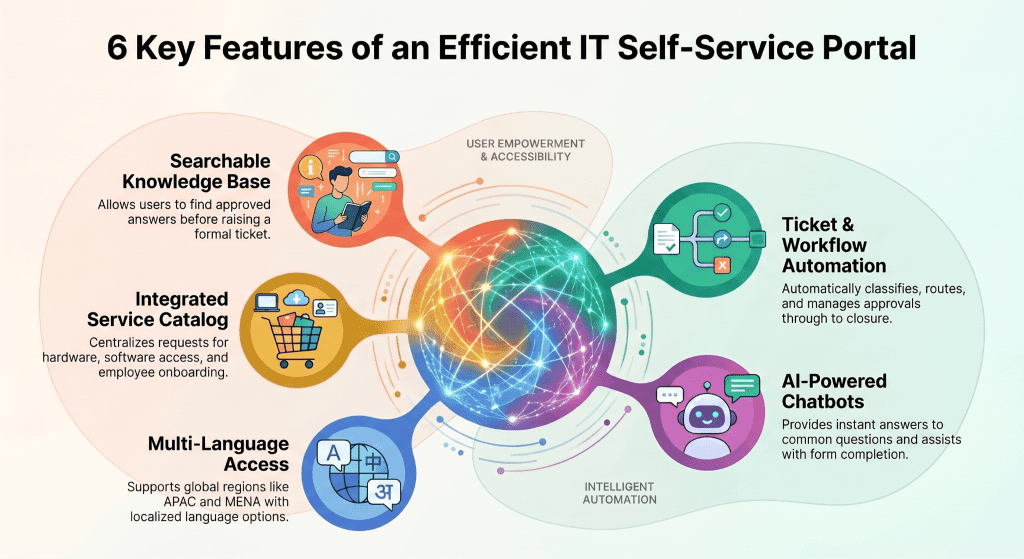
The best IT self service portal feels simple to the user and disciplined behind the scenes. It should guide employees toward the right service path while giving IT the structure needed for SLA tracking, governance, and reporting.
- Knowledge base integration so users can search approved answers before raising a ticket
- Service catalog for access, devices, software, onboarding, and standard IT requests
- Ticket automation that classifies, routes, and updates requests through set workflows
- AI chatbots and virtual agents that answer common questions and guide users through forms
- Workflow automation for approvals, fulfillment, notifications, and closure actions
- Multi-language access for APAC and MENA teams that serve users across regions
10 Real-World Use Cases of IT Self Service Portals
Password reset automation
Password reset requests are common and repetitive. A portal can guide the user through identity checks and trigger an automated reset path, reducing agent involvement for a high-volume ticket type.
Software request management
Employees can request approved software through a service catalog. The portal can route the request for manager approval, license review, installation, and closure with status updates visible to the user.
Incident reporting
Guided incident forms help users share device, application, urgency, screenshots, and impact details during submission. Better intake data helps agents respond faster and reduces follow-up questions.
Employee onboarding automation
HR and IT can use portal workflows for device provisioning, access setup, email accounts, role-based applications, and onboarding checklists. This keeps the new hire setup consistent across locations.
Asset request and tracking
Employees can request laptops, accessories, phones, or replacement devices through the portal. IT can link the request to inventory and asset records for better tracking and governance.
VPN access requests
VPN access often needs approval and policy checks. A portal can capture user role, location, device, and reason, then route the request through security and manager approvals.
IT policy access
The portal can centralize policy information for remote work, device use, software, data handling, and access rules. Users can find approved guidance instead of relying on informal answers.
Knowledge base search
Searchable articles help users solve common issues such as Wi-Fi setup, printer access, app errors, and email configuration. AI can recommend content based on user intent and ticket history.
Remote help requests
Remote employees can raise issues, share device data, and follow service status through the portal. This gives distributed IT teams a structured way to handle requests across offices and regions.
SLA tracking
Users can see where a request stands, which step is pending, and when action is expected. IT managers can track SLA risk and act before delays affect employee experience.
Benefits of IT Self Service Portals
Reduce ticket volume
Self service portals can reduce a large share of repetitive tickets when the portal includes useful knowledge content, service catalog forms, and automation. The biggest gains usually come from password resets, access requests, software requests, device requests, and common how-to questions.
Faster resolution time
Users can find answers faster, and agents receive better ticket details when a request needs human review. Guided forms reduce missing information, while routing rules send work to the right group earlier in the process.
Improved employee experience
Employees gain a single place to raise requests, search content, and follow status. This reduces uncertainty and cuts repeated follow-up messages about ticket progress.
Cost savings and ROI
Each deflected ticket saves agent time. Each automated request cuts manual handoff. Over time, the portal can reduce service desk load, improve capacity planning, and shift IT effort toward higher-value service improvement work.
Increased IT productivity
Agents spend less time on repetitive intake and simple fulfillment. Managers can use portal analytics to identify weak knowledge areas, high-volume categories, and workflows that need automation.
Challenges of Implementing IT Self Service Portals
A self service portal succeeds only when users trust it, and agents keep it useful. Weak adoption usually comes from confusing request paths, thin knowledge content, slow approvals, or a portal that duplicates email work instead of replacing it.
- Low user adoption when employees see the portal as slower than email or chat
- Poor knowledge base quality that gives outdated answers or shallow guidance
- Integration issues when portal workflows fail to connect with ITSM, identity, asset, and monitoring systems
- Weak automation strategy that leaves users filling forms while agents still perform every step manually
Best Practices for a Successful IT Service Portal
Design for user experience
Use plain category names, guided forms, visible status, and short request paths. Users should be able to find a service quickly and understand what information IT needs from them.
Build a useful knowledge base
Knowledge articles should answer common questions in plain language with steps, screenshots where needed, ownership details, and review dates. Content should connect with ticket categories so users and agents can find it during live work.
Promote self service culture
Adoption needs communication, manager buy-in, and visible service value. Train employees on common portal tasks and make the self service portal the preferred entry point for routine IT help.
Use AI for automation
AI can guide search, suggest service forms, classify tickets, and recommend answers. Use it to reduce friction at intake while keeping governance for approvals and service changes.
Measure and optimize usage
Track portal visits, search terms, article helpfulness, ticket deflection, service catalog use, SLA performance, and abandoned forms. These metrics show where to improve content and workflows.
IT Self Service Portal vs Traditional IT Support
| IT Self Service Portal | Traditional IT Support |
| Web portal access with guided forms, search, chat, and status tracking. | Phone, email, or chat requests that often need manual triage. |
| Automated support for password resets, access requests, software requests, and common issues. | Manual support where agents collect details, assign work, and send status updates. |
| Lower cost per routine request because self service and automation handle repeatable actions. | Higher cost per routine request because every request depends on agent time. |
| Better comparison of category demand, deflection, usage, SLA risk, and workflow gaps. | Limited comparison when service data is split across inboxes and informal channels. |
Manual vs automated support
Traditional support depends heavily on agent intake. A portal can automate classification, routing, approvals, and status updates, which reduces repetitive agent work.
Cost comparison
Manual service channels add cost when routine requests require agent time. Self service reduces this load by shifting common tasks to guided workflows and approved knowledge content.
Productivity comparison
Traditional channels often hide request patterns. A portal gives managers usage data, service demand, content gaps, and workflow performance in one reporting layer.
Top IT Self Service Portal Tools in 2026
What to look for in a tool
Tool selection should focus on how well the portal connects self service with ITSM workflows. Look for service catalog depth, knowledge search, AI guidance, automation, SLA tracking, integrations, security, and reporting.
Comparison table:
| Tool | Best suited for | Portal capabilities | Pricing model | Scalability |
| Infraon ITSM | Enterprises that want ITSM, automation, assets, CMDB, and portal workflows together | Self service, service catalog, AI workflows, SLA tracking, asset and CMDB links | Quote based | Enterprise and regional growth |
| ServiceNow ITSM | Large enterprises with complex service workflows and broad enterprise service management needs | Service portal, knowledge, workflows, AI options, enterprise integrations | Quote based | Large enterprise scale |
| Freshservice | Mid-market IT teams that want cloud ITSM with service desk and portal capability | Portal, service catalog, knowledge, automation, asset features | Tiered subscription | Mid-market to enterprise |
| Jira Service Management | Technology teams already using Atlassian tools | Request portal, knowledge links, automation, incident and change workflows | Tiered subscription | Team to enterprise |
| ManageEngine ServiceDesk Plus | Teams seeking ITSM with asset and service desk capabilities | Self service portal, service catalog, knowledge, SLA and asset workflows | Tiered and quote options | SMB to enterprise |
Why modern ITSM tools matter
A portal works best when it belongs to the same operating layer as tickets, assets, approvals, SLAs, CMDB data, and knowledge. Separate portal tools can create another handoff. Integrated ITSM gives IT teams a better way to manage the full service journey.
How Infraon ITSM Enables Smarter Self Service
Unified ITSM platform
Infraon ITSM connects self service with service request management, incident handling, SLA rules, asset data, CMDB records, knowledge content, and dashboards. This helps service teams manage portal demand and agent work through the same platform.
AI-powered automation
AI-powered workflows can guide users to answers, classify tickets, recommend categories, and help route requests. Automation can then handle approval, fulfillment, notifications, and closure steps for standard service needs.
Scalable for APAC and MENA enterprises
Regional teams often serve multiple languages, distributed offices, and varied compliance expectations. Infraon ITSM can help these teams bring portal requests, SLA visibility, and service workflows into a controlled ITSM environment.
Real-world impact
The impact shows up in lower repetitive ticket load, faster intake, better request data, fewer follow-up messages, and improved visibility for IT leaders. The portal becomes a practical entry point for service quality improvement.
Future Trends in IT Self Service Portals
AI-driven ITSM
AI will play a larger role in user guidance, ticket classification, knowledge recommendations, and agent assistance. The goal is faster service flow with governance across approvals and sensitive actions.
Hyperautomation
Portals will connect with identity, HR, endpoint, monitoring, asset, and collaboration tools to reduce manual work across request journeys.
Voice-based support
Voice entry may help users raise requests and search guidance through natural conversation, mainly for routine requests and quick status checks.
Predictive IT support
Portal data, ticket trends, and monitoring signals can help teams identify rising issues before they create large ticket spikes.
FAQs About IT Self Service Portals
What is an IT service portal?
An IT service portal is a digital place where employees can request IT services, search knowledge articles, raise tickets, track status, and access service catalog items.
How does a self service portal reduce tickets?
It reduces tickets by giving users answers, automating common requests, guiding forms, and resolving routine issues before they require agent involvement.
Is an IT self service portal necessary?
It becomes valuable when ticket volume rises, users need faster answers, and IT teams need a structured way to manage requests, approvals, and service communication.
What features should I look for?
Look for knowledge base search, service catalog, ticket automation, AI chat, workflow automation, SLA tracking, multi-language access, analytics, and ITSM integration.
How can teams improve adoption?
Improve adoption through simple portal paths, useful knowledge articles, visible status, manager communication, training, and fast response for portal-submitted requests.