


What Is IT Management Software?
IT management software gives IT teams a structured way to track, operate, and improve the technology that runs their organization. Rather than relying on disconnected spreadsheets, manual processes, and siloed point solutions, these platforms bring asset data, service workflows, and infrastructure telemetry into a single operational environment.
What Does IT Management Software Actually Manage?
The scope varies by platform type, but most IT management tools address some combination of the following domains.
- Hardware assets including servers, workstations, laptops, mobile devices, and network equipment
- Software assets covering installed applications, license entitlements, and SaaS subscriptions
- Cloud resources such as virtual machines, managed databases, object storage, and containerized workloads
- IT services including incidents, service requests, problems, and changes flowing through the service desk
- Infrastructure performance data collected from servers, network devices, and application stacks
- Configuration items and their relationships recorded in a CMDB
IT Management Software vs. IT Management Tools: Is There a Difference?
In practice, the terms are often used interchangeably. The distinction is mostly one of scope. A “tool” typically refers to a point solution that addresses one specific function, such as a network scanner or a ticketing system. “Software” in the IT management context tends to imply a platform or suite that handles multiple functions and connects them through shared data.
For this guide, both terms refer to the same category of platforms. The meaningful distinction lies between narrow point solutions and broader unified platforms, which is covered in depth later.
Where ITAM, ITSM, ITOM, RMM, and Endpoint Management Fit
| Category | Primary Purpose | Best For | Core Capabilities |
|---|---|---|---|
| ITAM | Track and manage IT assets across their full lifecycle | License compliance, inventory control, cost visibility | Asset discovery, inventory, lifecycle tracking, software license management |
| ITSM | Manage IT services, requests, incidents, and changes | Service desks and IT teams focused on service delivery | Incident, request, problem, change management, CMDB, SLA tracking |
| ITOM | Monitor and operate IT infrastructure for reliability | Operations teams managing server, network, and cloud performance | Infrastructure monitoring, event management, auto-remediation, AIOps |
| RMM | Remotely monitor and manage endpoints and client devices | MSPs and teams managing large distributed device fleets | Remote monitoring, patch management, scripting, endpoint health dashboards |
| Endpoint Management | Control configuration, security, and compliance of devices | Enterprise IT and security teams managing workstations and mobile devices | Device enrollment, policy enforcement, patch deployment, compliance reporting |
Why Are Businesses Investing in IT Management Software?
Growing IT Infrastructure Complexity
The average enterprise now runs across on-premises data centers, private clouds, multiple public cloud providers, and a distributed remote workforce. Every layer adds new asset types, new monitoring requirements, and new failure modes. Managing this complexity with point solutions and manual processes becomes progressively harder as the environment grows.
Too Many Disconnected IT Tools
Organizations accumulate IT tools over time, adding new solutions as needs arise without retiring older ones. The result is a fragmented toolchain where incident data lives in one system, asset data in another, and infrastructure monitoring in a third. Teams spend time context-switching and manually reconciling data rather than resolving issues. Unified IT management platforms address this directly by consolidating functions.
Limited Visibility Into IT Assets and Infrastructure
Shadow IT, unmanaged devices, and untracked SaaS subscriptions create blind spots that affect both security and cost management. Without automated discovery, asset inventories go stale quickly. A server gets decommissioned but stays in the records. A SaaS license goes unused for a year but keeps renewing. IT management software with built-in discovery keeps inventory accurate without manual audits.
Rising Security, Compliance, and Audit Requirements
Frameworks like ISO 27001, SOC 2, and regional data protection regulations require organizations to maintain accurate records of what assets exist, where they are, who owns them, and what software they run. Manual compliance processes are error-prone and time-consuming. IT management platforms generate audit trails and compliance reports automatically, reducing the preparation burden significantly.
Pressure to Automate IT Operations
IT teams are expected to support more users and systems with flat or shrinking headcounts. Automation is the primary lever available. IT management software automates ticket routing, alert triage, patch deployment, lifecycle notifications, and routine reporting, freeing engineers to focus on higher-value work.
What Are the Benefits of IT Management Software?
Create a Single Source of Truth for IT
When asset records, incident tickets, configuration data, and infrastructure metrics all live in the same platform, teams work from the same information. Troubleshooting is faster because the relationships between a failing server, its configuration history, and any open incidents are visible from a single interface rather than requiring manual cross-referencing across tools.
Automate Repetitive IT Tasks and Workflows
Routine tasks that consume engineering time include recurring asset audits, license reconciliation, patch deployment scheduling, SLA monitoring, and report generation. IT management platforms automate each of these, reducing the manual overhead that accumulates across large environments.
Reduce Downtime and Improve Service Reliability
Proactive monitoring surfaces degrading infrastructure before it causes outages. Problem management processes identify the root causes of recurring incidents. Together, these capabilities shift IT operations from reactive firefighting toward predictable, stable service delivery.
Control IT Costs and Optimize Technology Investments
Unused software licenses, idle cloud instances, and over-provisioned hardware represent direct budget waste. IT management platforms surface these redundancies through utilization reporting and license reconciliation, giving teams the data needed to reduce spend without affecting service quality.
Improve Security, Governance, and Audit Readiness
Full visibility into which devices are running outdated software, which assets lack security agents, and which configurations have drifted from approved baselines is foundational to any security program. IT management platforms make this visibility continuous rather than point-in-time, and generate the audit-ready records that compliance frameworks require.
What Features Should You Look for in IT Management Software?
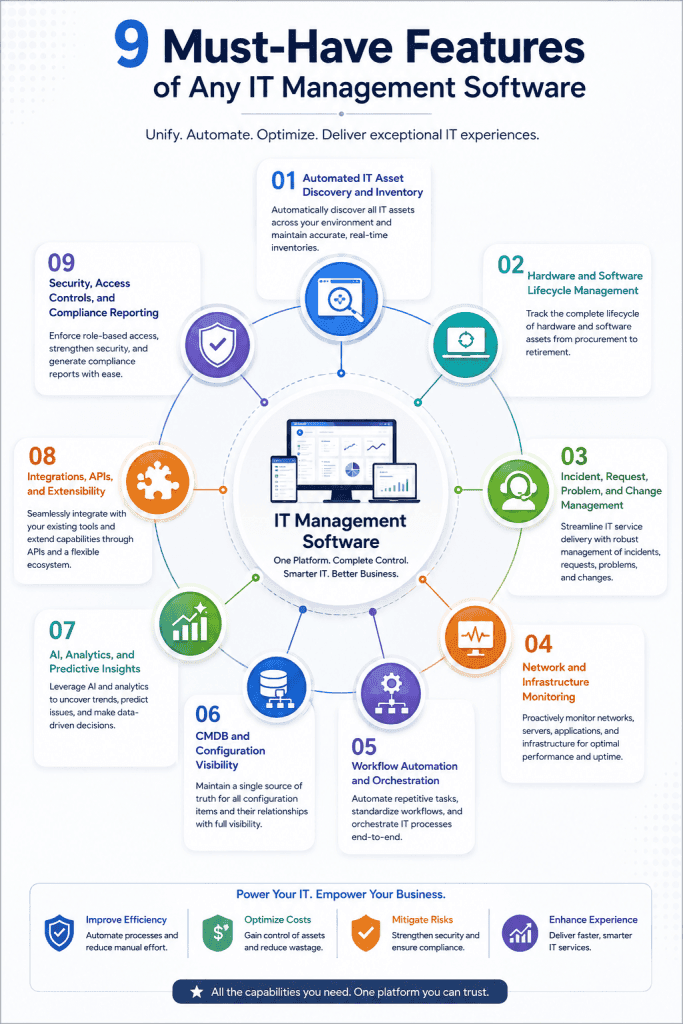
Automated IT Asset Discovery and Inventory
Discovery should run continuously, not just during scheduled scans. As new devices connect, cloud resources spin up, and software gets installed, the inventory updates automatically. Agent-based and agentless discovery methods serve different asset types, and the best platforms support both.
Hardware and Software Lifecycle Management
Tracking assets from procurement through retirement gives teams visibility into warranty expirations, upcoming refresh cycles, software license renewals, and end-of-life timelines. This data feeds budgeting, procurement planning, and compliance reporting.
Incident, Request, Problem, and Change Management
A full ITSM layer manages the service interactions between IT teams and the rest of the organization. Incident management restores service. Request fulfillment handles standard changes and service requests. Problem management eliminates recurring root causes. Change management implements modifications safely.
Network and Infrastructure Monitoring
Real-time visibility into server health, network device performance, and application availability allows teams to detect and respond to degradation before users are affected. Strong monitoring platforms correlate events across infrastructure layers to accelerate root cause identification.
Workflow Automation and Orchestration
Automation capabilities determine how much manual work the platform eliminates. Look for auto-discovery triggers, SLA escalation workflows, ticket routing rules, automated patch scheduling, and lifecycle event notifications that fire without manual intervention.
CMDB and Configuration Visibility
The Configuration Management Database stores records of configuration items and their relationships. A well-maintained CMDB tells you not just what assets exist but how they connect to services and which other components depend on them. This dependency mapping is critical during incident investigation and change planning.
AI, Analytics, and Predictive Insights
Modern IT management platforms apply machine learning to historical performance data to detect anomalies, predict resource exhaustion, and recommend configuration improvements. AI-driven capabilities are moving from marketing differentiator to operational standard across the category.
Integrations, APIs, and Extensibility
No IT management platform operates in isolation. Integration quality with your ITSM, monitoring, identity, procurement, and cloud tools determines how much data flows automatically and how much requires manual reconciliation. A strong API layer and pre-built connector library reduce integration overhead.
Security, Access Controls, and Compliance Reporting
Role-based access controls limit what different user groups can see and do within the platform. Audit logging records every action for compliance purposes. Compliance reporting modules generate the documentation that frameworks like ISO 27001 and SOC 2 require, without manual data assembly.
How We Evaluated the Best IT Management Software
IT Management Capabilities
We assessed the depth and completeness of each platform’s core IT management functions, covering asset management, service management, infrastructure monitoring, and configuration management. Platforms that handle multiple disciplines from a unified data model scored higher than those requiring separate tools for each function.
Automation and AI
We evaluated the breadth of automation available out of the box, including auto-discovery, workflow triggers, alert correlation, and predictive analytics. Platforms with embedded AI capabilities for anomaly detection and root cause analysis received stronger marks in this area.
Scalability and Deployment Flexibility
We considered how well each platform handles growth in terms of asset volume, user count, and geographic distribution. We also noted deployment options, including cloud-only, on-premises, and hybrid, since deployment flexibility matters significantly for organizations in regulated industries or with data residency requirements.
Integrations and Ecosystem
We reviewed the depth of each platform’s integration library, the quality of available APIs, and how well the platform connects with commonly used tools in enterprise IT environments, including monitoring systems, identity providers, cloud consoles, and procurement platforms.
Security and Governance
We looked at role-based access controls, audit logging, compliance reporting capabilities, and the platform’s own security posture, including any known vulnerabilities or incidents in the vendor’s history.
Ease of Implementation and Administration
Total cost of ownership includes the time and expertise required to deploy and maintain the platform. We factored in deployment complexity, configuration overhead, the availability of implementation resources, and the ongoing administrative burden once the platform is running.
Best-Fit Organizations and Use Cases
We identified the organization types and use cases where each platform delivers the most value, whether that is a large enterprise running complex cross-department workflows, a mid-market IT team prioritizing ease of use, or an MSP managing distributed endpoints across multiple client environments.
9 Best IT Management Software Platforms in 2026
1. Infraon: Infraon offers Infraon Infinity, a unified IT management platform that covers asset management, ITSM, infrastructure monitoring, and workflow automation through a single connected environment. Rather than requiring separate tools for ITAM, ITSM, and ITOM, Infraon connects these disciplines through a shared data model that keeps asset records, service records, and operational data synchronized.
Key Capabilities
- Automated asset discovery covering on-premises, cloud, and hybrid environments
- Full ITSM module with incident, request, problem, and change management
- Network and infrastructure monitoring with AI-powered alerting
- Built-in CMDB with automated relationship mapping
- Workflow automation for lifecycle events, SLA management, and audit processes
- Compliance reporting aligned to regional regulatory frameworks
Pros Single platform eliminates ITAM, ITSM, and ITOM tool sprawl | Strong automation depth | Cost-effective for mid-market through enterprise | Regional support for India, SEA, and the Middle East
Best For Organizations seeking unified IT management without the cost and complexity of enterprise-only platforms, particularly those in India, Southeast Asia, and the Middle East
2. ServiceNow: ServiceNow is the dominant enterprise ITSM and ITOM platform, with a product portfolio spanning IT, HR, security, finance, and customer service operations. Its Now Platform provides a common data model and workflow engine across all these domains, making it the default choice for large organizations running complex cross-department service workflows.
Best For Large enterprises with complex cross-department service workflows and dedicated IT governance resources
3. Jira Service Management: Jira Service Management brings ITSM capabilities to teams already operating on the Atlassian stack. It connects development and operations workflows through native integration with Jira Software, Confluence, and Bitbucket, making it the natural choice for engineering-led organizations where the dev team and IT ops team work in the same toolchain.
Best For DevOps and engineering teams already running on Atlassian tools who need ITSM that integrates with development workflows
4. Freshservice: Freshservice is a cloud-based ITSM platform built for accessibility. It delivers the core capabilities required for IT service management with a cleaner onboarding experience and more predictable pricing than enterprise-grade alternatives, making it a practical choice for mid-market IT teams.
Best For Mid-market IT teams that prioritize deployment speed and ease of administration over deep customization
5. NinjaOne: NinjaOne is a unified endpoint management and remote monitoring platform built for MSPs and internal IT teams managing large device fleets. Its architecture prioritizes visibility and automation across endpoints rather than broad IT service management, making it purpose-built for organizations whose primary challenge is endpoint scale.
Best For MSPs and IT teams whose primary operational challenge is managing large volumes of distributed endpoints
6. ManageEngine: ManageEngine offers one of the widest IT management product portfolios in the market, covering service desk, asset management, network monitoring, patch management, identity and access, and security from a single vendor. This breadth makes it attractive for organizations that want to standardize across IT domains without adopting enterprise pricing.
Best For Organizations seeking broad IT management coverage from a single vendor without enterprise-only pricing structures
7. SolarWinds: SolarWinds is a long-established IT infrastructure and network management vendor with deep monitoring capabilities across network performance, server health, and application behavior. Its strength lies in the depth of its operational telemetry rather than the breadth of its service management features.
Best For Network-heavy environments and NOC teams where infrastructure visibility and network performance monitoring are the primary requirements
8. Zendesk: Zendesk began as a customer support platform and has since extended into IT service management. For organizations where IT helpdesk and customer support workflows overlap, or where user experience in support interactions is the primary priority, Zendesk offers a familiar and well-designed environment.
Best For Organizations where IT helpdesk and customer support operate from the same team or need a unified support platform
9. Ivanti Ivanti covers endpoint management, ITSM, security, and digital employee experience through a consolidated portfolio targeting enterprise environments with complex endpoint and compliance requirements. Its approach connects IT service management with endpoint security in a way that few platforms match.
Best For Security-focused enterprises managing complex endpoint environments in regulated industries
IT Management Software Comparison: Which Tool Is Right for You?
Quick Comparison of the Top 9 IT Management Tools
| Tool | Type | Deployment | Key Strength | Primary Limitation | Pricing Tier |
|---|---|---|---|---|---|
| Infraon | Unified ITAM+ITSM+ITOM | Cloud / On-prem | All-in-one platform with automation | Newer market presence | Mid-market to Enterprise |
| ServiceNow | Enterprise ITSM / ITOM | Cloud | Workflow depth and ecosystem | Cost and admin complexity | Enterprise |
| Jira Service Mgmt | ITSM | Cloud | Atlassian-native integration | Limited ITAM depth | Mid-market to Enterprise |
| Freshservice | ITSM | Cloud | Ease of use, fast deployment | Limited ITOM capabilities | SMB to Mid-market |
| NinjaOne | RMM / Endpoint | Cloud | Endpoint management at scale | No full ITSM layer | MSP / Mid-market |
| ManageEngine | Multi-product suite | Cloud / On-prem | Breadth of product coverage | Loose cross-product integration | SMB to Mid-market |
| SolarWinds | ITOM / Network | Cloud / On-prem | Network monitoring depth | Vendor security scrutiny | Mid-market to Enterprise |
| Zendesk | Support-centric ITSM | Cloud | User experience for support | Limited change and CMDB depth | SMB to Mid-market |
| Ivanti | Endpoint + ITSM | Cloud / On-prem | Endpoint security and service mgmt | Platform complexity | Enterprise |
Best IT Management Software by Use Case
| Use Case | Best Tool | Why It Fits |
|---|---|---|
| Unified asset and infrastructure management | Infraon | Covers ITAM, ITSM, and ITOM in one connected platform |
| Enterprise-wide service workflow automation | ServiceNow | Deepest workflow engine with cross-department scope |
| DevOps-aligned IT service management | Jira Service Management | Native Atlassian integration bridges development and IT ops |
| Mid-market ITSM deployment | Freshservice | Fast to deploy with predictable pricing and low admin overhead |
| MSP endpoint management | NinjaOne | Purpose-built RMM with multi-tenant and MSP billing support |
| Broad IT management from one vendor | ManageEngine | Products spanning ITSM, ITAM, network monitoring, and identity |
| Network and infrastructure monitoring | SolarWinds | Deep network performance visibility and operational telemetry |
| Support-led IT service delivery | Zendesk | Familiar helpdesk interface with strong satisfaction reporting |
| Enterprise endpoint security and ITSM | Ivanti | Endpoint management with integrated vulnerability and compliance coverage |
Best IT Management Software by Organization Size
| Organization Size | Recommended Tools | Primary Reason |
|---|---|---|
| Small (under 100 employees) | Freshservice, ManageEngine | Affordable, fast to set up, low ongoing administration |
| Mid-market (100 to 1,000 employees) | Infraon, Freshservice, NinjaOne | Balanced capability, cost, and deployment complexity |
| Large enterprise (1,000+ employees) | ServiceNow, Infraon, Ivanti, ManageEngine | Scalability, governance depth, and cross-department workflow support |
| MSP / multi-tenant environments | NinjaOne, ManageEngine | Multi-tenant architecture and MSP billing capabilities |
Which Type of IT Management Software Do You Actually Need?
Choose ITAM When Asset Visibility Is Your Priority
If your organization struggles with inaccurate asset inventory, license compliance exposure, audit preparation consuming weeks of manual work, or budget waste from unused software licenses and over-provisioned hardware, ITAM is the right starting point. Without accurate asset data, every other IT management function is operating on a shaky foundation.
Choose ITSM When Service Delivery Is Your Priority
If your service desk is overwhelmed with unstructured requests, SLA performance is poor, incident resolution is inconsistent, or the same problems keep recurring without anyone finding the root cause, ITSM is the core need. ITSM platforms bring structure and accountability to the service relationship between IT and the rest of the organization.
Choose ITOM When Infrastructure Reliability Is Your Priority
If your team is reacting to outages after they occur, has no visibility into infrastructure trends before they become problems, or is spending engineering time managing alert noise rather than resolving actual issues, ITOM tools address that operational visibility gap. Monitoring, event correlation, and automated remediation move IT from reactive to proactive operations.
Choose RMM When You Manage Distributed Endpoints
If the primary challenge is managing and maintaining a large fleet of user devices, particularly across multiple locations or client environments, RMM tools address that specific problem more effectively than general ITSM or ITAM platforms. Patch management, remote diagnostics, and scripting at endpoint scale are what RMM platforms are designed for.
Choose a Unified Platform When Tool Sprawl Is the Problem
If your organization already has separate tools for several of the above functions but teams are frustrated by data silos, manual reconciliation, and the overhead of managing multiple vendor relationships, a unified platform is the right direction. Consolidating onto a single platform reduces context-switching, improves data quality, and lowers the total cost of the toolchain over time.
How to Choose the Right IT Management Software
| Step 1 | Map Your Current IT Management Challenges Before evaluating tools, document the specific pain points your organization faces. Are incidents taking too long to resolve? Is the asset inventory unreliable? Are compliance audits consuming weeks of manual effort? The clearest tool selection decisions come from a concrete list of problems to solve rather than a general feature comparison. |
| Step 2 | Audit Your Existing IT Tools and Data Silos List every IT tool currently in use and identify where data is duplicated or missing. Understanding which tools overlap, which lack integrations, and where data quality breaks down gives you a baseline for evaluating how much consolidation is possible and what integration requirements any new platform must meet. |
| Step 3 | Define Your Must-Have Capabilities Separate capabilities into three categories: mandatory (the platform cannot work without these), important (significantly increases value), and nice-to-have (desirable but not deciding factors). This structure keeps evaluation focused and prevents vendors from winning on features that do not address your actual problems. |
| Step 4 | Evaluate Integrations and Automation Requirements List the tools your new platform must connect with from day one and any where integration would be valuable but not required immediately. Assess each shortlisted platform against this list. Evaluate the quality of pre-built connectors versus API-based custom integrations, since the latter add implementation time and ongoing maintenance overhead. |
| Step 5 | Assess Security, Compliance, and Deployment Needs Organizations in regulated industries or with data residency requirements need to confirm that each platform’s deployment model, data handling practices, and compliance reporting capabilities align with their specific obligations. This step often eliminates several options before detailed capability evaluation begins. |
| Step 6 | Calculate Total Cost of Ownership License cost is typically the smallest component of TCO. Implementation cost, training time, ongoing administration overhead, and the cost of integrating the platform with your existing toolchain all add up significantly. Get these numbers for each shortlisted platform before making a decision. |
| Step 7 | Run a Proof of Concept With Real IT Workflows A proof of concept using your actual data and workflows surfaces integration gaps, configuration complexity, and usability issues that demo environments hide. Run the PoC against the specific use cases your organization cares most about, and involve the IT staff who will use the platform daily in the evaluation. |
Use the IT CONTROL Framework to Evaluate IT Management Platforms
The IT CONTROL framework gives IT buyers a structured lens for evaluating platforms across nine dimensions. Each letter in the framework corresponds to a capability area that determines whether a platform will deliver long-term operational value or require workarounds and supplemental tools.
| I Infrastructure Visibility Real-time awareness of all infrastructure components, their current health status, and their service dependencies. | T Technology Asset Intelligence Automated discovery, inventory, and lifecycle tracking of hardware, software, cloud, and SaaS assets. | C Connected Workflows Processes that link incidents, assets, configuration records, and changes through a shared data model. |
| O Operational Automation Automated execution of routine tasks including alert triage, ticket routing, patch scheduling, and lifecycle notifications. | N Network and System Scalability Platform performance at current scale and confidence that it handles growth in devices, users, and data volumes. | T Toolchain Integration Pre-built connectors and API depth that determine how well the platform links with your existing technology stack. |
| R Risk, Security, and Compliance Role-based access controls, audit logging, patch visibility, and compliance reporting for relevant regulatory frameworks. | O Observability and Analytics Trend detection, anomaly surfacing, and predictive insights that move operations from reactive to forward-looking. | L Lifecycle Cost and Value Total cost of ownership across licensing, implementation, training, and administration relative to the operational value delivered. |
Why Unified IT Management Is Replacing Disconnected Point Solutions
The Hidden Cost of IT Tool Sprawl
Every additional point solution in the IT toolchain adds licensing cost, integration overhead, training requirements, and data reconciliation work. A network monitoring tool that does not share data with the asset management system means engineers manually cross-referencing device records during outages. A ticketing system disconnected from the CMDB means change impact assessments done from memory rather than from accurate configuration data.
These costs do not appear on any single line item but accumulate significantly across an IT operation of any scale.
From Reactive IT Management to Predictive Operations
Traditional IT management is largely reactive. An alert fires, an engineer responds, service is restored. The same failure often occurs again weeks later. Predictive operations uses historical performance trends, anomaly detection, and capacity forecasting to surface problems before they cause outages.
This shift requires a platform that aggregates data across asset, service, and infrastructure domains and applies analytics across all of it. Disconnected point solutions cannot do this effectively because the relevant data is distributed across systems that do not communicate.
How AI Is Changing IT Management Software
AI capabilities in IT management platforms have moved from experimental to operational. Current applications include incident classification and routing based on ticket content, anomaly detection that identifies metric deviations before thresholds are crossed, root cause correlation that groups related events into a single problem record, and natural language interfaces that let engineers query asset and performance data in plain text.
Platforms that train these models on connected data across asset, service, and infrastructure domains produce more accurate results than those applying AI to a single data type.
Why IT Asset Data Is Becoming the Foundation of IT Operations
Every meaningful IT operation traces back to an asset. An incident involves a device or application. A change modifies a configuration item. A security finding affects an endpoint. A compliance report references software license records. Organizations that invest in accurate, continuously updated asset data find that the quality of every downstream IT process improves. Asset data accuracy is not a nice-to-have. It is the infrastructure on which effective IT management is built.
How Infraon Helps Enterprises Simplify IT Management
Infraon at a glance
- Unified ITAM, ITSM, and ITOM on a single platform
- Automated discovery
- AI-powered monitoring
- Built-in workflow automation
- Regional deployment support for India, SEA, and the Middle East
Discover and Track Distributed IT Assets
Infraon’s discovery engine scans on-premises networks, cloud environments, and hybrid infrastructure using both agent-based and agentless methods. New assets are added to the inventory automatically as they connect to the network or appear in cloud APIs. The asset record includes hardware specifications, installed software, assigned users, location, and lifecycle status.
Manage Hardware and Software Across the Asset Lifecycle
Asset records in Infraon carry the full lifecycle history from procurement through retirement. Warranty expiration alerts, contract renewal notifications, and end-of-life flags fire automatically based on the dates in the asset record. Software license reconciliation compares installed counts against purchased entitlements and flags compliance gaps before they become audit findings.
Connect Asset Data With IT Operations
When an incident ticket opens in Infraon, the affected asset record is linked automatically. Engineers see the device’s configuration history, open problems, recent changes, and current health status without leaving the incident view. This connection between asset data and operational records reduces the manual investigation work that slows incident resolution in fragmented tool environments.
Automate Workflows, Audits, and Operational Processes
Infraon’s workflow automation handles the repetitive tasks that consume engineering time at scale, including ticket routing, SLA monitoring, lifecycle notifications, scheduled audit reports, and change advisory board workflows. Automation rules are configurable without code, allowing IT administrators to build and adjust workflows as processes evolve.
Gain Actionable IT Visibility From Unified Dashboards
Infraon’s dashboards aggregate asset health, infrastructure performance, service desk metrics, and SLA compliance data into views that match the information needs of different roles. A NOC engineer sees real-time infrastructure alerts. A problem manager sees recurring incident trends. An IT director sees SLA performance and asset lifecycle status across the full environment.
Final Thoughts: Which IT Management Software Should You Choose?
The right IT management platform depends on where your organization currently struggles most. If disconnected tools and data silos are the core problem, a unified platform like Infraon eliminates the integration overhead and delivers connected visibility across ITAM, ITSM, and ITOM from day one.
Ultimately, start with a clear picture of the problems you are trying to solve. Feature comparisons and vendor demos are useful, but they only translate into good decisions when the evaluation is anchored to specific operational pain points and measurable outcomes.
Frequently Asked Questions About IT Management Software
What is IT management software?
IT management software is a platform or suite of tools that gives IT teams visibility and control over their technology environment. Depending on the platform type, it may cover asset tracking, service desk management, infrastructure monitoring, endpoint management, or all of the above.
What are some examples of IT management software?
Examples include Infraon, ServiceNow, Jira Service Management, Freshservice, NinjaOne, ManageEngine, SolarWinds, Zendesk, and Ivanti. Each platform addresses a different combination of IT management disciplines with varying depth and pricing.
What is the best IT management software?
There is no single best platform for all organizations. Infraon is a strong choice for teams seeking unified ITAM, ITSM, and ITOM without enterprise-only pricing. ServiceNow leads for large enterprises with complex workflows. The right answer depends on your environment’s scale, your primary operational challenges, and your budget.
What is the difference between IT management software and ITSM software?
ITSM software specifically manages IT services and the workflows around incidents, requests, problems, and changes. IT management software is a broader term that may include ITSM alongside asset management, infrastructure monitoring, endpoint management, and other functions. All ITSM platforms are IT management tools, but not all IT management platforms are limited to ITSM.
What is the difference between IT management software and IT asset management software?
IT asset management software focuses specifically on tracking and managing assets across their lifecycle, including discovery, inventory, license compliance, and financial tracking. IT management software typically includes ITAM as one component alongside service management and infrastructure operations.
What features should an IT management tool have?
Core features to look for include automated asset discovery, lifecycle management, incident and change management, infrastructure monitoring, workflow automation, CMDB, AI-driven analytics, integration capabilities, and compliance reporting. The specific priority of each depends on your organization’s use case.
How much does IT management software cost?
Pricing varies significantly by platform and scale. SMB-focused platforms like Freshservice and ManageEngine start in the range of a few hundred dollars per month for small teams. Enterprise platforms like ServiceNow can cost tens or hundreds of thousands of dollars annually depending on module selection and user volume. Mid-market platforms like Infraon fall between these extremes with pricing structured around asset count or user seats.
Can IT management software manage remote and distributed IT environments?
Yes. Most modern platforms support remote monitoring, cloud-based deployment, and agent-based discovery across geographically distributed environments. Platforms with strong agentless discovery capabilities can track assets across remote locations without requiring software installation on every device.
Is IT management software suitable for large enterprises?
Yes, though not all platforms scale equally. ServiceNow, Infraon, Ivanti, and ManageEngine are all capable of managing large enterprise environments with thousands of assets and hundreds of concurrent users. Scalability should be validated during the proof-of-concept phase using representative data volumes.
How is AI used in IT management software?
Current AI applications in IT management include automated ticket classification and routing, anomaly detection in infrastructure metrics, root cause correlation across events, predictive capacity and refresh planning, and natural language interfaces for querying asset and operational data. AI capabilities are increasingly standard rather than differentiating features across enterprise-grade platforms.