



Cloud Based Inventory Management Software enables businesses to centralize inventory data, streamline stock tracking, and gain real-time visibility across multiple locations. In the past, inventory teams relied on spreadsheets, local databases, and manual stock checks to understand what they owned. As warehouses, sales channels, suppliers, and fulfillment locations grow, that approach becomes increasingly difficult to manage. Cloud based inventory management software brings inventory records, movement data, orders, and reporting into one connected system that teams can access from anywhere.
Let’s understand how cloud inventory systems work, the features they include, the business gains they support, common deployment challenges, and the criteria buyers should review before selecting a platform.
What Is Cloud-Based Inventory Management Software?
Understanding Cloud Inventory Management
Cloud-based inventory management software is an online system used to record, track, analyze, and control stock. The application and its data are hosted in cloud infrastructure rather than on a local server. Authorized users connect through a browser or mobile application to review stock levels, record movements, manage orders, and generate reports.
Why Businesses Need Cloud Inventory Systems
Inventory becomes difficult to control when each location maintains separate records. Delayed updates can lead to duplicate purchases, missed replenishment, excess stock, and order delays. A cloud system gives purchasing, warehouse, finance, sales, and service teams access to the same inventory information.
How Cloud-Based Inventory Tracking Works
The system receives inventory data from manual entries, barcode scans, RFID reads, connected sales channels, supplier records, and integrated business applications. Each transaction updates the central inventory record. Users can then review quantities, locations, movement history, reorder status, and inventory value from a shared dashboard.
How a Cloud Inventory Management System Works
Inventory Recording
Each item is created as an inventory record with fields such as SKU, description, category, unit cost, supplier, storage location, serial number, and reorder level. Standardized records reduce duplicate entries and make reporting more consistent.
Stock Tracking
Every receipt, transfer, sale, return, adjustment, or disposal changes the available quantity. Barcode and RFID workflows can capture these movements at the point of activity, reducing reliance on later data entry.
Inventory Updates
Cloud systems update inventory records across connected locations and channels. A warehouse receipt can change available stock for purchasing, order management, and customer-facing sales systems within the same workflow.
Reporting and Analytics
Dashboards and reports convert transaction data into inventory insights. Teams can review slow-moving stock, aging inventory, turnover, stockout frequency, carrying cost, order status, and location-level performance.
Order Synchronization
Integrations connect inventory with purchase orders, sales orders, e-commerce platforms, ERP applications, and accounting systems. This coordination helps teams reserve available stock, update quantities, and reduce overselling.
Types of Cloud Inventory Management Software
Retail Inventory Systems
Retail systems connect stock with point-of-sale activity, store transfers, returns, promotions, and online orders. They help retailers manage item availability across stores and digital channels.
Warehouse Inventory Systems
Warehouse-focused platforms support receiving, put-away, bin tracking, picking, packing, cycle counts, and dispatch. They often include barcode workflows and location-level controls.
Manufacturing Inventory Software
Manufacturing systems track raw materials, work in progress, finished goods, bills of materials, production consumption, and supplier replenishment.
Enterprise Inventory Management
Enterprise platforms connect inventory data across business units, countries, suppliers, distribution centers, and finance systems. They support stronger governance, reporting, and role-based access.
Multi-Location Inventory Systems
These systems show stock by store, warehouse, branch, vehicle, or service location. Transfers and shared availability rules help teams move inventory where demand is strongest.
Key Features of Cloud Based Inventory Management Software
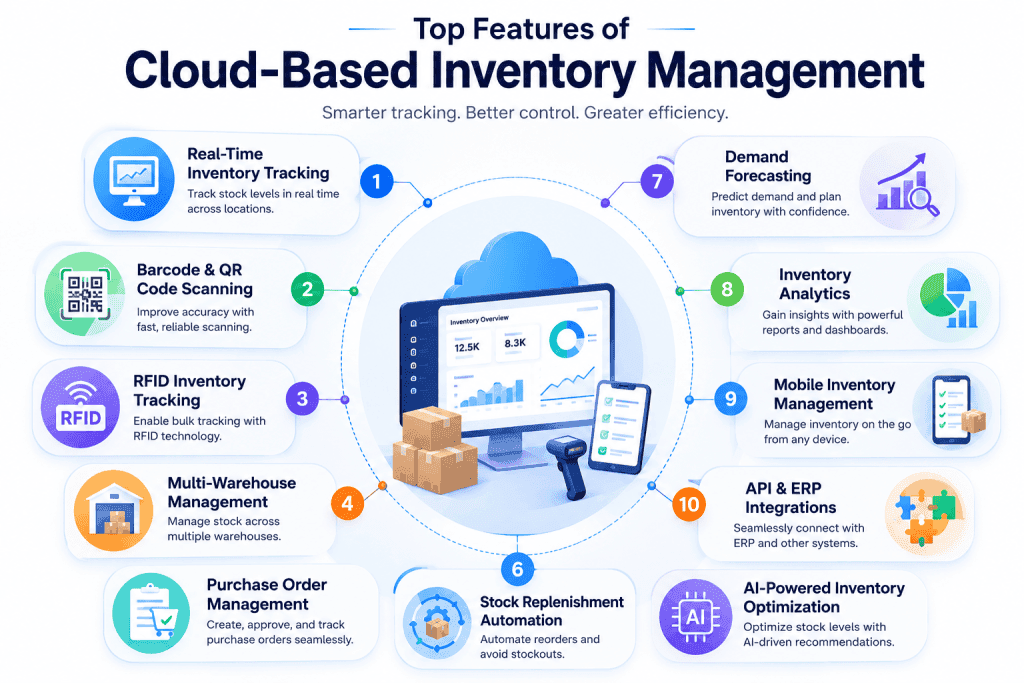
Real-Time Inventory Tracking
View current quantities, movements, reservations, and stock status across connected locations.
Barcode & QR Code Scanning
Capture receipts, transfers, counts, picks, and returns with scan-based workflows.
RFID Inventory Tracking
Read tagged items in bulk and improve visibility for high-volume inventory operations.
Multi-Warehouse Management
Manage stock, bins, transfers, rules, and availability across several facilities.
Purchase Order Management
Create, approve, receive, and reconcile supplier orders within the inventory workflow.
Stock Replenishment Automation
Trigger reorder actions when inventory reaches defined thresholds.
Demand Forecasting
Use sales and consumption history to estimate future stock requirements.
Inventory Analytics
Track turnover, aging stock, carrying cost, shortages, and inventory value.
Mobile Inventory Management
Perform counts, scans, transfers, and approvals from mobile devices.
API & ERP Integrations
Exchange inventory data with finance, sales, procurement, and fulfillment applications.
AI-Powered Inventory Optimization
Use pattern analysis to recommend reorder levels, stock placement, and purchasing actions.
Benefits of Cloud Inventory Management Systems
Real-Time Inventory Visibility
Teams can see stock levels and movement history without waiting for spreadsheet updates. Shared visibility also reduces conflicting records between purchasing, sales, and warehouse teams.
Reduced Stockouts
Reorder points, alerts, demand data, and supplier lead times help teams act before high-demand items run out.
Lower Carrying Costs
A clearer view of aging, duplicate, and slow-moving stock helps teams reduce excess inventory and storage expense.
Faster Order Fulfillment
Accurate location and availability data helps staff find items, reserve stock, and process orders with fewer delays.
Better Inventory Accuracy
Scan-based workflows, audit trails, and synchronized records reduce errors created by repeated manual entry.
Improved Collaboration
Teams across purchasing, warehousing, finance, sales, and service can work from the same inventory record.
Increased Scalability
Businesses can add users, locations, product lines, and transaction volume without building a separate local system for each site.
Enhanced Business Decisions
Inventory trends help leaders make stronger decisions about purchasing, supplier performance, warehouse use, and working capital.
Common Use Cases for Cloud-Based Inventory Tracking
Retail Stores
Retailers track stock by store, coordinate replenishment, manage returns, and synchronize quantities with online sales channels.
Warehousing & Logistics
Warehouse teams use cloud inventory data for receiving, bin control, picking, transfers, cycle counts, and dispatch tracking.
Manufacturing
Manufacturers track raw materials, production consumption, components, finished goods, and supplier orders.
Healthcare Inventory
Healthcare organizations manage clinical supplies, equipment, consumables, lot details, expiry dates, and storage locations.
E-commerce Businesses
E-commerce sellers synchronize stock across marketplaces, websites, fulfillment partners, and warehouses to reduce overselling.
IT Asset Inventory
IT teams can track devices, spares, peripherals, serial numbers, assigned users, locations, warranties, and lifecycle status.
Cloud Inventory Management vs. Traditional Inventory Systems
| Area | Cloud Inventory Management | Traditional Inventory System |
|---|---|---|
| Access | Browser and mobile access across locations | Access commonly tied to local devices or networks |
| Updates | Central updates across connected users | Updates may remain isolated by file or site |
| Deployment | Hosted service with subscription access | Local installation and server management |
| Integration | APIs and connectors for business applications | Custom integration may require more local work |
| Maintenance | Vendor manages platform updates | Internal teams manage software and infrastructure |
| Scaling | Users and locations can be added through the service | Growth may require new servers, licenses, and local setup |
Advantages of Cloud Solutions
Cloud-based inventory management systems support shared access, faster deployment, centralized updates, remote work, and easier integration across distributed operations. They also reduce the need for each location to maintain separate infrastructure.
Which Solution Is Right for Your Business?
A cloud platform suits organizations that need multi-location access, frequent updates, remote workflows, and integration with online applications. A locally hosted system may suit operations with strict internal hosting requirements, limited internet access, or existing investments in on-premise infrastructure.
How to Choose the Right Cloud-Based Inventory Management Software
Define Business Requirements
Document the inventory types, locations, users, workflows, transaction volumes, and reporting needs the system must support.
Evaluate Inventory Tracking Capabilities
Review support for serial numbers, batches, lots, expiry dates, bins, transfers, reservations, kits, and location-level stock.
Review Automation Features
Check reorder alerts, approval flows, purchase order generation, stock allocation, exception alerts, and scheduled reporting.
Assess Integration Options
Confirm how the platform connects with ERP, accounting, e-commerce, procurement, CRM, shipping, and supplier systems.
Consider Scalability
Review user limits, transaction capacity, location support, data storage, and performance as inventory volume grows.
Compare Pricing
Compare subscription tiers, user charges, transaction fees, implementation costs, integration work, training, and support.
Evaluate Vendor Support
Review onboarding, migration assistance, documentation, service hours, response commitments, product updates, and customer references.
Best Practices for Cloud Inventory Management
Automate Inventory Tracking
Use scanning, integrations, and system rules wherever inventory movements follow repeatable steps. Automation reduces delayed entry and keeps stock records closer to actual activity.
Standardize Inventory Processes
Create common rules for item setup, naming, receiving, transfers, adjustments, returns, and retirement. Shared procedures make reports easier to compare across locations.
Implement Barcode & RFID Systems
Choose barcode or RFID workflows based on item value, transaction volume, read range, and operating conditions. Train users to capture movements at the point where they occur.
Conduct Regular Inventory Audits
Use cycle counts and exception reviews instead of relying only on a yearly count. Investigate recurring differences by location, item type, user, or process.
Monitor Inventory KPIs
Track inventory accuracy, turnover, stockout rate, order fulfillment, carrying cost, and aging stock. Review trends rather than isolated monthly figures.
Forecast Inventory Demand
Combine historical usage with seasonality, promotions, lead times, and planned business activity. Forecasts should be reviewed when market conditions or supplier performance changes.
Optimize Reorder Levels
Set reorder points using demand, lead time, service targets, and safety stock. Review thresholds as usage patterns and supplier timelines change.
Common Challenges and Solutions
Inventory Inaccuracy
Use scan-based transactions, mandatory fields, role controls, cycle counts, and exception reports to reduce record differences.
Overstocking
Review slow-moving items, demand patterns, duplicate SKUs, supplier minimums, and purchasing rules before placing new orders.
Stockouts
Set reorder alerts, safety stock, supplier lead times, and demand forecasts for items with high operational or revenue impact.
Data Synchronization Issues
Define a system of record, monitor integration failures, standardize item identifiers, and reconcile exceptions quickly.
Multi-Warehouse Complexity
Use common location structures, transfer workflows, stock ownership rules, and shared reporting across every facility.
AI in Cloud Inventory Management
Predictive Inventory Forecasting
AI models can examine demand history, seasonality, promotions, lead times, and external patterns to estimate future inventory needs.
Automated Stock Replenishment
AI-supported replenishment can recommend order quantities and timing based on demand, stock position, supplier performance, and service targets.
Intelligent Inventory Optimization
Optimization models can identify excess stock, weak item placement, unusual demand, and imbalanced inventory across locations.
AI-Based Demand Planning
Demand planning tools can compare forecasts with actual consumption and adjust future recommendations as new data arrives.
IoT-Powered Inventory Tracking
Connected shelves, sensors, gateways, and tags can feed location, quantity, temperature, movement, or condition data into the cloud platform.
Measuring Inventory Management Success
- Inventory accuracy: Measures how closely system quantities match physical counts
- Inventory turnover ratio: Shows how often inventory is sold or consumed during a period
- Order fulfillment rate: Measures the share of customer or internal orders completed as requested
- Carrying cost: Tracks storage, insurance, handling, capital, obsolescence, and related ownership costs
- Stockout rate: Measures how often requested items are unavailable when needed
- Inventory value: Shows the financial value of stock by category, location, status, or accounting method
Future Trends in Cloud Inventory Management
AI-Driven Inventory Management
More platforms will use AI for forecasting, replenishment, anomaly detection, and inventory recommendations.
IoT-Enabled Tracking
Sensors and connected tags will provide richer movement, condition, and location data for inventory records.
Digital Twin Technology
Digital models can represent warehouses, inventory flows, equipment, and constraints for planning and simulation.
Autonomous Warehouses
Robotics and automated handling systems will exchange inventory events directly with cloud platforms.
Predictive Analytics
Predictive models will help teams identify shortage risk, excess stock, supplier delays, and demand changes earlier.
Frequently Asked Questions
What is cloud-based inventory management software?
Cloud-based inventory management software is an online platform used to record, track, analyze, and control inventory across users and locations.
How does a cloud inventory management system work?
It collects inventory transactions from users, scanners, RFID systems, orders, and integrations, then updates a central record.
What are the key features of cloud inventory management software?
Common features include real-time tracking, barcode scanning, RFID support, multi-location control, purchase orders, replenishment, analytics, mobile access, and integrations.
What are the benefits of cloud-based inventory tracking?
It improves stock visibility, inventory accuracy, replenishment, order fulfillment, collaboration, and cost control.
Can cloud inventory software manage multiple warehouses?
Yes. Multi-warehouse systems can track stock by facility, bin, owner, status, and transfer workflow.
How do I choose the best cloud inventory management software?
Review business requirements, tracking depth, automation, integrations, scaling, pricing, security, and vendor support.
Is cloud inventory management suitable for small businesses?
Yes. Smaller businesses can start with core tracking and purchasing features, then add users, locations, and automation as operations grow.
Can cloud inventory software integrate with ERP and accounting systems?
Many platforms connect through native integrations, APIs, middleware, or data imports. Buyers should confirm supported data fields and synchronization rules.